Answers · Getting started
How Do Beginners Make a 30-Second to 3-Minute AI Video?
Published October 31, 2026

What beginners actually ask for
The original post behind this question listed two wishes, and neither was about picture quality:
The main thing I wish it could have is character consistency and longer video lengths.
The replies explain why: a generation is a few seconds to fifteen seconds long, so a three-minute video made clip by clip becomes dozens of separate clips, each with its own version of the main character, downloaded and lined up in an editor. One reply summed up the experience in seven words:
yeah, the five-second clip grind is brutal.
That grind is a workflow problem, not a talent problem. The posts come from a beginner's question in r/generativeAI, and getting started is one of the largest labels in the whole corpus — 11,000 posts.
Do the length arithmetic first
Length is built from segments. A segment is one generation: a few shots made together in one place, normally up to fifteen seconds, or thirty on the tiers that support long takes. So the numbers for a first project are simple:
| Target length | Roughly how many segments |
|---|---|
| Thirty seconds | Two |
| One minute | Four or five |
| Three minutes | About a dozen |
Across projects on the site, the median episode is seven segments and the median segment fourteen seconds — a little over a minute and a half. That is a comfortable first target: long enough to tell something, short enough to finish in an afternoon.
Pick a story that fits the length
The commonest first-project mistake is choosing a story that needs twenty minutes and trying to tell it in two. For thirty seconds, think of a single moment with a twist: a door opens on the wrong person, a message arrives, a joke lands. For one to three minutes, think of one scene with a beginning, a turn and an ending, or a short episode that sets up a longer series. Two or three characters and one or two places are plenty. A small story told completely looks far more finished than a big one told in fragments, and everything you set up — the cast, the places, the look — carries straight into episode two if the first one works.
The steps, in order
- Start with words. If you have a story, paste it. If you only have an idea, AI Create turns one line into a draft script you can edit. Either way, the first step reads it into characters, places and episodes.
- Set the look once. In Step 1 choose the visual style, vertical or landscape, the region and the language the characters speak. These are fixed for the project, which is what keeps the minutes consistent.
- Approve the cast and places. Each character, location and prop gets one reference image. This is the step that solves the consistency wish: every later shot is generated from these.
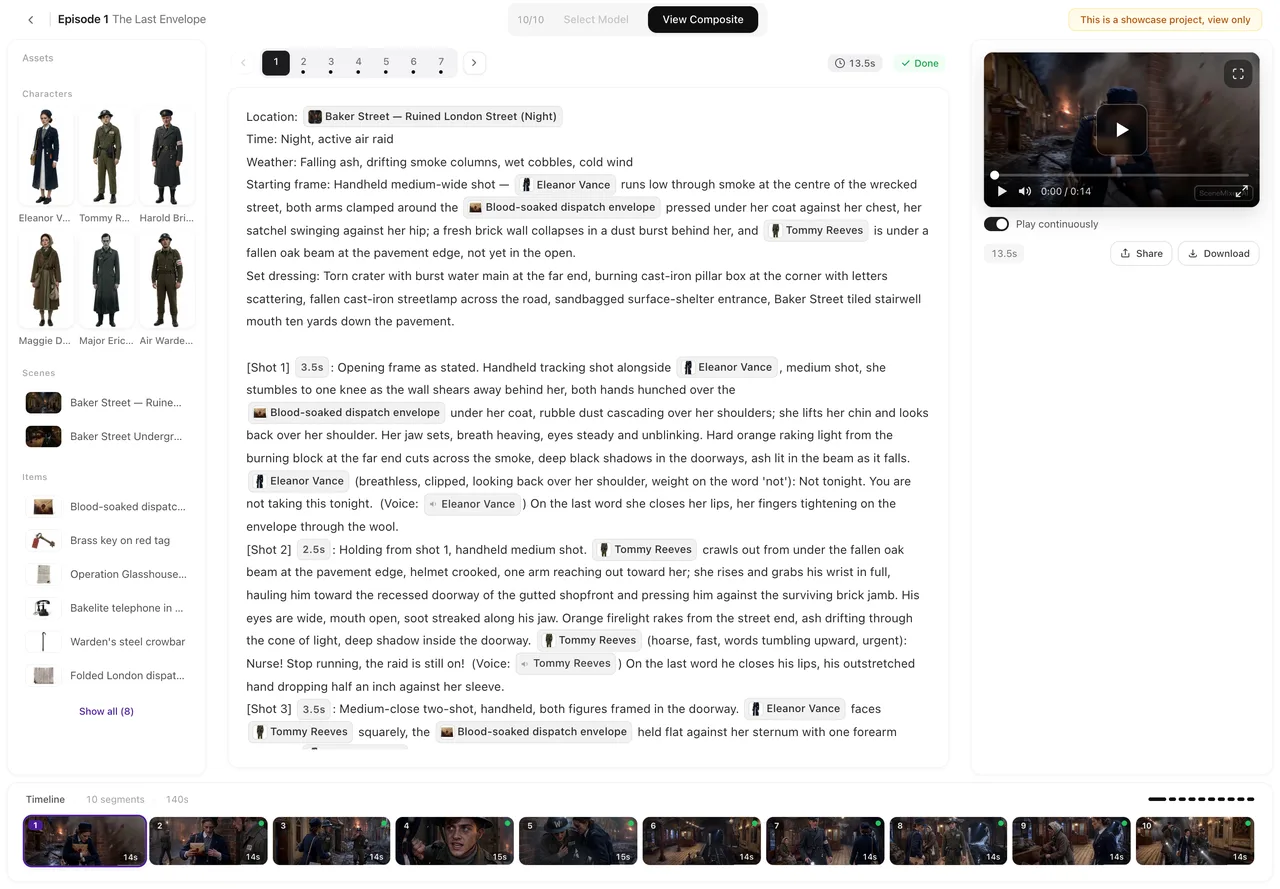
- Read the storyboard. The episode is written as numbered shots with their seconds, framing, lines and sound. Fix what is wrong here, in text, where it costs nothing.
- Render and join. Render the segments, regenerate any one that misses, and composite the episode into a single video with its score. Download it or share a link.
What a first project costs
New accounts start with 50 credits, 15 free reference images for the cast and places, the storyboard for episode one of the first project, and a free preview of up to 5 seconds rendered from that episode. Video itself is charged per rendered second, from 10 credits a second on the default tier, so a thirty-second piece and a three-minute piece differ in how many seconds you render, not in a subscription you must buy first. Plans with monthly credits start at $7.99 a month. The answer on why AI video costs what it does walks through the arithmetic.
Mistakes that cost beginners the most
- Rendering before reading. The storyboard is free to edit; a rendered segment is not. Read every shot first.
- Too many people in one shot. Two or three named characters per shot render cleanly; a crowded frame is where faces and hands go wrong.
- Changing your mind about the look. The visual style is fixed after Step 1. Try a short test project before committing a long one.
- Regenerating everything. If one segment is wrong, fix and regenerate that one; the rest of the episode stays.
When the step-by-step route does not apply
- If you want a single striking clip for a feed, one segment is enough and the planning steps are overhead.
- Music videos cut to a song you supply are a different workflow; the episode here carries its own background score.
- Generated video still needs review: expect to regenerate the occasional segment.
- The post counts are approximations from a rule-based labelling of one collection window.
FAQ
How long can my first AI video be?
As long as you plan it: each segment is up to fifteen seconds, and an episode is many segments joined. A minute or two is a comfortable first target.
Do I have to stitch the clips together myself?
No. Segments are joined into one video with its score when you composite the episode.
How do I keep the main character the same for three minutes?
Approve one reference image for them before anything is rendered; every shot they appear in is generated from it.
Can I start with no script at all?
Yes. Type one line in AI Create and a draft script is written, which you can edit before it is read.
Next steps: your first five minutes, four ways to start a project and 15- or 30-second segments. The answer on going past one minute covers longer pieces; counts follow the method note.
Make your first few minutes
One line or a full script; SceneMixer draws the cast once, writes the shots and joins the segments for you.
Sign up freePer-second video rates are on the pricing page with the same numbers.