Free AI animation generator

AI animation generator free: each click, in order
| Click | What is generated | First project |
|---|---|---|
| Read | The cast, the places, the props, the episodes | Paid by length, 4 credits per 1,000 characters |
| Draw a sheet | A character, place or prop in the animated look | First 15 free, then 7 credits each |
| Storyboard | Numbered shots with seconds and lines | Episode 1 of your first drama free, then 1 credit per 100 counted characters |
| Preview | One animated shot | One per account, up to 5 seconds |
| Video | Each animated segment, voiced | 10 credits a second on the default tier |
| Join | The episode as one file, with music | 1 credit a second |
Free animation AI generator: the look is set first
The animated look is chosen in Step 1, before any sheet is drawn, so every sheet and every shot comes out in it. Under 3D Animation: Realistic 3D, 3D Toy Cartoon, Family 3D Animation, Cel-shaded 3D, Game Engine Realism. Under 2D Animation: Anime, Painterly Anime, Watercolor Anime, Watercolor Storybook, American Comic, Claymation.
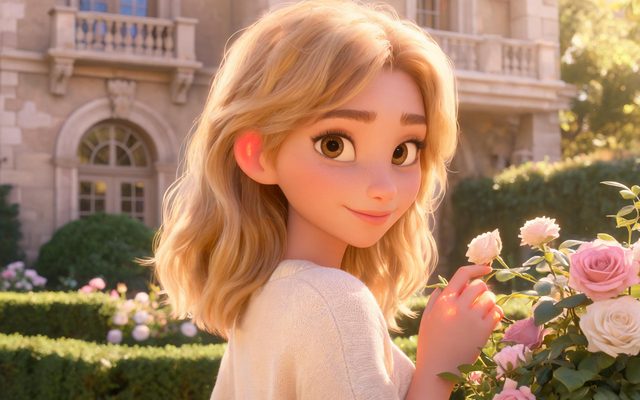
Visual Style: Family 3D Animation

Visual Style: Anime

Visual Style: Watercolor Storybook

Visual Style: Claymation
Choosing a 3D look over a 2D one does not change the price; the resolution and the length of the video do.
Free animation generator AI: making the free part count
- Animate one scene first. A single place and two characters keep the sheets inside the free count.
- Read the lead's sheet before the rest. In animation the outline carries the character, so get it right once.
- Preview a moving shot. A character walking or turning shows the animation better than a still close-up.
After the free part
Once the free part is used, each animated segment is priced on its button by tier, resolution and length. Fixing one shot means rendering one segment, not the episode. Sharing your first finished video adds 100 credits, once per account, within 14 days of that video.
Make it in SceneMixer, start to finish
- Script: paste your own on Upload Script, or write the brief above in AI Create and let it draft the episodes.
- Step 1: set Type to Short Drama; Scene Style Pastoral Healing; Costume Style Soft Everyday; Visual Style Family 3D Animation; Target Region; dialogue language; 16:9 Landscape. Then read the script.
- Step 2: Draw the lead's sheet first and read the outline before drawing the rest of the cast. The first 15 setup images on an account are free.
- Storyboard: generate episode 1 first (free on your first drama) and read it before you render anything. One place per segment.
- Video: render on the default tier at 10 credits a second, fix single shots instead of whole episodes, then put the episode together and post.
| Animated look | Group | Price of video |
|---|---|---|
| Family 3D Animation | 3D Animation | 10 credits a second on the default tier |
| 3D Toy Cartoon | 3D Animation | The same |
| Anime | 2D Animation | The same |
| Watercolor Storybook | 2D Animation | The same |
| Claymation | 2D Animation | The same |
FAQ
Is there a free AI animation generator?
SceneMixer is free to start an animated project: the first 15 sheets, episode 1's storyboard and one short preview are free. Animated video is charged per second.
AI animation generator free: what does it generate?
On SceneMixer: a cast and scenes from your script, a sheet for each in the animated look, a storyboard of shots, and voiced animated segments joined into an episode.
Do 3D and 2D animation cost the same?
Yes. In SceneMixer the look does not change the price of video; the tier, resolution and length do.
Can I animate my own drawing?
Upload the drawing on a character's card in Step 2 of SceneMixer; the sheet keeps the face, hair and clothing and redraws them in the project's look.
Free animation AI generator: how long is the free preview?
Up to 5 seconds of one shot, once per account, at 480P on SceneMixer.
Do the animated characters talk?
Yes. SceneMixer voices the lines in each segment, in the project's language, one of 15.
Is there a watermark on free animation?
Video from a free SceneMixer account carries a small AI badge in the corner; removing it is a membership setting.
Is there a free AI animation video generator for a whole episode?
Not a whole episode: SceneMixer’s free part is the first setup images in your chosen look, the first storyboard and one short preview. Video is charged per second.
Animate one scene free
Pick an animated look, draw two characters on free sheets, and preview a moving shot.
Updated November 19, 2026