How to make an AI preschool learning cartoon

Brief for AI Create: A 75-second counting cartoon for ages 2 to 4: a small yellow duck called Pip swims across a pond and meets one more duck each time, one to five; same pond, same camera, Pip says the number and quacks; it ends with all five ducks and Pip saying ‘Five!’
What changes at preschool
| Point | Preschool (2 to 5) | Older kids' episode |
|---|---|---|
| Length | 60 to 90 seconds | Two to five minutes |
| Ideas | One: a number, a colour, a shape, a feeling | One question with an experiment |
| Pace | Slow; a thing happens, then it repeats | A small story |
| Words | A few, said clearly, again and again | A short script |
| The viewer | Talked to directly by the guide | Watches the characters |
These are starting points, not rules. For older children: An educational cartoon for kids · A bedtime story series.
A counting episode, segment by segment
| Segment | On screen | Said |
|---|---|---|
| 1 | Pip alone on the pond | ‘One duck. Quack!’ |
| 2 | Pip and one more duck | ‘Two ducks. Quack, quack!’ |
| 3 | Three ducks in a row | ‘Three ducks. Quack, quack, quack!’ |
| 4 | Four ducks, one splashing | ‘Four ducks!’ |
| 5 | All five ducks; Pip waves | ‘Five! Hooray!’ |
Five segments of 15 seconds is 75 seconds. Each segment is a fresh generation, so what repeats has to be written into each one. The first two shots of segment 1:
[Shot 1] 6s: Medium shot, camera still. A round blue pond with lily pads, morning light. @Pip, a small yellow duck, floats in the middle. @Pip (bright): One duck. Quack! (voice: Pip)
[Shot 2] 5s: Same medium shot, camera still. @Pip looks at the viewer and waves a wing. Ambient: gentle water, a bird far off. No dialogue.
Repeat the shot on purpose
Keep the pond, the camera words and the order of events the same in every segment, and change one thing: the number of ducks. A segment is generated on its own, so copy the framing sentence into each one; one place per segment keeps the pond the same pond. Why the next segment opens like the last one ended · Shot-to-shot continuity.
Rhymes: spoken, not sung
The video speaks the lines written in the storyboard; it takes no audio, so it does not sing a tune you bring. Write a rhyme as short lines with the beat in the punctuation, read steadily, at about three words a second. If you want a sung version, record or license one elsewhere and lay it under the video in an editor after turning the Music switch off. Write your own rhyme, or use one you have the right to use. The built-in score and your own · How voices work.
Looks that suit very young children
Rounded, bright, calm. 3D Toy Cartoon and Claymation are tactile and funny; Family 3D Animation suits a guide with expression; Watercolor Storybook is the softest. The look is fixed after step 1.
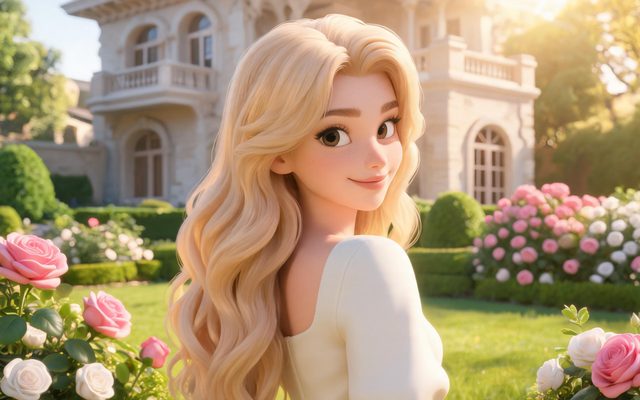
Visual Style: 3D Toy Cartoon
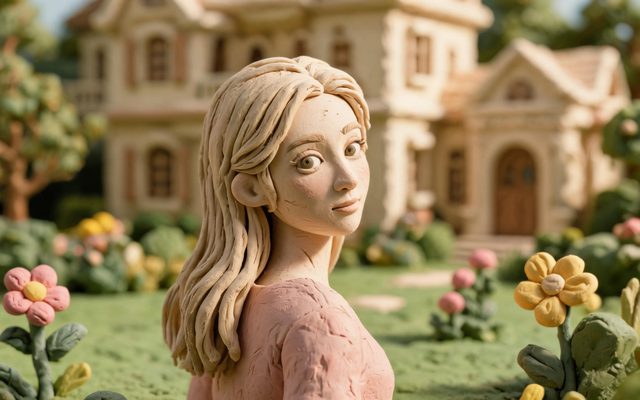
Visual Style: Claymation
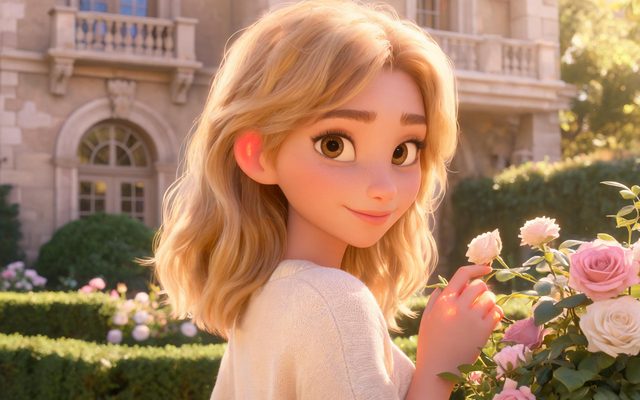
Visual Style: Family 3D Animation
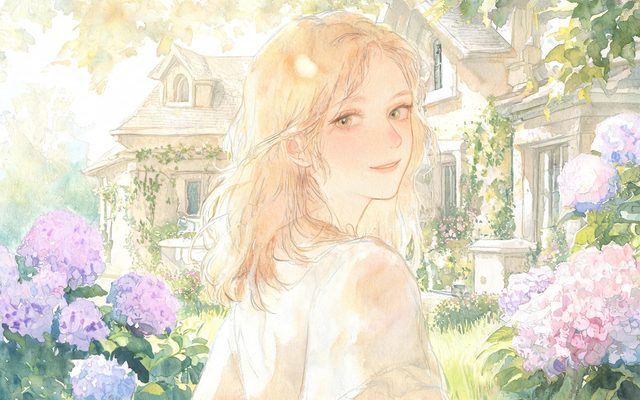
Visual Style: Watercolor Storybook
Before you post kids' content
YouTube's own page on setting a video's audience says creators must tell YouTube whether their videos are “made for kids”, at channel or video level in YouTube Studio, and frames it as part of complying with the Children's Online Privacy Protection Act and other laws; it also says to consult legal counsel if you are unsure. Source: Set your channel or video's audience (checked November 2, 2026). That is YouTube's wording, not our judgement.
TikTok's page on AI-generated content lists as not allowed “the likeness of young people under the age of 18” (About AI-generated content, checked November 2, 2026). Keep your cast invented: do not use a real child's photo as a reference, and the video provider's face check refuses images that look like a real person. Reference image flagged as a real person's face · Run a kids' cartoon channel with AI.
Make it in SceneMixer, start to finish
- Script: paste your own on Upload Script, or write the brief above in AI Create and let it draft the episodes.
- Step 1: Type TV Series; Scene Style Pastoral Healing; Costume Style Soft Everyday; Visual Style Watercolor Storybook, Family 3D Animation; Target Region; dialogue language; 16:9 Landscape. Then read the script.
- Step 2: Draw Pip and the four other ducks as non-human characters, and the pond as the one place; the pond is the same in every episode. The first 15 setup images on an account are free.
- Storyboard: generate episode 1 first (free on your first drama) and read it before you render anything. One place per segment.
- Video: render on the default tier at 10 credits a second, fix single shots instead of whole episodes, then put the episode together and post.
| Age | Episode length | Segments of 15 s | One idea |
|---|---|---|---|
| 2 to 3 | 45 to 60 seconds | 3 to 4 | A number to three, a colour, a sound |
| 3 to 4 | 60 to 90 seconds | 4 to 6 | Counting to five, a shape, a feeling |
| 4 to 5 | 90 to 120 seconds | 6 to 8 | A letter, a routine, a kindness |
FAQ
Can AI make a preschool cartoon?
Yes: a guide character and a place drawn once, one idea per episode of 60 to 90 seconds, and the same shot repeated on purpose.
Can it sing a nursery rhyme?
It speaks the lines you write; it takes no audio and does not sing a tune you bring. Add a sung or licensed track in an editor.
How long should an episode be?
60 to 90 seconds is four to six 15-second segments; these are starting points, not rules.
Which look suits toddlers?
3D Toy Cartoon, Claymation and Watercolor Storybook are common choices; Family 3D Animation suits a more expressive guide.
Who checks the facts?
You do. The characters say exactly what your script says.
Do I have to mark it made for kids on YouTube?
YouTube's page says creators must set whether their videos are made for kids, and to consult legal counsel if unsure. Read it at the link above.
Can I use a photo of my child?
Do not. Use invented characters; the video provider's face check refuses images that look like a real person.
What does it cost?
Video is 10 credits a second on the default tier plus 1 credit a second to join, so a 75-second episode is 75 seconds of each, before retakes.
Updated November 2, 2026