How to Make an AI Kids’ Bedtime Story Series

Brief for AI Create: Bedtime stories about a small fox who cannot sleep, one short story per night: each night a different forest friend shows him one calm thing; a soft narrator, slow shots, every episode ends with the fox asleep.
Pick a look that is calm
| Visual Style | What it feels like | Good for |
|---|---|---|
| Watercolor Storybook | A picture book that moves | Ages 2–6, very gentle stories |
| Family 3D Animation | A family animated film | Adventures with a lesson, ages 4–9 |
| 3D Toy Cartoon | Toys come to life | Funny stories, animal casts |
| Claymation | Handmade, tactile | Short, cosy stories |
Scene Style: Pastoral Healing for meadows and farms, Elven Forest for an enchanted wood, Soft Romance for a cosy home. The visual style is fixed after step 1. Visual style presets.
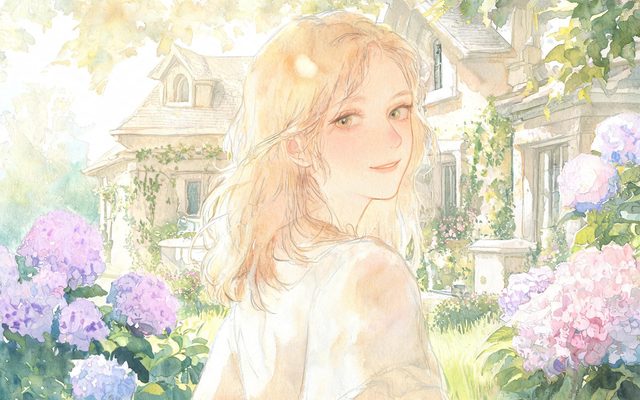
Visual Style: Watercolor Storybook
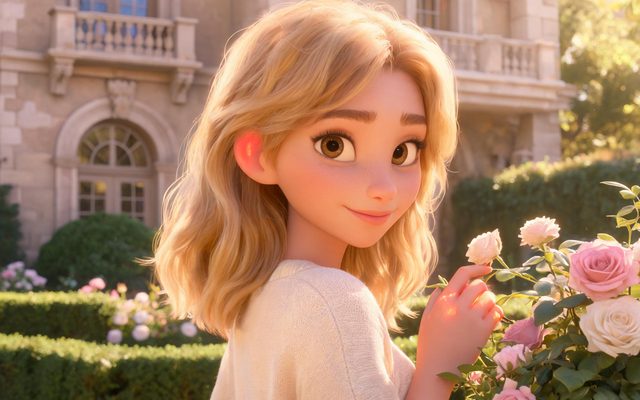
Visual Style: Family 3D Animation
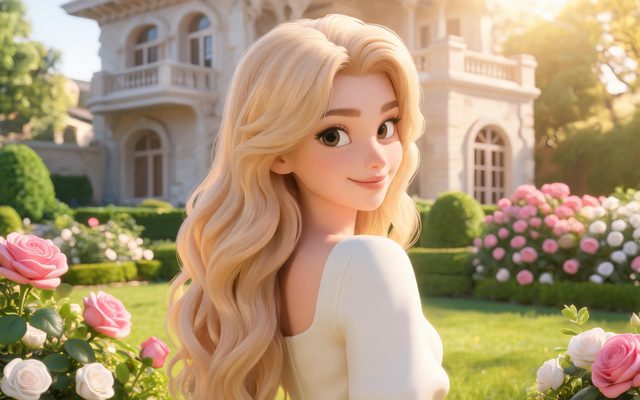
Visual Style: 3D Toy Cartoon
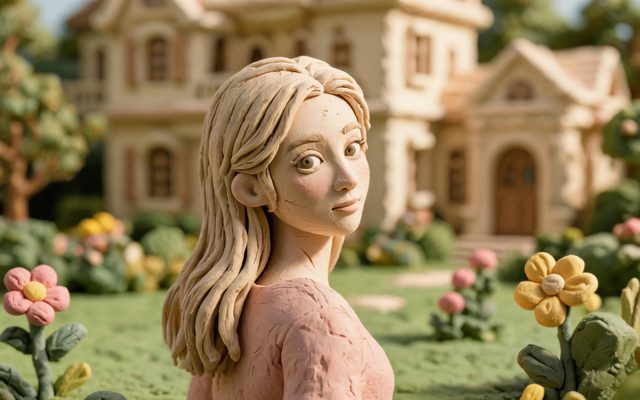
Visual Style: Claymation
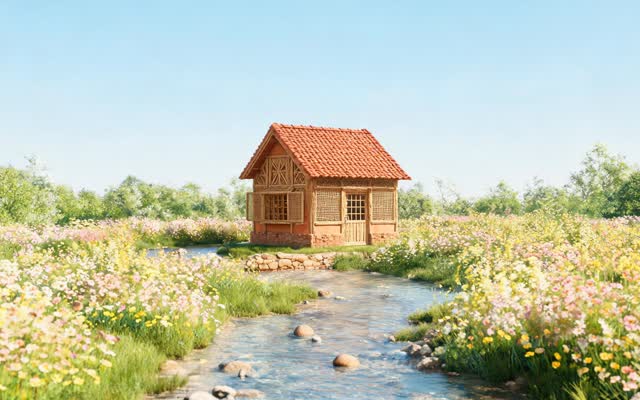
Scene Style: Pastoral Healing
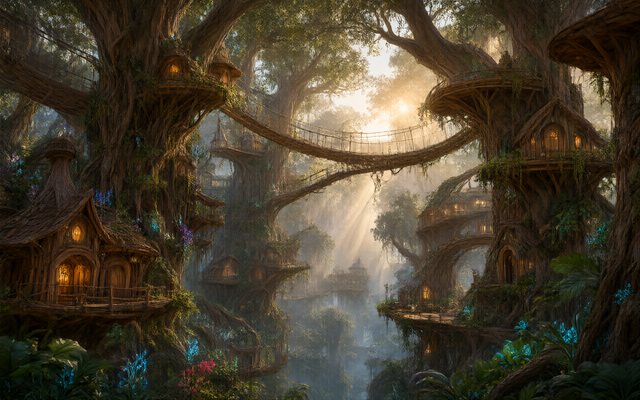
Scene Style: Elven Forest
The shape of a bedtime episode
- One to three minutes. Long enough to settle, short enough for one night.
- One small problem, one small kindness. The fox cannot sleep; the owl shows him the stars.
- A quiet ending, not a cliffhanger. The last shot is the character asleep, the light going down, the narrator saying goodnight.
- The same opening and closing every night. Children like the ritual: the same first line, the same last image.
Characters children recognise
Animal and toy characters are cards like any other. Describe what the character is, its colours and one mark that never changes: a small red fox cub with a white tip on his tail, oversized ears, a blue knitted scarf; walks upright; big round amber eyes. The scarf and the white tail tip are what keep him recognisable from shot to shot and night to night. Non-human characters.
Keep the cast small — the hero and two or three friends — and reuse them. Add new friends one at a time, in new episodes of the same project, so the cast and the forest carry over. Reuse a character across projects.


A gentle narrator and slow shots
Add the narrator as an Off-screen character: it has a voice and no image. In its voice description, write how it should sound (a warm, soft, slow female voice, like a parent reading aloud); the characters’ own voices are described the same way on their cards. You can also pick a voice from the library or upload your own on the voice field. Voice-only characters · Character voices.
| Beat | Shot to adapt |
|---|---|
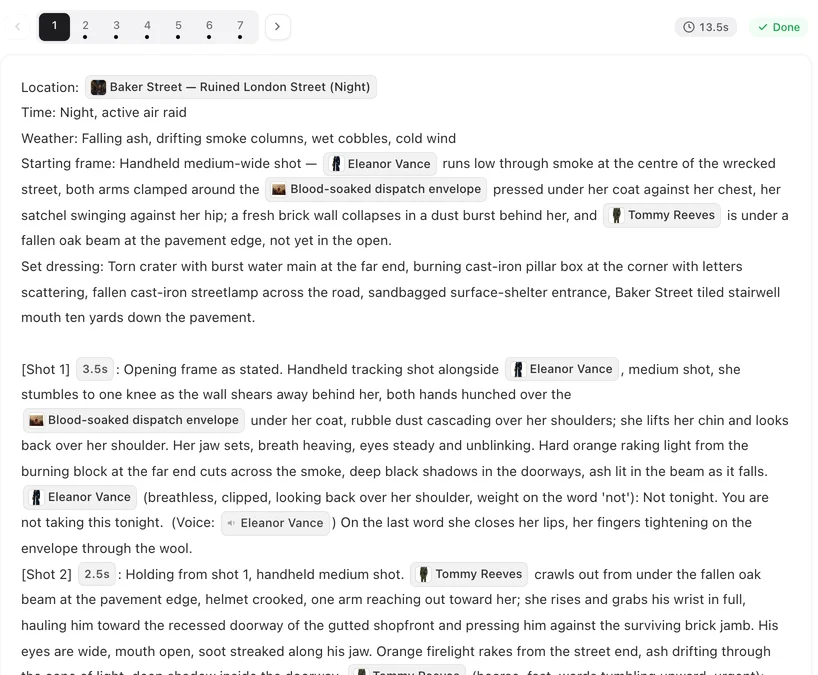
| The ritual opening | [Shot 1] 5s: Wide shot, slow push in. A little den under an old oak at dusk, fireflies. In frame only: @Fox, curled up, eyes open. @Narrator (voice-over, soft, slow): In the old oak wood, a little fox could not sleep. Ambient: crickets. |
| A friend arrives | [Shot 2] 4s: Medium shot. @Owl lands on a branch above the den. @Owl (gentle, slow): Shall I show you something? Ambient: wings, crickets. |
| The goodnight | [Shot 3] 6s: Close-up, the light fading. @Fox asleep, tail over his nose. @Narrator (voice-over, whisper): Goodnight, little fox. Ambient: crickets fading. |
Slow shots are written, not added later: say slow push in, fixed camera, and give each shot a few more seconds than a drama would. How to write one shot.
Keep it safe and calm
- No real scares. Darkness is cosy, not threatening; no sudden loud sounds in the Ambient line.
- No known characters. Characters from films, games and books are refused by the IP check; invent your own. IP check.
- Language: choose the dialogue language in step 1 and the narrator reads in it; 15 languages are available.
Make it in SceneMixer, start to finish
- Script: your own story on Upload Script, or a brief in AI Create naming the hero, the friends and the nightly ritual.
- Step 1: Type Short Drama or TV Series; a calm visual style; 16:9 for a tablet or TV, 9:16 Portrait for a phone; the dialogue language. Read the script.
- Step 2: check each character has its colours and one mark; add the narrator if the reading did not. The first 15 setup images on an account are free.
- Storyboard: episode 1 first (free on your first project); slow shots, a voice-over opening and goodnight.
- Video: generate on the default tier at 10 credits a second; composite.
For a family 3D look, watch Rocket Pup.
| Night | The small problem | How it ends |
|---|---|---|
| 1 | The fox cannot sleep. | The owl shows him the stars; he falls asleep counting. |
| 2 | The fox is afraid of the rain. | The badger shows him the drops on the leaves; asleep. |
| 3 | The fox misses the sun. | The moon is a night-time sun; asleep. |
| 4 | The fox lost his scarf. | A friend has kept it warm; asleep. |
| 5 | The fox wants to stay up. | He tells the story this time; asleep mid-sentence. |
FAQ
How do I make AI bedtime story videos?
Write a short story or give AI Create a brief, pick a calm style such as Watercolor Storybook or Family 3D Animation in step 1, add an off-screen narrator, and generate one episode per night.
Can I make kids' story videos for YouTube?
Yes. Pick 16:9 in step 1 for regular videos or 9:16 for Shorts, and post each composited episode.
Will the same character appear every night?
Yes. Each character is drawn once as a reference sheet and used in every shot it appears in; add new nights to the same project and the cast carries over.
Can the narrator sound like a parent reading?
Describe the voice on the narrator's card, for example a warm, soft, slow voice; you can also pick a library voice or upload your own.
How long should a bedtime episode be?
One to three minutes: one small problem, one kindness, and a quiet ending.
Can I use characters from my child's favourite show?
No. Known characters are refused by the IP check. Invent your own: the colours and one mark make them memorable.
Which language can the story be in?
Any of the 15 dialogue languages; choose it in step 1.
Is it free to try?
The first project includes free allowances, and the first 15 setup images on an account are free; the generate button shows the price before anything is charged.
Updated October 20, 2026