How to make an animated movie with AI

Brief for AI Create: A ten-minute animated short: a clockmaker's daughter wakes the tower clock that has been silent for a hundred years; one tower, one village, three characters, no villain.
Choose the look first, and keep it
The look is chosen in Step 1 and fixed once you continue, and every character, place and prop is drawn in it. Choose for the mood of the film:
| Look | Suits |
|---|---|
| Painterly Anime | Big scenery, quiet scenes, emotional endings |
| Anime | Action, school, romance |
| Family 3D Animation / 3D Toy Cartoon | Family comedy, a world of toys |
| Claymation | Gentle comedy in a small place |
| Watercolor Storybook | Fables and bedtime stories |
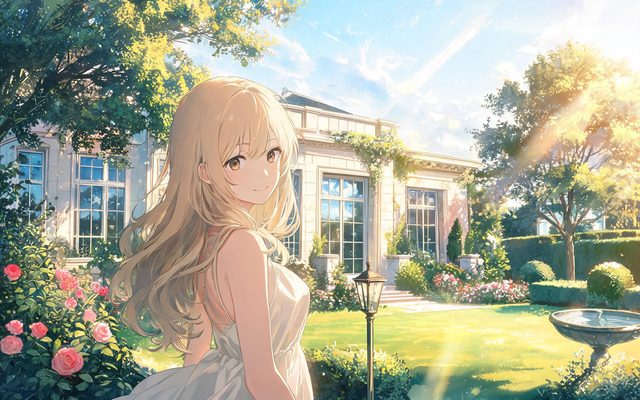
Visual Style: Painterly Anime

Visual Style: Anime
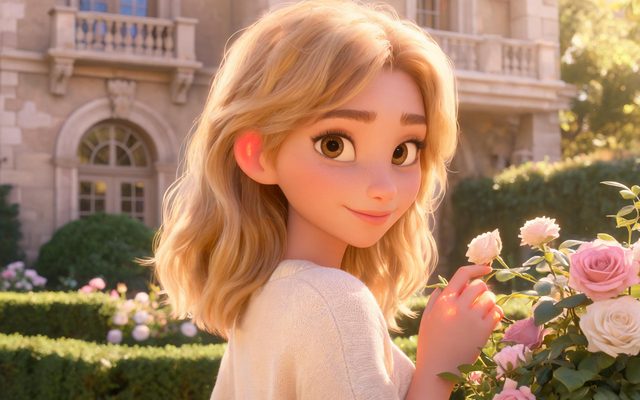
Visual Style: Family 3D Animation
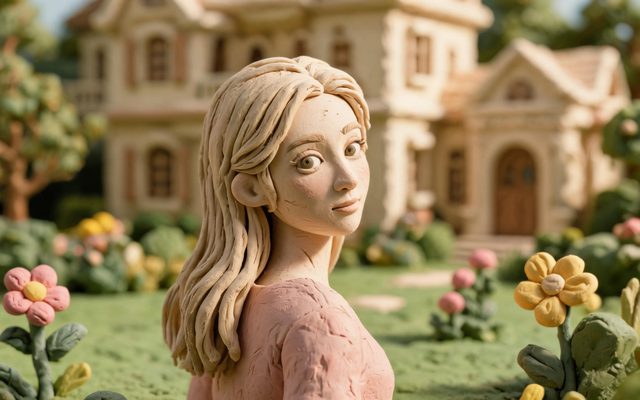
Visual Style: Claymation

Visual Style: Watercolor Storybook
Sequences, not one render
The Film type has no hard length cap and splits the script into sequences. A 10-minute short is 40 segments of 15 seconds or 20 of 30; a feature is hundreds. Each sequence is its own storyboard, render and join. AI animated movie generator · How length is built.
Trailer, then sequence one
- Write a trailer script of five to eight moments and render it with the same cast. Make a movie trailer.
- Read what the look does to your cast; change a design now, not later.
- Make sequence one; watch it with sound.
- Decide how far to take it.
Voices and music
Each character has a voice and speaks in the video, in any of 15 languages, and each episode is joined with a background score. AI video generator with dialogue · An animated short film · A 3D cartoon movie.
Make it in SceneMixer, start to finish
- Script: paste your own on Upload Script, or write the brief above in AI Create and let it draft the episodes.
- Step 1: Type Film; Scene Style Pastoral Healing, Medieval Castle; Costume Style Soft Everyday, Smart Casual; Visual Style Watercolor Storybook, Family 3D Animation; Target Region; dialogue language; 16:9 Landscape. Then read the script.
- Step 2: Draw the clockmaker's daughter, her two friends and the tower; no villain needs drawing. The first 15 setup images on an account are free.
- Storyboard: generate episode 1 first (free on your first drama) and read it before you render anything. One place per segment.
- Video: render on the default tier at 10 credits a second, fix single shots instead of whole episodes, then put the episode together and post.
| Length | Segments of 15 s | Segments of 30 s | Usually |
|---|---|---|---|
| 2 minutes | 8 | 4 | A trailer |
| 10 minutes | 40 | 20 | An animated short |
| 30 minutes | 120 | 60 | A TV special, in sequences |
FAQ
How do I make an animated movie with AI?
Choose a look, set the type to Film, draw the cast and places once, then storyboard, render and join it one sequence at a time.
How long can it be?
The Film type has no hard length cap; each sequence holds up to 60 segments.
Which look should I choose?
Painterly Anime for emotional films, Anime for action, Family 3D or 3D Toy Cartoon for family stories, Claymation for small gentle worlds.
Should I make a trailer first?
Yes. It tests the look and the cast cheaply.
Will the characters look the same throughout?
Yes. Each is drawn once and used in every shot.
How much does it cost?
Video is 10 credits a second on the default tier plus 1 credit a second to join; a trailer is a minute or two of that.
Do the characters speak?
Yes, in any of 15 languages.
Updated November 2, 2026