The Free Preview: Why It Is Only a Few Seconds, Once, and How It Differs From Generating

Open the editor of a parsed project; the preview card sits at the start of the timeline, before the first segment; once you have used your preview, the same card plays it.
What the preview is
The preview is a real generation, made from your own character sheets and one shot of the episode, on the cheapest 480P tier that is switched on. It picks a short shot where someone starts talking, so you hear your cast as well as see them; when the episode has no such shot, it uses the opening shot of the first segment. It exists so that you see a finished shot with your cast before spending credits. It is not a shortened version of your episode and not a sample of every segment: one shot, a few seconds, once. The clip lands in the preview pane like any other and can be shared; downloads come with the segments you generate.
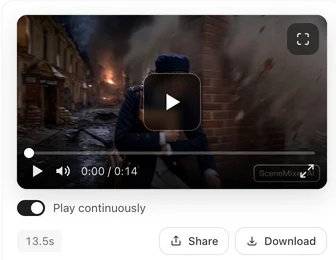
Why only a few seconds, and only once
Video is priced per second and the preview is free, so it is capped at 5 seconds and at one per account — not one per project. The full run of an episode is the paid part: each segment on the timeline generates separately at the tier you pick, for the seconds you set, and the price tag on each card tells you the cost before you press. Generating a Video Segment.
Where the button is
Until you use it, the offer pops up as a card each time you open a parsed episode. Generate free preview starts it; Maybe later closes the card without using the preview and leaves a preview card at the start of the timeline, before the first segment; Don’t show this again hides the pop-up but keeps that card. After you use it, the timeline card stays and plays your preview. On the phone the entry is a button in the top bar. There is no preview entry when no 480P tier is available for it.
If the preview looks wrong
It is made from that shot and the sheets as they are: a poor sheet or a thin shot shows up here first. That is the point — fix the sheet in Step 2 or that segment’s text, then generate the real segment. The preview is not regenerated. When a Shot Comes Out Wrong.
The rest of the project
Nothing else is generated for free on the video side. Your account’s 15 free sheets (on projects whose parse you paid for) and the first project’s first storyboard are the other allowances; after that, every segment costs its tier’s price per second (10 credits a second on the default tier). What SceneMixer Gives You for Free.
| Free preview | Generating a segment | |
|---|---|---|
| Length | About 5 seconds | The seconds you set, up to the tier's cap |
| Content | One shot, preferably with dialogue | Any segment of the storyboard |
| Tier | Lowest 480P tier | Your choice in the selector |
| Cost | Free, once per account | Per second of the tier |
| Download | Share only | Original and play versions |
FAQ
Why did I only get a few seconds?
That was the free preview, not your project. Generate the segments on the timeline for the full episode.
Can I preview again in a new project?
No. The preview is once per account.
I clicked Later. Did I lose it?
No. The preview card stays at the start of the timeline; after you use it, the same card plays your preview.
Can I choose which shot is previewed?
No. It picks a shot from the episode you are in, one with dialogue when there is one, otherwise the opening shot.
I pressed a button and it asked for credits. Was that the preview?
No. The preview card sits before the first segment and is marked Free preview. The Generate button on a segment card is a normal, paid generation.
My preview will not play.
Click the preview card again to load it in the player. If it still does not play, the steps in the video-will-not-play guide apply to it too.
Does the preview use my credits?
No. It is free and holds nothing.
Use the preview, then generate for real
One free shot to check your cast; the episode itself is generated segment by segment at the tier you choose.
Updated October 2, 2026
Pricing·Novel to Video·Guides·Samples·Support·Privacy·Terms·Legal·Contact·© 2026 SceneMixer