The Affiliate Program

Reading your credit history shows the Referral reward lines.
Where it is
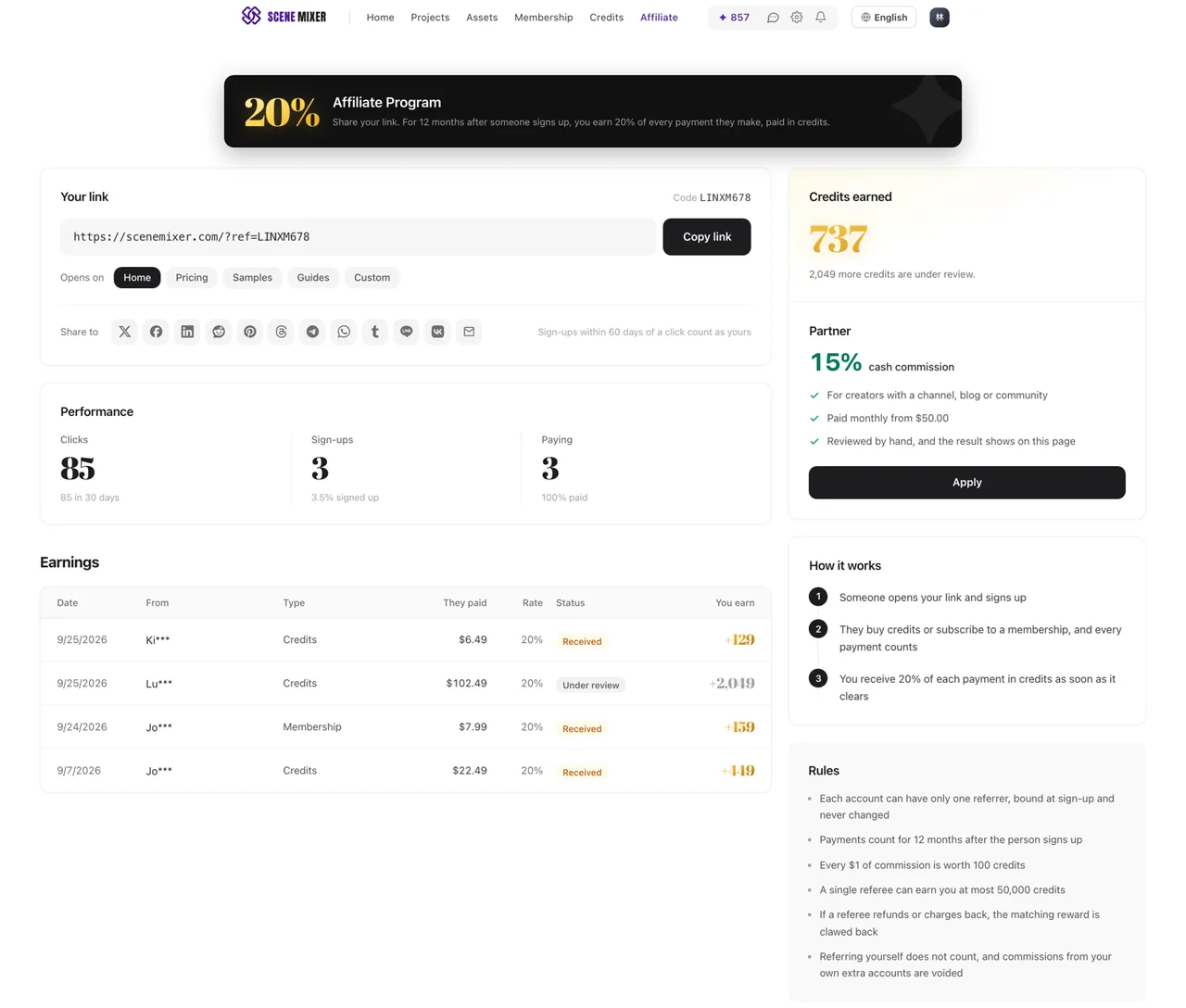
Invite friends in the top navigation; on a phone it is in the menu. The page shows your rate in large type, Your link with Copy link, the Opens on choices, a row of Share to buttons, Performance with Clicks, Sign-ups and Paying, Credits earned, and Earnings line by line. If the page says Referrals are not available right now, the program is switched off for the moment. The program for creators with an audience has a page of its own: Affiliate program, linked in the footer of every page and at the bottom of Invite friends.
How the link works
Under Opens on, pick where the link should land: Home, Pricing, Samples, Guides, or Custom for any other page on this site. Then copy it, or use a Share to button. Someone who opens the link and creates an account within 60 days is bound to you at sign-up. Each SceneMixer account can have only one referrer, and it never changes, so an existing account cannot be claimed later.
Your code
Your code is shown next to the link, after Code. It is the same code your link carries, so people who never click a link can still be bound to you: when they create an account, they tap Have a referral code? and type it in. That makes it the one to say out loud in a video, a stream or a podcast. Typing is forgiving: lower case and spaces are fine. If someone has opened several referral links before signing up, the most recent one carrying a real code counts, and a code typed at sign-up counts over any link.
Changing your code
Your code starts as a random one we pick for you. To make it easier to remember, select Change next to it and type your own: capital letters A–Z and numbers only, 4 to 20 characters. You can change it once every 30 days. Your old code keeps working for you, so links and videos you already shared still count, and it is never given to anyone else. Codes that look like ours or a payment provider’s, such as SceneMixer, Official, Support or PayPal, and codes that match an existing promo code cannot be used.
What you earn and when
20% of the amount your referral actually pays, on every payment they make: credit top-ups and membership plans, the first payment and the renewals. It is paid in credits — every $1 of commission is worth 100 credits — and it lands the moment the payment clears, as a Referral reward line in your Credit History and a row in Earnings that shows what they paid, the rate and what you earned. Payments count for 12 months after the person signs up.
The cap on credits
When you are paid in credits, a single referral can earn you at most the number of credits stated under Rules on SceneMixer's referral page. When a person reaches it, their later payments show (capped) in Earnings and earn nothing more; your other referrals are unaffected.
Partners: cash instead of credits
If you have an audience — a channel, a blog, a community — open the Affiliate program page and select Apply. The form asks where you promote, how many followers you have on your biggest platform, who your audience is, and where payouts should go: PayPal or Wise. Every application is reviewed by hand, and the result shows on that page. Once you are approved, each payment earns you cash at a rate set by the size of your audience:
| Audience | Cash commission |
|---|---|
| Under 10,000 followers | 15% of each payment |
| 10,000 to 100,000 followers | 20% of each payment |
| Over 100,000 followers | 25% of each payment |
The rate that applies to you is shown in large type on your partner dashboard: Partner dashboard in your account menu, or the same Affiliate program page once you are signed in.
Partners also get a promo code for their audience: 300 bonus credits on a credit top-up of $1.49 or more, once per person. Create it yourself in one click under Promo code for your audience on your partner dashboard; it uses the same name as your referral code, so there is only one word to remember. Your viewers type it when they create an account, which binds them to you, and again into Promo code (optional) when they buy credits on the Billing page (see buying credits step by step).
A cash commission becomes withdrawable 30 days after the payment. Payouts go out once a month, once your withdrawable balance reaches $50. You can switch between cash and credits whenever you like; the switch applies to new orders only. You can also convert a withdrawable cash balance into credits, which cannot be undone.
Partners tell their audience that they earn a commission, and do not bid on our brand name in search ads, send spam or make misleading claims.
Refunds and chargebacks
If a payment is refunded or charged back, SceneMixer takes back the commission it produced in the same proportion. For credits that is a Referral reward reversed line in your history, and the row in Earnings is marked clawed back; if that leaves your balance short, later commission covers it first. For cash, a commission that has not been paid out yet is reduced, and one that has already been paid out appears as a Refund adjustment row and comes off your next payout.
What does not count
Sign-ups alone earn nothing; only payments do. Referring yourself does not count: commission from an account created on your own device is held for review, and commission from your own extra accounts is voided.
| Everyone | Partners | |
|---|---|---|
| How to join | Open Invite friends | Apply on the Affiliate program page; reviewed by hand |
| Paid in | Credits | Cash, or credits if you prefer |
| Rate | 20% of each payment | 15%–25% of each payment, by audience size |
| Your code | Typed at sign-up; change it once every 30 days | Typed at sign-up; change it once every 30 days |
| For your audience | — | A promo code you create yourself: 300 bonus credits on a top-up of $1.49 or more |
| What counts | Credit top-ups and membership plans | Credit top-ups and membership plans |
| For how long | 12 months after sign-up | 12 months after sign-up |
| When | The moment the payment clears | Withdrawable after 30 days, paid monthly from $50 |
| Refund | The matching commission is taken back | The matching commission is taken back |
FAQ
Where is my referral link?
Invite friends in the top navigation; the link is at the top of SceneMixer's Invite friends page with Copy link. Partners find it on their Partner dashboard.
Can people use my code without a link?
Yes. When they create a SceneMixer account they tap Have a referral code? and type your code.
Can I change my code?
Yes, once every 30 days on SceneMixer: capital letters A–Z and numbers, 4 to 20 characters. Your old code keeps working for you and is never given to anyone else.
What do I earn?
SceneMixer pays 20% of every payment the people you referred make in the 12 months after they sign up, paid in credits. Approved partners earn cash instead: 15% under 10,000 followers, 20% from 10,000 to 100,000, and 25% over 100,000.
Do membership plans count?
Yes. Credit top-ups and membership payments both count on SceneMixer, renewals included.
When does it arrive?
Credits land in your SceneMixer account the moment the payment clears. Cash becomes withdrawable 30 days after the payment and is paid out monthly from $50.
How do I get paid in cash?
Apply on SceneMixer's Affiliate program page, linked in the footer of every page. Applications are reviewed by hand, and payouts go to PayPal or Wise.
Is there a perk for my audience?
Yes. Once approved, create a promo code for SceneMixer in one click on your partner dashboard: 300 bonus credits on a credit top-up of $1.49 or more, once per person, typed into Promo code (optional) when buying credits.
Does a sign-up alone earn anything?
No. Only payments do.
What if they refund?
SceneMixer takes back the commission from that payment.
Updated November 15, 2026