Alternatives
A Runway Alternative for AI Drama Series
Updated October 13, 2026

Shot-level craft, or a whole show
Runway's plans are sized in seconds of its models — Standard's 625 monthly credits equal 52 seconds of Gen-4.5 — and add projects, brand kits, custom voice clones and studio-grade formats as you go up1. SceneMixer is sized in projects: one script, one cast, every episode rendered and composited in the same place.
At a glance
| Runway | SceneMixer | |
|---|---|---|
| Built around | Its Gen-4.5 model plus other video and image models, an agentic creative collaborator and editing1 | One series project: script → cast → episode outline → storyboard per episode → video per segment → one file per episode |
| Audio | Music, voice and sound-effect generation; custom voice clones from Pro1 | Lines are performed in the generated video itself, in any of 15 languages (Cantonese as a 16th dialogue option) |
| Finishing | 4K upscaling; HDR, ProRes and image sequences on Max1 | One composited file per episode; resolution follows the tier |
| Price to start | Free: 125 one-time credits; Standard $15/month ($12 billed annually), 625 credits = 52s of Gen-4.51 | Credit packs from $1.49; Pro plan $7.99/month with 700 credits. New accounts get 50 free credits and 15 free reference images. |
| Unused credits | Standard and Pro monthly credits don't roll over; Max rolls over up to one month; purchased credits never expire1 | Plan credits and bought credits sit in one balance and do not expire at the end of the month. |
Models differ between platforms, so compare a test clip of your own scene, not only the price per second.
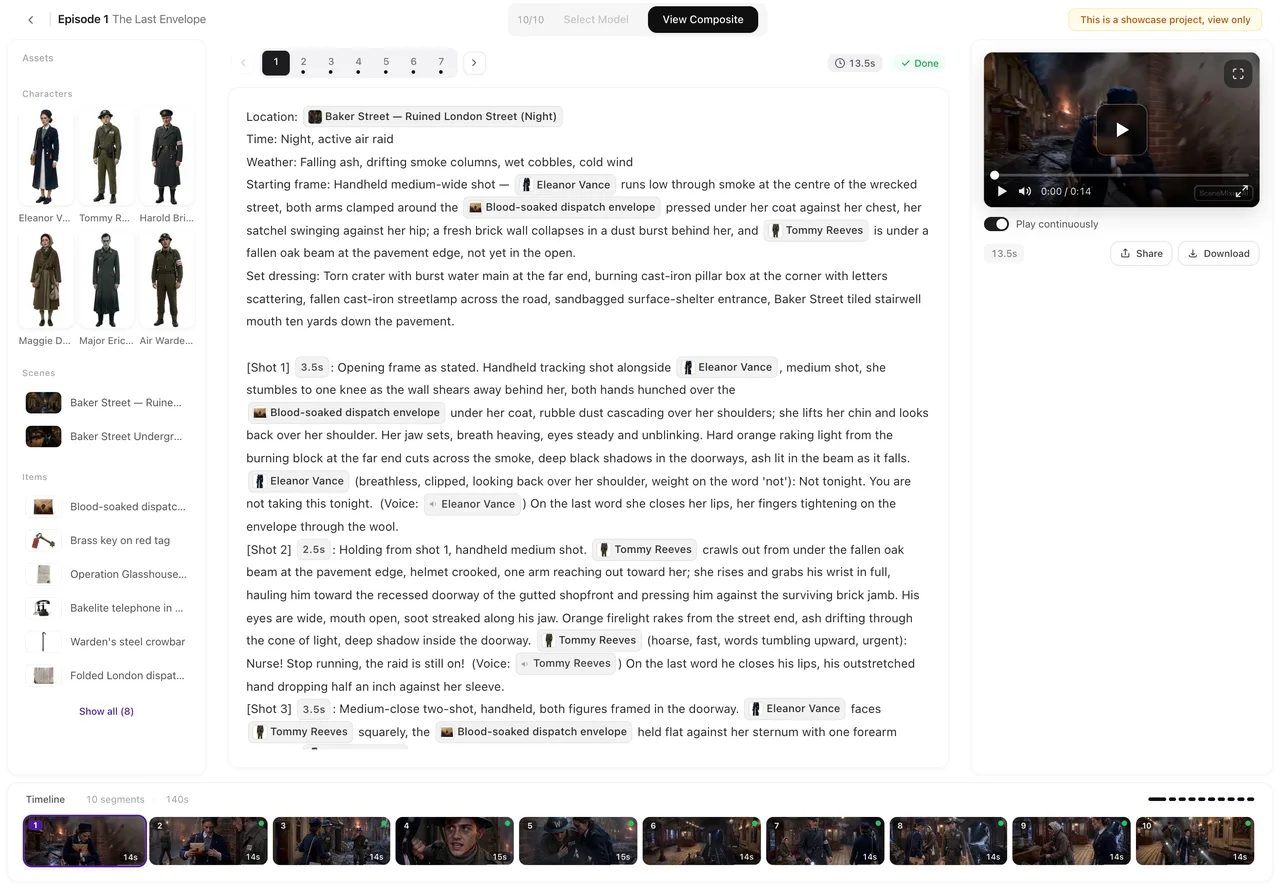
What a fixed cast looks like


Stay with Runway if…
- You are editing or finishing shots. Runway pairs generation with editing tools, 4K upscaling and studio formats1.
- You want Runway's own model, Gen-4.51.
- You need music and sound effects generated alongside the picture1.
- You work under brand kits across projects1.
SceneMixer fits if…
- You are telling a story in episodes. One read of the script returns the cast, locations, props and an episode-by-episode outline with an end-of-episode hook; each episode gets its own storyboard. Upload a script and read it.
- The same faces must hold from shot to shot. Reference sheets ride along with every segment, linked by id rather than by name. How consistency works.
- Your cast should speak a particular language. Pick it in step 1 and the lines are performed in that language as the shot renders — no dubbing pass. Native dialogue vs dubbing.
- You are adapting one story for a market. The target region adapts names, casting and scenery for Western, East Asian, Southeast Asian or Latin American audiences. Relocate a story by region.
- You would rather pay as you go. Packs start at $1.49 and plan credits stay in your balance. Do credits expire?
Where Runway lands in SceneMixer
| In Runway | Closest step in SceneMixer |
|---|---|
| Agentic creative collaborator | AI Create and the script read, which plan the whole series |
| Voice generation and custom voices | A voice matched to each character, performing lines in the project's language. Native dialogue vs dubbing |
| Generations and upscales | Segments rendered per tier; regenerate a segment at a higher resolution when it matters |
Moving a story over
- Bring the script — paste it or upload .txt, .docx or .md.
- Set the project in step 1: Type (Short Drama, TV Series or Film), aspect ratio, dialogue language and target region.
- Reuse character art you own. On a paid plan, upload it in place of a generated sheet; otherwise generate sheets — the first 15 on an account are free.
- Draft cheaply, finish the keepers. Generate at the lowest tier, then regenerate only the segments that will be seen most at a higher resolution. Draft at 480P, finish at 1080P.
Frequently asked questions
Is SceneMixer a Runway alternative?
For producing a multi-episode drama from a script, yes. For shot-level editing, Runway's own model, music and sound effects or studio formats, Runway has more.
How much does Runway cost?
On October 13, 2026, Runway's pricing page listed Free with 125 one-time credits, Standard at $15 a month or $12 billed annually (625 credits), Pro at $35 or $28 (2,250) and Max at $95 or $76 (9,500). Check its pricing page for current prices.
Do Runway credits roll over?
Its pricing FAQ says Standard and Pro monthly credits don't roll over, Max rolls over up to one month, and purchased credits never expire. In SceneMixer, plan credits and bought credits do not expire at the end of the month.
Does SceneMixer generate sound?
The dialogue is performed in the generated video, in the project's language, with the ambient sound you write into each shot.
Sources and corrections
- Choose the Right Plan for You (runway.com/pricing) — plans, credits, credit rules, models and features
Facts about Runway come only from the pages listed above, as checked on October 13, 2026. Prices and plans change often, so check Runway's site before you buy. Runway is a trademark of its owner and is named here only to identify the product; SceneMixer is not affiliated with it. Spotted something out of date? Email support@scenemixer.com and we will correct it.
From a script to a show
Outline, cast, storyboards and video in one project.
Start a project freeCredit packages from $1.49 · Pro $7.99/mo · No credit card to start
Pricing·Novel to Video·Guides·Samples·Support·Privacy·Terms·Legal·Contact·Affiliate program·© 2026 SceneMixer