Target Region: Relocating a Story

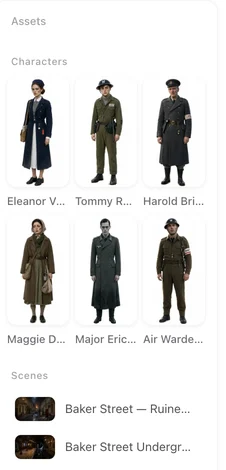
A finished Western-region episode: the cast, the street, the signage all belong to one place.
Where it is
Step 1, Set Up Your Project, the Target Region row. Hover the label for a short description: it sets character ethnicity, names and scene styling, and cultural settings explicit in your script are preserved.
The options
Western, East Asia, Southeast Asia, South Asia, Central Asia, Middle East, Mediterranean, Eastern Europe, Latin America, Africa, and Follow script. The default depends on the site you are on; Follow script means the story keeps whatever world the text describes.
What changes
Character names become local names. Faces and builds follow the region’s people. Buildings, streets and interiors look like that part of the world. Visible text in the picture — signs, labels — is in the local language. Props follow the culture: the tea set, the car, the phone. The story, its structure and its dialogue are untouched.
What your script overrides
Anything explicit. If the script says the scene is in Tokyo, it stays in Tokyo. If a character has a name the story depends on, keep it in the text and it is kept. The region fills in what the script leaves open; it does not overrule what the script decides.
When it takes effect
At parse time. The region is read together with the script, and the cast and locations are produced from it. After the read, Step 1 shows the summary and the region can no longer be changed in that project. To move an existing cast, edit the descriptions and names in Step 2 and regenerate the images; for a whole project in another region, start a new project with the same script. Checking the summary.
Region, language and voice
The region moves the world. The Dialogue language row on the same screen decides what the cast speaks; the two are independent, so a Western-region cast can speak Japanese. Voices are matched to characters afterwards, in step 2. Dialogue language and cast localization.
Ads and remakes
An ad follows the language of its dialogue rather than a region setting. A remake applies the region when it tidies the descriptions of the cast and places it read from your video. After a remake read.
| Element | Follows the region | Stays as written |
|---|---|---|
| Character names | Yes — local names | Names you keep explicit in the script |
| Faces, builds | Yes | Traits the script states |
| Buildings, streets, interiors | Yes | Places the script names |
| Signs and visible text | Yes — local language | — |
| Props | Yes — local culture | Objects the script names |
| Story, structure, dialogue | No | Always as written |
FAQ
Does the region change the story?
No. It moves the world the story happens in. Plot, structure and dialogue stay as written.
Can I change the region after the script is read?
Not in that project. Edit the descriptions and names in Step 2 and regenerate the images, or start a new project with the same script.
Can I keep one character's original name?
Yes. Keep it explicit in the script and it is preserved.
Does the region set the language the cast speaks?
No. That is the Dialogue language row. They are independent.
What does Follow script do?
Nothing is relocated; the story keeps the world the text describes.
Move a story across the world
Upload a script, pick a region, and see the cast come out local.
Updated September 27, 2026
Pricing·Novel to Video·Guides·Samples·Support·Privacy·Terms·Legal·Contact·© 2026 SceneMixer