How to make an AI birthday story video

Brief for AI Create: A one-minute birthday story: seven-year-old Lily, curly red hair and a yellow raincoat, flies her cardboard rocket to the moon to bring back the last slice of birthday cake, with her dachshund Pip as co-pilot; ends with the whole family singing to her.
A story, not a slideshow
| Who | The adventure |
|---|---|
| A seven-year-old | A rocket to the moon to rescue the cake |
| A grandmother at eighty | Sailing back to the harbour town where she grew up |
| A friend at thirty | A heist to steal the last slice |
| A partner | The night you met, told as a film |
Describe them in words
The details people recognise are the ones you write: curly red hair, gap in the front teeth, yellow raincoat, a dachshund called Pip. They go into the character description and the sheet draws them in the project's style. Free setup images (15 per account) cover a small cast. Describe a face · The dog as a character.
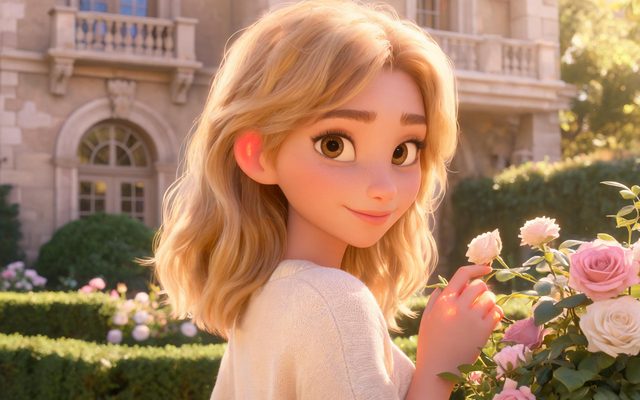
Visual Style: Family 3D Animation
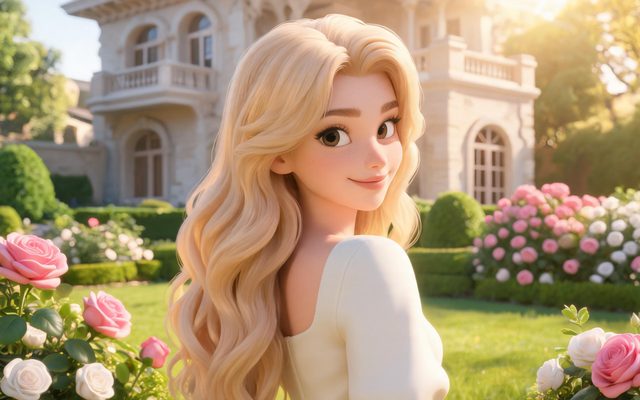
Visual Style: 3D Toy Cartoon

Visual Style: Watercolor Storybook
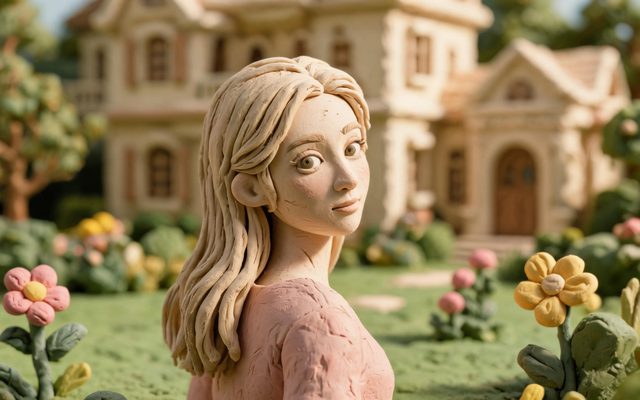
Visual Style: Claymation
Photos: what works
On the current plans, uploading a photo is a membership feature. Upload only with the person's consent (for a child, a parent's). Choose Optimize into a reference sheet so the photo is redrawn in the project's style; a realistic photo of a real person is refused by the video's face check, while drawn and 3D faces are rarely flagged. Using your own photo · Real faces.
The wish at the end
Make the last shot a line someone says: @Mum (smiling): Happy birthday, Lily. Spoken lines come out right; written text in the frame does not, so put a title card on in your editor if you want one. The video carries a background score; a birthday song is something to add in your editor. Dialogue in the storyboard.
Length, cost and sending it
A one-minute story is about four 15-second segments, rendered at 10 credits a second on the default tier; there is a free 5-second preview once per account. Composite the episode, then download it or send a share link, which plays without an account. Composite and share · Share links · What is free.
Make it in SceneMixer, start to finish
- Script: paste your own on Upload Script, or write the brief above in AI Create and let it draft the episodes.
- Step 1: Type Film; Scene Style Pastoral Healing, American Small Town; Costume Style Soft Everyday; Visual Style Family 3D Animation, Watercolor Storybook; Target Region; dialogue language; 9:16 Portrait. Then read the script.
- Step 2: the birthday person described in words (or a consented photo, optimised); family members and pets as characters; home and the adventure's place as locations. The first 15 setup images on an account are free.
- Storyboard: generate episode 1 first (free on your first drama) and read it before you render anything. One place per segment.
- Video: render on the default tier at 10 credits a second, fix single shots instead of whole episodes, then put the episode together and post.
| Second | Shot |
|---|---|
| 0–15 | Lily finds the cake plate empty; a crumb trail to the window |
| 15–30 | The cardboard rocket, Pip in a helmet, lift-off |
| 30–45 | The moon, the slice on a crater, a grumpy moon mouse |
| 45–60 | Home through the window; the family, candles, the wish |
FAQ
How do I make a birthday video with AI?
Write a short adventure with the birthday person as the hero, describe them in words, pick a cartoon look and render a minute or so.
Can I use their photo?
On a paid plan, with consent, optimised into a drawn sheet; realistic photos of real people are refused by the face check.
Can it say happy birthday with their name?
Yes, as a spoken line. Written text in the frame is unreliable; add it in your editor.
Can it include the Happy Birthday song?
The video has a background score; add a song in your editor.
How long should it be?
Thirty seconds to two minutes: two to eight segments.
How do I send it?
Download the composite or send a share link that plays without an account.
Which look suits a birthday video?
Family 3D Animation, 3D Toy Cartoon, Watercolor Storybook or Claymation.
Can the pet be in it?
Yes. A dog or cat is a character with its own sheet.
Updated October 31, 2026