How to make a music video with AI

Brief for AI Create: A story video for a slow three-and-a-half-minute song about leaving a coastal town: a young woman ties her bicycle to the ferry rail, three flashbacks of the harbour, the ferry pulls away; no dialogue, only the sound of the sea.
What it can't do, so you don't pay to find out
- Take your song. There is no audio upload. What you can feed in.
- Sing it. Characters speak the lines written in the storyboard, with their lips moving to those words; they do not lip-sync to a track you bring.
- Cut to the beat. Segments are 15 or 30 seconds and the shots inside them have their own seconds; where the picture cuts against your beat is something you set in your editor.
- Print the lyrics. Video models do not draw readable text reliably, and the subtitles feature shows the lines your characters speak, not your lyrics. Lyrics go on in your editor.
What is left is a narrative or concept video: a story, told in pictures, that runs as long as your song.
Plan the picture to the song's length
| Song | Seconds | Segments (15 s / 30 s) | Type |
|---|---|---|---|
| 2:30 | 150 | 10 / 5 | Short Drama |
| 3:30 | 210 | 14 / 7 | Short Drama |
| 4:00 | 240 | 16 / 8 | Short Drama (its limit) |
| 4:30 | 270 | 18 / 9 | TV Series (up to 300 s) |
| 6:00 | 360 | 24 / 12 | Film (no length cap) |
A Short Drama episode runs up to 240 seconds and a TV Series episode up to 300; longer than that, choose Film. Video is 10 credits a second on the default tier and joining is 1 credit a second, so a 3:30 song is 210 seconds of each, before retakes. Short drama, series or film · Length and cost.
Map the song, section by section
For a 3:30 song (210 seconds, fourteen 15-second segments):
| Song part | Seconds | Segments | What the picture does |
|---|---|---|---|
| Intro | 15 | 1 | The harbour at dawn, no people |
| Verse 1 | 45 | 3 | She packs the bicycle; the kitchen window; the road down |
| Chorus | 30 | 2 | The quay: the ferry, the rail, the knot |
| Verse 2 | 45 | 3 | Three flashbacks of the harbour, one per season |
| Chorus | 30 | 2 | The ferry's rope is thrown; her hand on the rail |
| Bridge | 15 | 1 | The kitchen window, a lit lamp, nobody there |
| Outro | 30 | 2 | The wake widens; the town gets small |
That adds up to 210 seconds and 14 segments. Mark the sections in your script and the storyboard follows them.
Write it as a silent film
Say what is on screen and what the place sounds like; leave dialogue out. One segment of 15 seconds, four shots:
[Shot 1] 4s: Wide shot, slow push in. A small harbour at dawn, a ferry at the quay, gulls on the rail. Ambient: water against the hull, a far-off bell. No dialogue.
[Shot 2] 4s: Medium shot. @Nell, 20s, in a yellow raincoat, ties a bicycle to the ferry's deck rail. No dialogue.
[Shot 3] 3s: Close-up on a lit kitchen window, a hand lifting the curtain. No dialogue.
[Shot 4] 4s: Wide shot, the ferry's wake widening behind it. Ambient: engine, wind. No dialogue.
The shot seconds add up to the segment (4 + 4 + 3 + 4 = 15). Dialogue and sound in one generation · Shot seconds and timing.
Put your track under it
- The episode is scored for you by default. Turn the Music switch off for the shots and the composite; downloads then come without the score.
- Download the composite and open it in any video editor, or in the editing tools of the platform you post to.
- Lay your licensed track under the whole piece and cut or retime to the beat there.
Use a track you have the right to use; the Terms do not allow generating protected music without permission, and platforms have their own checks. Background music: the built-in score and your own · Trimming a clip in the editor · Composite and share an episode.
Pick a look for a song
A music video lives on its look. Painterly Anime suits big scenery and quiet feeling; Watercolor Storybook suits something tender and slow. The look is fixed once you continue past step 1, so choose it before the script is read.
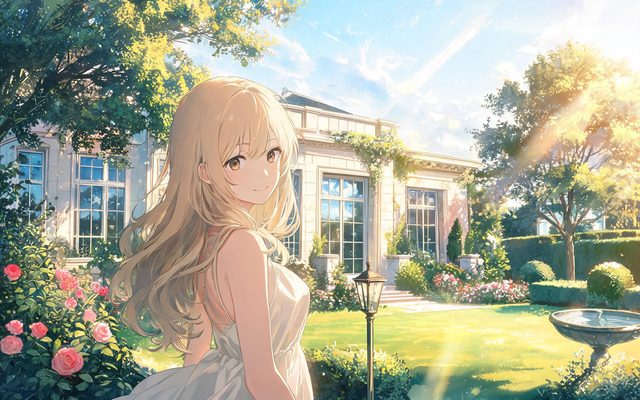
Visual Style: Painterly Anime
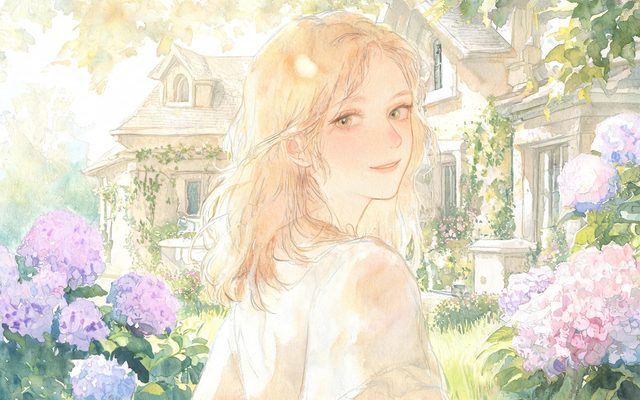
Visual Style: Watercolor Storybook
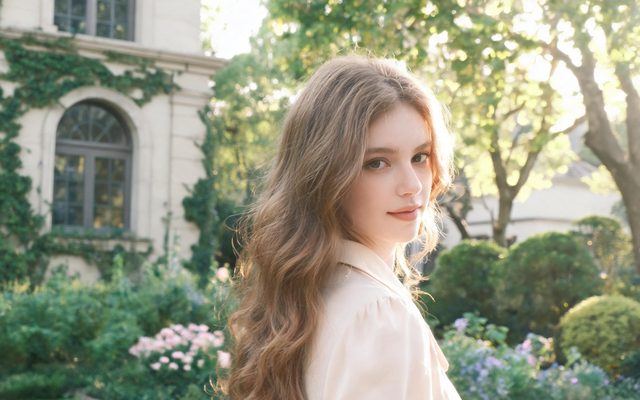
Visual Style: Soft Glow
Make it in SceneMixer, start to finish
- Script: paste your own on Upload Script, or write the brief above in AI Create and let it draft the episodes.
- Step 1: Type Short Drama; Scene Style Pastoral Healing, American Small Town; Costume Style Soft Everyday; Visual Style Watercolor Storybook, Soft Glow; Target Region; dialogue language; 16:9 Landscape. Then read the script.
- Step 2: Draw the young woman and the harbour and ferry; no voices are needed for a silent story, and the music switch is the last thing you turn off. The first 15 setup images on an account are free.
- Storyboard: generate episode 1 first (free on your first drama) and read it before you render anything. One place per segment.
- Video: render on the default tier at 10 credits a second, fix single shots instead of whole episodes, then put the episode together and post.
| You want | Possible? | How |
|---|---|---|
| A story video that runs as long as your song | Yes | Plan in segments, silent shots, your track laid under it |
| Cuts that land on the beat | In your editor | Cut and retime there |
| Someone singing your song | No | Characters speak generated lines |
| Your lyrics on screen | In your editor | Readable text is not drawn reliably |
| Upload the song | No | No audio input |
FAQ
Can AI make a music video from a song?
Not from the song itself: there is no audio upload. You can make the story video and lay your track under it in an editor.
Can the characters sing my lyrics?
No. They speak generated lines; they do not lip-sync to a track you bring.
Can it sync to the beat?
No. The editor's timeline is one card per segment, and fine cutting to a beat happens in your own video editor.
Can I add lyrics?
Add them in your editor. The subtitles feature shows the lines your characters speak, and readable on-screen text is not drawn reliably.
Which look suits a music video?
Whichever fits the mood; Painterly Anime and Watercolor Storybook are common starting points for quiet songs.
How long can it be?
Up to 240 seconds as a Short Drama episode, 300 as a TV Series episode, and longer as a Film.
Is the song's copyright my concern?
Use a track you have the right to use. The Terms do not allow generating protected music without permission.
What does it cost?
Every second of video is 10 credits a second on the default tier plus 1 credit a second to join, before retakes. A 3:30 song is 210 seconds.
Updated November 2, 2026