Dialogue and Sound in One Generation

Open a finished episode, play a segment with dialogue, and watch the speaker's mouth.
What comes out
Three layers, all generated with the picture. Voices: every tagged line, spoken in the voice chosen for that character, by the person whose lips move. Ambience: the sound of the place, from the Ambient line of the shot. Silence where you asked for it: a shot marked No dialogue has nobody talking. Ads additionally get music that fits the tone you picked; dramas are not asked for a score, though a clip sometimes comes with a light bed of music of its own. Adding your own music.
What you write to get it
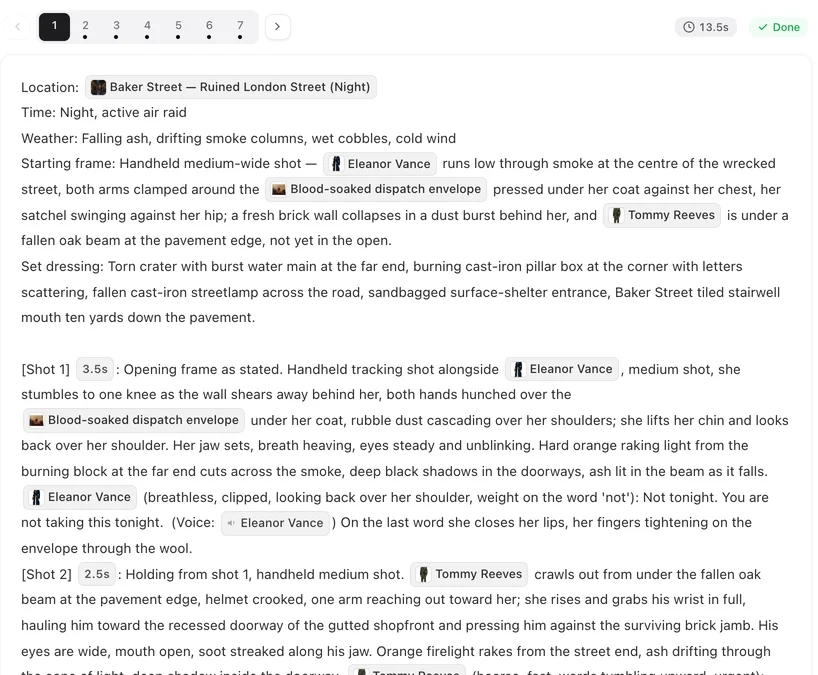
A line: @Mara (low, steady): the words. (voice: 🔊Mara). The voice tag from the @ menu’s Voice tab is what says whose voice speaks; without it the line may be spoken in some other voice, and the editor warns you after saving. Dialogue lines.
Ambience: at the end of a shot, Ambient: rain on the glass, a clock in the hall. Say what is audible, in a few words. Nobody speaking: No dialogue.
Lips: the person speaking moves their mouth; give anyone else in the shot lips closed, no lip movement so they do not mouth the line.
Where the voice comes from
Each character has one voice, chosen in step 2 — matched to the character, previewed, changeable, or uploaded by you. Every line tagged with that character is spoken in it, in every episode. To change how a character sounds, change the voice on the character, then regenerate the segments you want updated. How character voices work.
Which language
Lines are spoken in the project’s dialogue language, set when the project was created. Write the lines in that language. A German project speaks German; the interface you use to write it does not matter. Choosing a dialogue language.
Changing the sound afterwards
There is no mixer and no separate track to edit; the sound is part of the clip. You can still change it without regenerating: Redub, under the player of a finished segment, changes the lines or a character’s voice, and Trim cuts a stray word at the start or end. Or change the words or the delivery note and regenerate the segment. If the voice is wrong, check the tag first, then the voice on the character. Change a line after the video is made · Change a character’s voice.
When the sound is off
Wrong voice on a line: the tag names the wrong character, or is missing. Listener moving their mouth: add lips closed, no lip movement. Line rushed or cut: the shot is too short for the words — about three words a second in English. Shot seconds. Too quiet a room: the shot has no Ambient line; add one. Then regenerate that segment; the old take stays in Version History.
| You want | Write |
|---|---|
| A line in her voice | @Mara (how): the words. (voice: 🔊Mara) |
| Rain and a clock under the scene | Ambient: rain on the glass, a clock in the hall |
| Nobody talking | No dialogue |
| The other person not mouthing the line | @Jules lips closed, no lip movement |
| A voice from off screen | (voice-over) at the start of the delivery note |
FAQ
Do I need to add voices afterwards?
No. The lines are spoken in the generated clip, in the character's chosen voice, and the lips move with them.
Can I change a line after the clip is made?
Yes. Use Redub under the player; it lists the segment's lines for you to edit.
Can I use my own voice?
Yes, on a paid plan. Upload a voice on the character in step 2; every tagged line for that character is then spoken in it.
Is there background music?
Ads get music matched to their tone. Dramas are generated with voices and ambience and no requested score; to add your own, edit the downloaded file.
The wrong character spoke the line.
Check the voice tag after the line: it names the speaker. Fix it and regenerate the segment.
Does the downloaded file include the sound?
Yes. Voices and ambience are in the clip, and in the composited episode.
Hear your first line
Write one line with its voice tag, generate the segment, and listen.
Updated October 2, 2026
Pricing·Novel to Video·Guides·Samples·Support·Privacy·Terms·Legal·Contact·© 2026 SceneMixer