Why Every Shared Video Carries the SceneMixer Badge

If you are a member and want an unbadged file for your own channel, use Download, not Share.
What changes and what does not
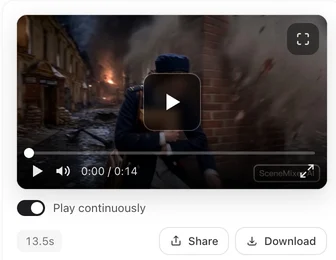
- Shared: the video on the share page, its preview image when the link is posted, and the file your phone’s share sheet sends all carry the badge.
- Not changed: your clip in the editor, your versions, and Download — they stay exactly as they were, badge or no badge according to your setting.
- If your clip already has the badge, it is shared as it is.
The AI badge switch and What Download saves.
Why
A shared video travels on without you: reposted, clipped, embedded. The badge tells anyone who meets it that it was made with AI, which is what AI-content labelling rules in many places expect, and it is the same everywhere, whoever made the clip. Keeping it off your own downloads is a membership choice; keeping it on what leaves through our share links is not. AI short drama compliance.
The one-minute wait
The first time you share a clip without a badge, the share buttons show Adding the SceneMixer badge to your video, about a minute… and become active when the copy is ready. Share the same clip again later and it is immediate. If you change the clip — a new version, a trim, an edit — the new clip needs its own copy.
Links you shared before
Share links made before this rule, for clips without a badge, now show the badged copy too. The first person to open such a link may see the video is being prepared for about a minute while the copy is made; after that the page plays as normal. It happens once per clip. Search engines see the page’s poster meanwhile, so nothing drops out of search. Share links: who can see them.
Where the badge sits
Bottom-right, small, the same mark generated clips carry when their badge is on. It is burned into the picture of the shared copy, so it stays when the video is reposted.
| Carries the badge? | |
|---|---|
| Your clip in the editor | Only if your badge setting is on |
| Download | Only if your badge setting is on |
| Share link page | Always |
| File sent by the phone's share sheet | Always |
| Preview picture of a posted link | Always |
FAQ
I'm a member and removed the badge. Why is it on my shared video?
Shared copies always carry it. Your own clip and downloads stay without it.
Can I share without the badge?
Not through SceneMixer's share options. Download the file and post it yourself.
Does the shared copy cost credits?
No.
Why was my share button spinning?
The badged copy was being made; it takes about a minute, once per clip.
Share it with the badge, keep your file clean
Shared copies carry the mark; your clip and downloads follow your setting.
Updated September 30, 2026
Pricing·Novel to Video·Guides·Samples·Support·Privacy·Terms·Legal·Contact·© 2026 SceneMixer