The AI Badge Switch

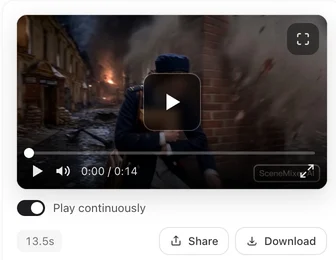
Open a finished episode and look at the bottom-right corner of a clip.
What the badge is
A small SceneMixer AIGC mark in the bottom-right corner of the video, telling anyone who watches that the clip was generated. The panel behind the switch says it plainly: new videos carry the badge; this only affects videos generated from now on; existing clips are unchanged. Rights and labels.
Where the switch is
In the episode editor, next to the model picker above the preview pane, as a pill that reads AI Badge or No Badge. Click it to open the panel AIGC Badge on videos, which shows a preview of the badge and the state. On a phone the same control is at the bottom of the model sheet. The account settings dialog has the same switch.
Who can turn it off
Removing the badge is a membership benefit. A member’s videos are badge-free by default; the panel says so, and offers to keep the badge if you prefer. Without a membership the panel shows Upgrade to remove the Badge and the badge stays on. What a paid plan changes.
The panel also carries a sentence worth reading before you press Remove Badge: once removed, you assume all compliance risks and legal liability for how the video is labelled wherever you publish it.
When it takes effect
The switch is read at the moment a segment is generated. Flip it, and the next clip follows; the clips you already have do not change. To change an existing clip, regenerate it with the switch set the way you want; the earlier version stays in Version History.
What you download
The download button gives you the full-quality file, and it carries whatever the switch said when that clip was made. The episode composite is stitched from the clips as they are, so a mixed episode has a badge on some segments and not others. Generate them all under one setting before compositing. Original and play versions.
Where it cannot be turned off
Some regions require AI-generated video to be labelled. On a site that operates under such a rule, the switch is locked and the panel says so; the badge stays on for everyone, members included.
| You are | Default | Can change it |
|---|---|---|
| Not a member | Badge on | No — the panel offers an upgrade |
| A member | Badge off | Yes — keep or remove, per your account |
| On a site with a labelling requirement | Badge on | No |
FAQ
Where is the badge on the video?
Bottom-right corner, a small SceneMixer AIGC mark.
I turned it off, but my old clips still have it.
The switch applies to clips generated from then on. Regenerate a clip to apply the current setting.
Can I remove the badge without a membership?
No. Badge-free video is a membership benefit.
Does the composite have the badge?
The composite is stitched from the clips as they are. If some clips carried the badge, those parts of the composite do too.
Is the badge in the downloaded file?
Yes, if it was on when the clip was made. The download is the full-quality file with whatever the clip carries.
Check the pill before you generate
One glance at AI Badge or No Badge beside the picker tells you what the next clip will carry.
Updated September 26, 2026
Pricing·Novel to Video·Guides·Samples·Support·Privacy·Terms·Legal·Contact·© 2026 SceneMixer