Answers · Editing
Can AI Edit Videos?
Published November 18, 2026

Two meanings of AI editing
The question hides two different jobs. The first is assisting a human editor with footage that already exists: finding the good takes, cutting dead air, transcribing, reframing a landscape clip for a phone, suggesting a rough cut. The second is editing video that a model generated, where there is no footage to cut, only the description it was made from. Editors in the first group are watching the second group closely. A thread in r/VideoEditing put the worry plainly:
I’m sure you lose a bit of creative control that you would otherwise keep if you did it manually
Editing and post-production are a big part of the conversation: about 14,000 posts in the community corpus touch on them.
What AI does well with real footage
The tedious parts. Transcribing an interview so you can cut by text, removing pauses and filler words, matching levels, generating captions, finding every shot of one person, cropping to keep a face centred in a vertical frame. These save hours and rarely change the result much. Taste is still the editor's: which take, how long to hold a look, when to cut away.
How editing works when the video is generated
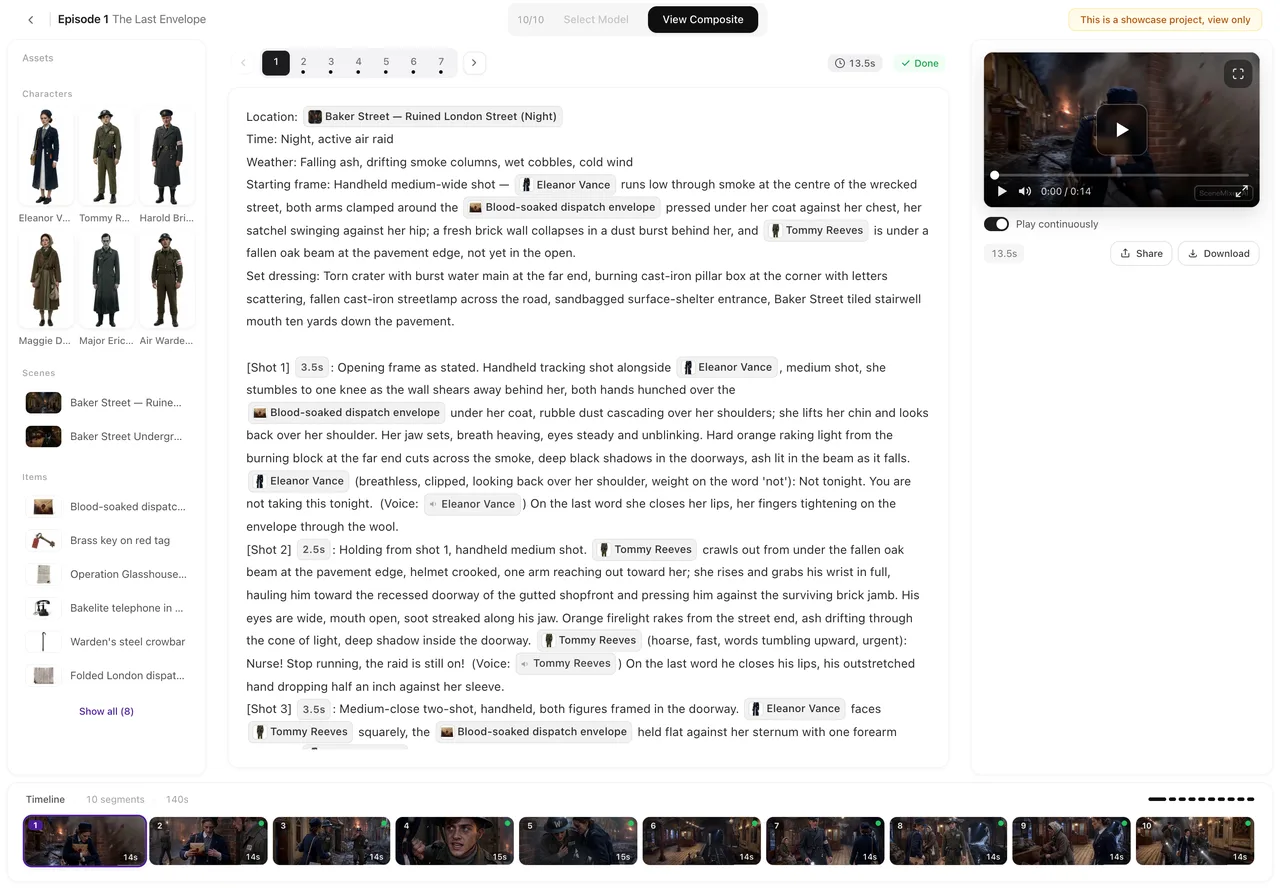
In SceneMixer an episode is a storyboard of numbered shots and a row of segments. To change what happens, you edit the shot's words and save, which is free, then regenerate only that segment, priced by its length and shown on the button. The old take is kept, so switching back costs nothing. Under the player, Edit this clip offers more targeted fixes: AI visuals to change the picture of one clip, Redub to change a spoken line in the same voice without remaking the picture, Trim, and Enhance to raise a finished clip one resolution step.
What it does not replace
A frame-accurate timeline. Colour grading, titles laid over footage, cutting on an exact frame and mixing several music tracks are still a desktop editor's job. SceneMixer edits its own segments; it does not cut footage you upload, and Enhance works only on clips it generated. The practical workflow is to make the episode where the shots are generated, download the original-quality file, and finish it in the editor you already use.
Editing a generated episode, step by step
Read the storyboard first, the way an editor watches a rough cut: does each shot do one thing, is every line spoken by the right person, does the episode end where it should. Fix those in the text. Generate, then watch the episode through once without stopping, noting the two or three segments that hurt it most. Regenerate only those, one at a time, and compare each new take with the old one before keeping it. A changed line goes through Redub; a soft clip you already like goes through Enhance. When the episode holds, download the original-quality file for anything that needs a desktop editor, such as titles or a colour pass.
Where the time actually goes
With generated video, most editing happens before anything renders. Reading the storyboard as text and fixing a shot there takes a minute and costs nothing; fixing the same shot after rendering costs a regeneration. The habit worth building is to proof the words of an episode the way an editor watches a rough cut, before pressing generate.
For real footage the order is reversed. Shoot first, then let AI handle the transcription and the first rough assembly, and spend your own time on the decisions that shape the piece: what to leave out, where the story starts, which reaction to hold. Either way, the human part of editing is choosing, and no tool removes that job.
Limitations of AI video editing
- Assistants speed up cutting but still make wrong guesses about which take is best.
- Regenerating a shot can change details you liked; keep the old take until the new one is better.
- SceneMixer does not edit footage you upload, and it has no frame-accurate timeline.
- Editing text is free; each regeneration and enhancement is charged by length.
- The editing-topic count is a rule-based label over a fixed window of public posts.
FAQ
Can AI edit videos automatically?
Partly. It can remove silences, caption and rough-cut real footage; with generated video on SceneMixer you edit the words and regenerate one segment.
Can AI edit a video I already filmed?
Assistant tools can. SceneMixer does not cut uploaded footage; it edits the episodes it generates.
Does editing an AI video cost money?
On SceneMixer editing the text and switching takes are free; regenerating or enhancing a segment is charged by its length.
Will AI replace video editors?
It replaces tedious steps, not judgement. Choosing takes and pacing a story are still editing work.
Related: fixing one shot without regenerating everything, editing one shot and regenerating it, the AI video editor, and the collection method behind the count.
Edit the words, not the footage
Change one shot's text, regenerate one segment, and keep the old take in case you liked it better.
Sign up freePer-second video rates are on the pricing page with the same numbers.