Answers · Voices
How Do I Make a Video With AI Voice?
Published November 6, 2026

Why voices are the giveaway
Ask viewers how they spot AI video now and the answer has moved from hands to sound. Under a thread in r/aivideo about telling AI video apart in 2026, the top reply put it in one line:
But the biggest tell is always the voices.
Audiences of AI dramas say something more forgiving, which is just as useful. A viewer listing series they had watched admitted:
sometimes the words and voices are off, but easily overlooked by the overall appeal and plot
Both are true: a good story carries a weak voice, and a strong voice makes a good story feel real. Voice is one of the largest topics in the community corpus, about 12,000 posts, and complaints about lips not matching the words alone come to about 520.
Voice and picture in one pass
The usual way to make a talking AI video is three tools: generate a silent clip, generate a voice track elsewhere, then fight to make the mouth match the audio. The video models used on SceneMixer generate audio and picture in one pass instead, so a segment comes out with its sound already in it — the line, the room tone and the lips that say it. That removes the matching problem, and it changes what a "voice setting" is: you choose which voice a character has, and the delivery comes from the storyboard.
Give each character a voice once
A character's voice comes from one of two places. A matched preset is picked from a library of sampled system voices, each with a short sample you can listen to; matching is a free model call and does not use credits. Or, on a paid plan, you upload audio for a character, and it becomes that character's reference for every segment they speak in. Voices are no longer designed from a list of adjectives, because a voice made from words drifts between takes the same way a face described in words does.
Whatever voice is attached to a character is attached at the project level and travels into every segment they speak in, so the voice stays the same across episodes for the same reason the face does. SceneMixer clones a voice only from what you may use: the clip being redubbed (Redub’s Original voice) or a recording you upload with the right to use it.
Steer the delivery in words
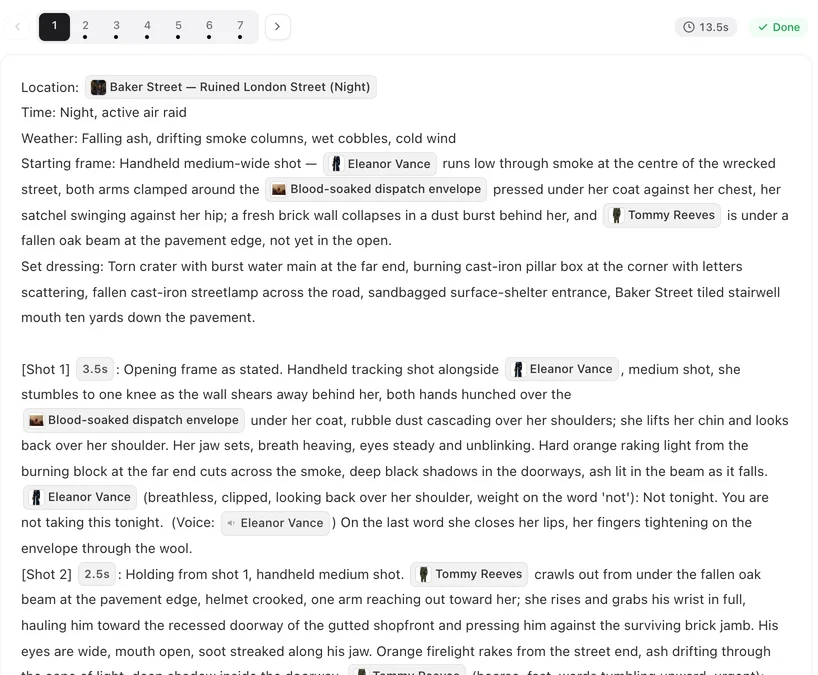
The performance is steered by the written note in front of each line in the storyboard — breathless, whispered, flat with anger — not by a waveform editor. If a reading is wrong, change the note and regenerate that segment. That is also why changing a line means regenerating its segment rather than re-cutting an audio track: the voice and the picture are one take.
Language works the same way. The dialogue language is chosen in Step 1 and the lines are written in it from the start, rather than dubbed afterwards; 15 languages are available, and the casts on the site spoke 11 of them over the 30 days to November 6, 2026.
Fixing a voice after the fact
If a finished clip has the right picture but the wrong voice, you do not have to regenerate it. Redub lets you pick another voice from the library for a character's lines in that clip, listen first, and redub into a new version without changing the words; with lip sync it costs 2 credits per second of clip. The character's own voice setting does not change, so to make a character sound different everywhere, change the voice on the character itself and then regenerate or redub the segments you want.
On cost generally, there is no separate charge for speech: the audio is part of video generation, which starts at 10 credits per second of output. The character voices page has the full detail, and changing a character's voice in a finished clip walks through Redub.
Limitations of AI voices here
- Clone only voices you have the right to use: upload your own voice, or one you have permission for.
- Redub offers the clip’s own voice (Original voice, cloned from that clip) or a voice from the site’s library; to hear a character’s uploaded voice afresh, regenerate that segment instead.
- A clip you upload from elsewhere gets new lines only through a remake’s Swap, which generates the changed part again.
- Delivery is steered by words. A very specific reading may need a few attempts, each a regeneration of that segment.
- The site figure is one month of SceneMixer projects, refreshed monthly; the community counts are keyword approximations.
FAQ
Can I upload my own voice?
On a paid plan, yes. Upload a sample for a character and it becomes that character's voice reference for every segment they speak in. In SceneMixer, an uploaded sample serves as the voice for that character in all their segments.
Does the voice stay the same across episodes?
Yes. A character's voice is attached at the project level and travels into every segment they speak in.
Can I clone a celebrity's or a friend's voice?
Only with their permission. On SceneMixer a member can upload a recording they have the right to use, such as a friend who agreed, and that character speaks in it; there is no way to fetch a celebrity’s voice by name.
How do I change how a line is said?
Edit the bracketed note in front of the line in the storyboard and regenerate that segment.
Related: getting real emotion and acting from AI characters goes deeper on performance, keeping a voice the same across episodes covers continuity, and the community counts follow the collection method.
Hear your cast speak
Match a voice to each character for free and hear the first line in your own episode.
Sign up freePer-second video rates are on the pricing page with the same numbers.