Fixing One Shot Without Redoing Everything

The three-pane editor is the same one every project uses. Open a finished episode to see the storyboard text, the shot list and the preview side by side.
What the editor is showing you
Left is the asset library for this episode — the characters and locations this episode draws on. Middle is the storyboard for the segment you have selected: the shot-by-shot text with durations. Right is the video for that segment, or the button to generate it. Along the bottom is the timeline of every segment in the episode.
The storyboard text is a working document, not a log. It is what gets turned into the video prompt, so editing it is how you change the picture.
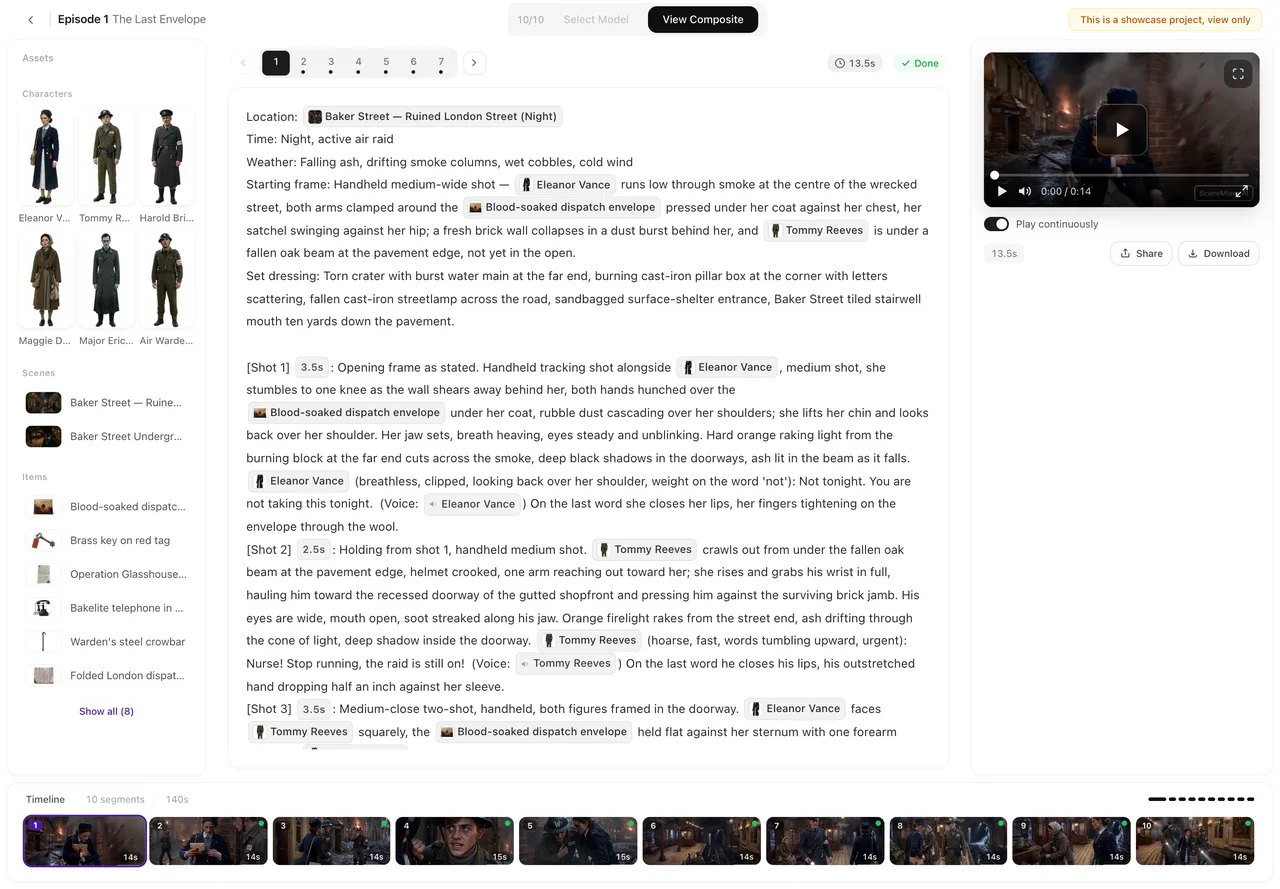
Editing the text
Hit edit, change what you want, save. Nothing is charged and no model is called — your edit is re-read locally and only the shots you actually touched are re-interpreted.
In a non-Chinese interface the structural labels appear as chips carrying their original values. Type around them freely; the chips keep the machine format intact underneath so the downstream rules still recognise the shot.
The shot durations in the text are real — they add up to the length of the segment. Cutting a line of dialogue without adjusting the seconds leaves a shot with dead air in it.
Regenerating one segment
The generate button on the segment is priced by that segment's duration, and the price is on the button before you press it. It does not touch any other segment.
Changing the script does not change a video you have already shot — the shot you have is the shot that was generated from the old text. Regenerate it to pick up the edit.
Versions
Every generation of a segment is kept. The history control on the segment lets you flip between them and put a different one back in the episode, which is also what the final composite will use.
This is why regenerating a segment is safe: a worse result never costs you the better one you already had. Regenerating the storyboard is a different button, and it is not safe — see below.
The one destructive button
Regenerating the storyboard for an episode replaces all of its segments — and the videos you have already shot for that episode go with them, along with their version history. Those credits are not refunded. The system refuses the request and asks you to confirm first, but there is no undo once you do.
Per-segment choices you made by hand, such as which state image a particular segment uses, are recalculated. Anything assigned at the episode level, and any episode you have already composited, is unaffected.
Use it when the breakdown itself is wrong. When one shot is wrong, edit that shot.
Two things worth knowing
You can insert a segment or delete one, and neither costs anything — no model is called. A new segment starts out empty, so write its shots before you generate it. A segment whose video is still generating cannot be deleted, which stops you paying for a shot and then throwing it away.
If you delete an episode or a project while a video is still generating, the ones that never started are refunded and the ones already running are charged — the model has already been called by then, and that call is already paid for upstream.
| Action | Cost | What it touches |
|---|---|---|
| Edit the storyboard text | Free | One segment's text |
| Regenerate one segment | That segment's duration | One segment |
| Switch to an earlier version | Free | Which version is active |
| Insert or delete a segment | Free | One segment |
| Regenerate the storyboard | One storyboard fee | Every segment in the episode |
FAQ
Does editing the script cost credits?
No. Editing is free and involves no model call. Only generating video is charged.
Will my edit change the video I already have?
No. Regenerate that segment to pick up the change; until then you keep the shot you had.
Can I get an old version back after regenerating?
Yes. Every generation is kept and you can switch back at any time.
What happens to my videos if I regenerate the storyboard?
They are deleted along with the segments, and the credits are not refunded. You are asked to confirm first. An episode you have already composited is not affected.
What happens to my manual choices if I regenerate the storyboard?
Per-segment picks are recalculated from the new text. Episode-level assignments survive.
Can I change the duration of a segment?
The shot seconds in the storyboard add up to the segment length, so editing them changes it. Keep the shots and the total consistent or you will get dead air.
Open an episode and try it
Editing is free, so there is nothing to lose by changing a line and seeing what moves.
Updated September 21, 2026
Pricing·Novel to Video·Guides·Samples·Support·Privacy·Terms·Legal·Contact·© 2026 SceneMixer