Answers · Basics
How to Make a Video?
Published November 18, 2026

How to make videos: the steps every method shares
The tools change; the order does not. A wedding film, a product demo, a tutorial and an animated short all pass through the same stages, and most videos that disappoint skipped one of them rather than lacked a better camera.
- Decide. Who is it for, what should they feel or do after watching, and how long can it be before it outstays its welcome?
- Write. A script for anything with words, or at least a list of beats in order.
- Plan the shots. For each beat, what does the viewer see? A short shot list saves hours later.
- Capture. Film, record the screen, gather images, or generate the shots.
- Edit. Put the shots in order, cut what drags, add sound, music and text.
- Export. One file, in the shape the destination wants: wide for a television screen, vertical for a phone feed.
How to create a video when you have no footage
Not every video needs a camera. Screen recordings carry tutorials, software walkthroughs and commentary. Still images with movement and a voice carry explainers and history pieces. And generated shots now carry stories, ads and scenes that would be expensive or impossible to film. The planning steps stay the same; only the capture step changes, which is why it is worth writing the script and shot list even when nothing will be filmed.
Beginners in video communities tend to ask the same question about their first attempts: what is wrong with the edit, not the camera. A post in r/videography puts it in six words:
Feedback on first real video edit?
Getting started is one of the largest subjects in AI video communities too, with about 11,000 posts in the community corpus tagged with starting out or getting going.
How to make a video on your phone
A phone is enough for most first videos if you treat it like a camera. Clean the lens, use the main camera rather than the wide or front one, and face a window instead of standing with it behind you. Tap to lock focus and exposure so the picture does not pump as you move. Record sound close to the speaker; a cheap clip-on microphone beats the best phone held across a room. Shoot each shot two or three times and a few seconds longer than you need, so the edit has room. And decide the shape first: hold the phone upright for a vertical feed, sideways for a wide screen.
How to create videos people finish watching
- Open on the point. The first seconds should say what the video is, not who made it.
- One idea per video. Two good ideas make two videos.
- Cut on change. When nothing new is happening, cut to the next shot.
- Sound first. Viewers forgive soft pictures before they forgive bad audio.
- Text for silent viewing. Many people watch on mute; captions or on-screen text carry the meaning.
Making a video in SceneMixer
SceneMixer is built for story videos: dramas, short films, series, ads and remakes. There are four ways in: Upload Script, AI Create, Ad Video and Remake a video are the four ways to start a SceneMixer project, and whichever tab you start from, you end up in the same project with a cast, sets and a storyboard. A script is read into characters and places, each drawn once as a reference, and every episode gets a storyboard of short segments that are generated one by one.
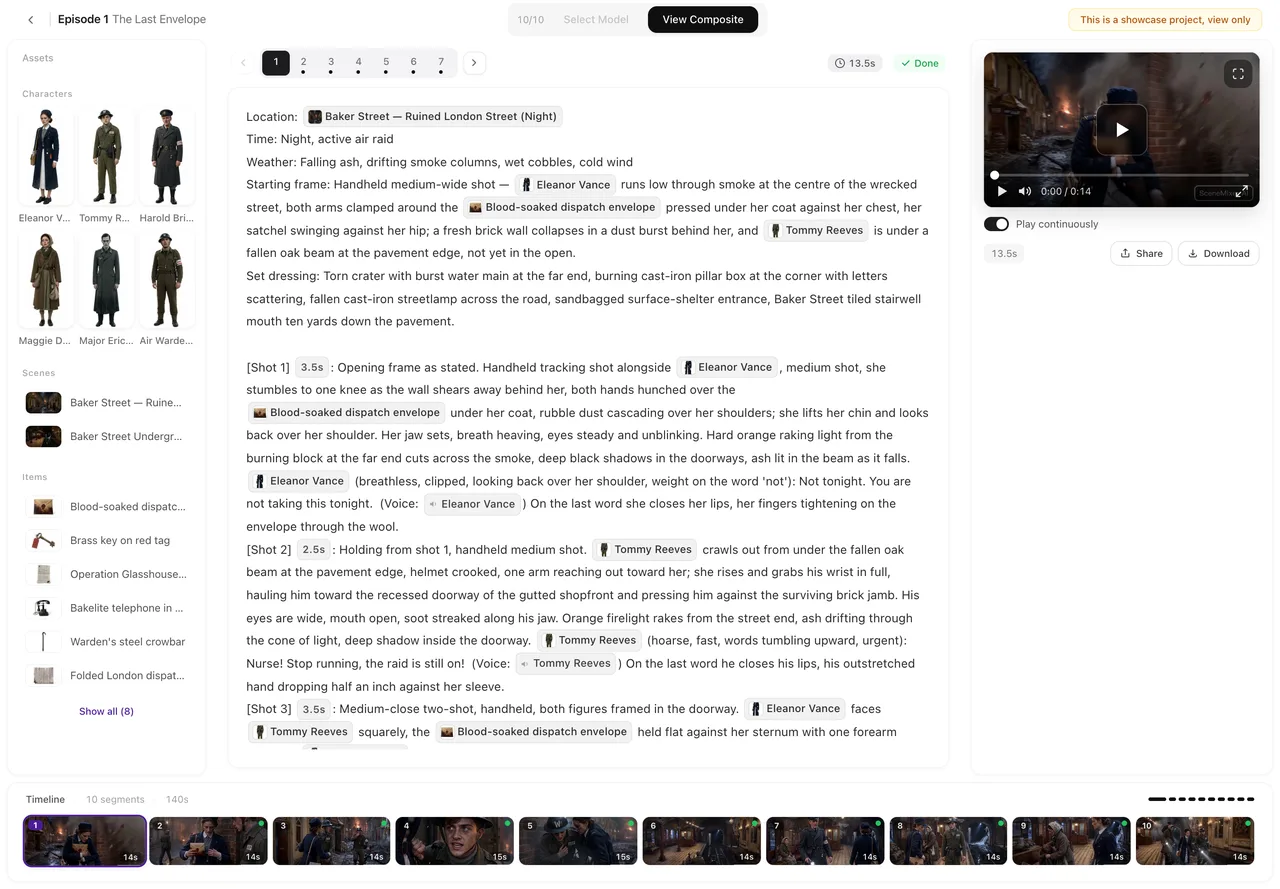
When every segment has a clip, Composite joins them into one episode, and the finished file can be downloaded at full quality or shared with a link. If you are new to it, a beginner's first short AI video walks through a first project at a small size.
Limitations of each way of making a video
- Filming needs light, sound and time on location; generating needs a clear written plan and a budget per second.
- SceneMixer is not a general editor for footage you filmed; it generates, trims and joins its own segments.
- Screen recordings and slides suit teaching, not drama; pick the method that fits the video.
- The getting-started figure counts tagged posts, not people, over a fixed window of public posts; see the collection method.
FAQ
Can you make videos without a camera?
Yes. Screen recordings, still images with a voice, and generated shots all make videos without filming. The script and shot list still come first.
How do you make videos look professional?
Good sound, steady framing, light from one clear direction, and cutting whenever nothing new happens. A tight edit does more than a new camera.
How do I make videos from a script?
List the shots each line of the script needs, capture them, and cut them in order. In SceneMixer, a pasted script is read into a cast and a storyboard, and each segment is generated from it.
How long should my first video be?
Short. Under a minute is enough to practise every step, from script to export, before you spend time on a long one.
Related: a first short AI video, creating a video and uploading it to YouTube, four ways to start a project, the five-step workflow, and the collection method behind the count.
Start with the script, not the camera
Paste a script or type one line, and SceneMixer plans the shots and generates them.
Sign up freePer-second video rates are on the pricing page with the same numbers.