Checking the Summary, and What “Re-parse” Means

A finished sample started from exactly this screen.
What the summary shows
Title (the project name, editable), Protagonist, Era, Adaptation Strategy — how the reading intends to turn the text into episodes — and the counts: characters, scenes, items, episodes. Below, the script content, and an outline for each episode with Show more to expand them.
What to check
The episode count. Ten episodes for a story you expected in three means the type or the split is not what you wanted. The protagonist. If the reading picked the wrong person, the roles in step 2 will be off. The era and strategy. A modern story read as period will dress and stage everything wrong. Everything else — a name, a description, a scene that should not exist — is a step-2 edit.
Fixed in step 2
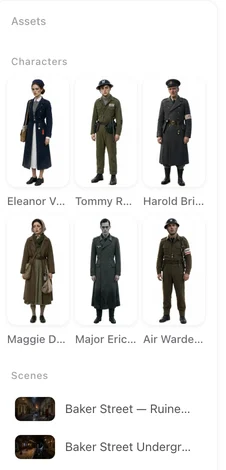
Names, roles, appearance, clothing, voices; a missing character or place (add it); a place the story does not need (delete it). None of that needs the script read again. Step 2.
Fixed with an episode Re-parse
Each episode’s storyboard is written from its outline when you press Parse Storyboard in step 3. If the storyboard is wrong, Re-parse writes it again; it costs the storyboard fee and discards that episode’s segments and videos. What re-parsing an episode costs you.
Needs a new project
The reading itself: where the episode breaks fall, the region the cast was moved to, the world the story lives in. Those are decided when the script is read, and step 1 does not read it again once it has a summary. Start a new project with the same script and the settings you want. The reading is priced by script length — 4 credits per 3,333 characters of English — and your free image allowance is counted per account, so images already made do not cost you the allowance twice. Region · Type.
When the reading failed
Step 1 shows Previous parsing failed with the reason, and the credits are back. Fix what the reason names — usually the script is too long, too short, or a link — and press Next again. The reading.
| Wrong | Fix where | Costs |
|---|---|---|
| A name, role, description, voice | Step 2, the card | Nothing (regenerating an image is priced) |
| A character or place missing / unwanted | Step 2, Add / delete | Nothing |
| One episode’s storyboard | Step 3, Re-parse | The storyboard fee; that episode’s videos are discarded |
| The episode split, the region, the type | A new project | The reading fee for the script length |
| The project name | Step 1 or the project card | Nothing |
FAQ
Can I read the script again in the same project?
No. Once step 1 has a summary it does not read the script again. Start a new project with the same script for a different split, region or type.
Do I lose my free images if I start a new project?
No. The free allowance is counted per account across projects.
A character has the wrong name.
Edit it in step 2. Every later shot follows the new name.
The episodes are cut in the wrong places.
That is the reading. Start a new project, choosing the type you want before pressing Next.
What does Re-parse in step 3 do?
It rewrites one episode's storyboard from its outline, discarding that episode's segments and videos.
Read the cast, then move on
Most of the summary is fixable later. The episode count is the one to get right now.
Updated September 27, 2026
Pricing·Novel to Video·Guides·Samples·Support·Privacy·Terms·Legal·Contact·© 2026 SceneMixer