While the Script Is Being Read

A finished sample is what a reading produces once every later step is done; step 2 is where you will land first.
What starts it
In step 1, once the project name, visual style, scene style, costume style, aspect ratio and type are set, Next saves the settings and starts the reading. Before that the button waits for the three style choices. If Next is greyed.
The stages
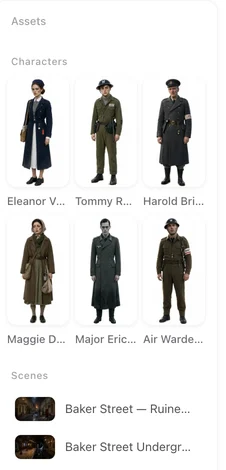
The panel is titled Reading the script and shows the stage it is on: Finding characters, Finding scenes, Finding props, Splitting episodes, Shaping visual style, and for a long script Preparing episodes. Under it, short hints describe what is being worked out — the story core, the characters, the pacing. The names of characters and places appear as they are found.
How long
Minutes for a typical episode-length script; longer for a long one, roughly in proportion. A long script keeps preparing its later episodes in the background after you have moved on, so you can start on episode 1 while episode 30 is still being readied; an episode that is not ready yet says so when you try to storyboard it.
Leaving the page
You can. The panel says it: you will move on automatically when it is done; feel free to browse elsewhere — progress stays in the corner. Close the panel and a small pill remains; open another project, read a guide, or close the tab. The reading finishes without you, and the project opens at step 2 next time.
What it costs
The reading is priced by the length of the script: 4 credits per 3,333 characters of English text, shown on the button before you press it. It is charged when the reading completes. Character, scene and prop images are separate and come in step 2, with 15 free per account. Where credits go.
If it fails
The panel says Parsing failed. Credits have been refunded. Please try again. Nothing is kept from the failed attempt and nothing is owed. Press Next again. If the script itself is the problem — too long for a single reading, too short to be a story, or a link instead of text — you are told before the reading starts. Uploading a script.
What you get
The panel changes to Script Parsed with a summary: title, protagonist, era, adaptation strategy, the counts of characters, scenes, props and episodes, and an outline per episode. Read it, then Next to step 2 where the cast gets its images. Checking the summary.
| Stage | What is being worked out |
|---|---|
| Finding characters | Who is in the story, what each looks like |
| Finding scenes | Where it happens, what each place looks like |
| Finding props | The objects the story depends on |
| Splitting episodes | Where the episode breaks fall, by type |
| Shaping visual style | How the whole piece will look |
| Preparing episodes | Long scripts only: readying later episodes in the background |
FAQ
Can I leave while the script is being read?
Yes. Progress stays in a pill in the corner and the project opens at step 2 when it is done, even if you closed the tab.
How long does the reading take?
Minutes for a typical script, longer in proportion for a long one.
What happens if it fails?
The credits are refunded and you press Next again. Nothing from the failed attempt is kept.
Why does an episode say it is still being prepared?
A long script keeps readying its later episodes in the background. Wait a moment and try again.
Is the reading charged before it finishes?
It is charged when it completes. A failed reading is refunded.
Press Next and go make coffee
The reading finishes without you. Step 2 is waiting when you get back.
Updated September 26, 2026
Pricing·Novel to Video·Guides·Samples·Support·Privacy·Terms·Legal·Contact·© 2026 SceneMixer