Alternatives
A Topview Alternative for AI Drama Series
Updated October 13, 2026

The same idea, two different workshops
Topview describes Drama Studio as planning a drama with an agent, reviewing story assets in a workbench, creating storyboards and moving approved beats into episode production1. SceneMixer runs the same arc as five steps in one project — read the script, draw the reference art, write a storyboard per episode, render each segment, composite the episode — and every step can be edited before the next one starts. If you have used one, the other will feel familiar; the table below is where they part ways.
At a glance
| Topview | SceneMixer | |
|---|---|---|
| What you can start from | “A one-line story idea, a short plot outline, a full drama script, a novel chapter, or a serialized story concept”1 | One sentence (AI Create), a pasted script, or an uploaded script or novel (.txt, .docx, .md) |
| Planning | An agent plans the drama; story assets are reviewed in a workbench; Single Episode and Series modes1 | One read returns cast, locations, props and an episode outline; Type is Short Drama, TV Series or Film |
| Output format | Recommends vertical 9:16 as “usually the best format” for short drama platforms1 | 16:9 by default, 9:16 available, set per project |
| Voice and on-screen text | Generates voiceover and captions1 | Lines are performed in the video itself; no automatic subtitle track (short on-screen text can be written into a shot, platform captions are added after export) |
| Dialogue languages | Not stated on the Drama Studio page1 | 15 languages, with Cantonese as a 16th dialogue option |
| Also on the same plan | AI avatars (5,000+ public avatars), product avatars, voice cloning, TikTok Ad Library browsing, API and MCP access2 | Ad video and video remake modes alongside drama projects |
| Price to start | Monthly: Basic $8 for 50 credits, Plus $24 for 100, Business $58 for 250, Ultra $112 for 500 (shown as time-limited discounts on list prices)2 | Credit packs from $1.49; Pro plan $7.99/month with 700 credits. New accounts get 50 free credits and 15 free reference images. |
| Video price | Its own comparison table (dated August 7, 2026) lists $0.12 per second of 720P video on the Ultra Annual plan ($599.9 billed annually)2 | From about $0.06 per second at 480P, $0.12 at 720P and $0.24 at 1080P (lowest tier at each resolution, at the lowest credit price). |
| Unused credits | On a monthly plan “credits reset every month” and don't roll over; top-up credits are valid for 24 months2 | Plan credits and bought credits sit in one balance and do not expire at the end of the month. |
| Unlimited generation | Plans include credit-free “Unlimited” windows on listed models and resolutions2 | None; every generation is priced in credits |
Models differ between platforms, so compare a test clip of your own scene, not only the price per second.
What a fixed cast looks like


Stay with Topview if…
- You also make product ads, avatar or UGC-style videos. Topview puts avatars, product avatars, voice cloning and TikTok Ad Library browsing on the same plan as Drama Studio2.
- You generate at volume and its unlimited windows on annual plans cover the models and resolutions you use2.
- You need API or MCP access, which its plans list2.
- You want captions generated for you as part of the drama workflow1.
SceneMixer fits if…
- Your cast should speak a particular language. Pick it in step 1 and the lines are performed in that language as the shot renders — no dubbing pass. Native dialogue vs dubbing.
- You are adapting one story for a market. The target region adapts names, casting and scenery for Western, East Asian, Southeast Asian or Latin American audiences. Relocate a story by region.
- You need landscape as well as vertical. 16:9 is the default and 9:16 is one setting away. Vertical and landscape projects.
- You would rather pay as you go. Packs start at $1.49 and plan credits stay in your balance. Do credits expire?
- You want to try it before paying. New accounts get 50 free credits and 15 free reference images.
Where Topview lands in SceneMixer
| In Topview | Closest step in SceneMixer |
|---|---|
| Agent planning | AI Create (from one sentence) or the script read, which returns the cast, locations, props and an episode outline you edit. Upload a script and read it |
| Workbench story assets | Step 2: characters, scenes and props, each with a reference sheet. Regenerate or replace one sheet |
| Storyboards | A storyboard per episode, shot by shot, with editable text and versions. How to write one shot |
| Episode production | Video per segment; regenerate one segment without re-billing the episode; composite the episode into one file |
| Voiceover and captions | Dialogue performed in the video; captions added after export. Lines, voice-over and on-screen text |
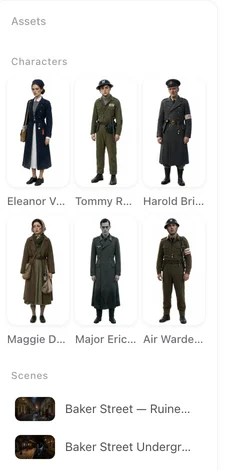
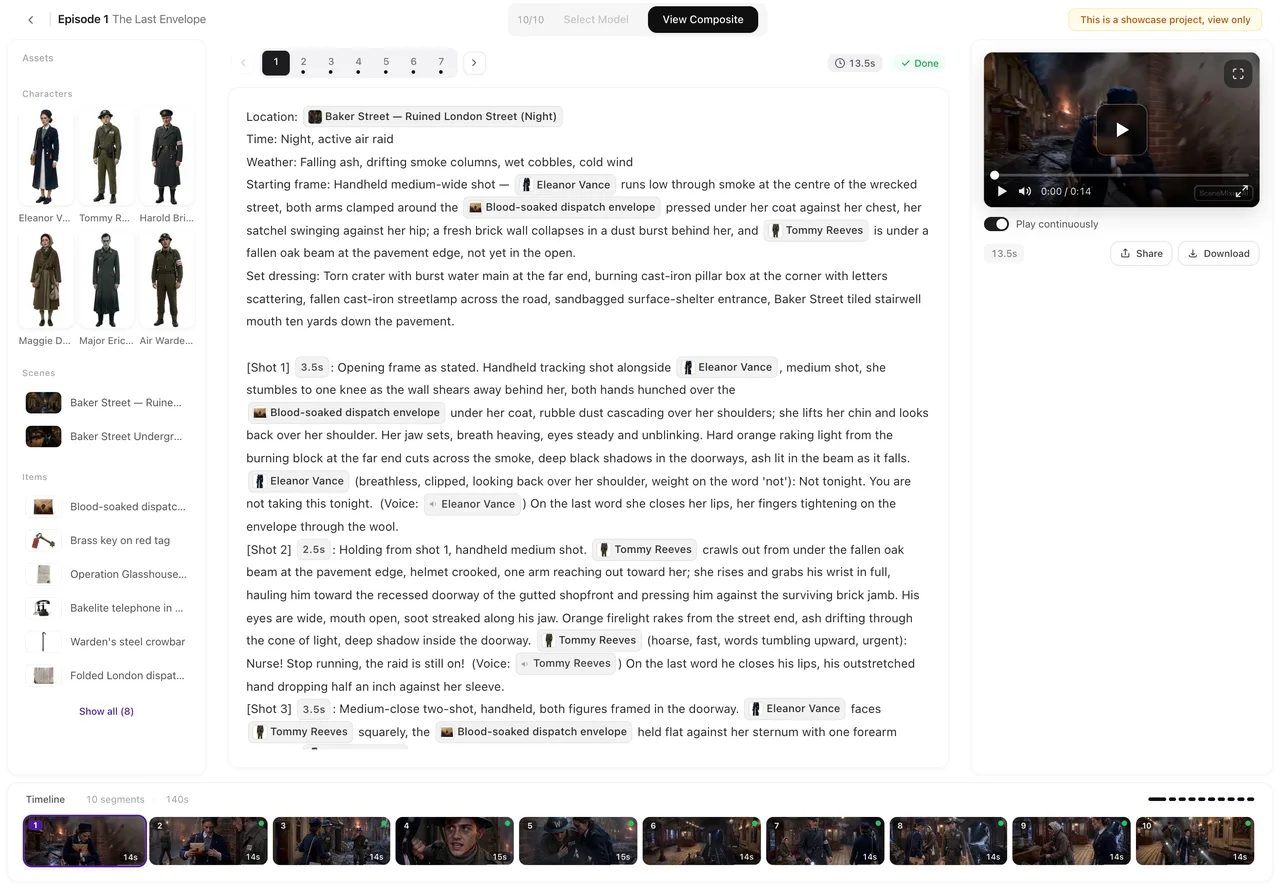
Moving a story over
- Copy the script or outline out of Drama Studio and paste or upload it.
- Set the project in step 1: Type (Short Drama, TV Series or Film), aspect ratio, dialogue language and target region.
- Reuse character art you own. On a paid plan, upload it in place of a generated sheet; otherwise generate sheets — the first 15 on an account are free.
- Draft cheaply, finish the keepers. Generate at the lowest tier, then regenerate only the segments that will be seen most at a higher resolution. Draft at 480P, finish at 1080P.
Frequently asked questions
Is SceneMixer a Topview alternative?
For script-to-episode drama work, yes: both plan characters, episodes and storyboards before generating video. SceneMixer differs in on-screen dialogue in 15 languages, market relocation, landscape as well as vertical output, and pay-as-you-go credits. For avatar videos, product ads or unlimited generation on an annual plan, Topview covers more.
How much does Topview cost?
On October 13, 2026, Topview's pricing page listed monthly plans at Basic $8 (50 credits), Plus $24 (100), Business $58 (250) and Ultra $112 (500), shown as time-limited discounts, and Ultra Annual at $599.9 a year. Check topview.ai/pricing for current prices.
Do Topview credits roll over?
Its pricing FAQ says that on a monthly plan credits reset every month and unused credits don't roll over, while top-up credits are valid for 24 months. In SceneMixer, plan credits and bought credits sit in one balance and do not expire at the end of the month.
Which languages can SceneMixer characters speak?
Any of 15 languages, with Cantonese as a 16th dialogue option. The language is set per project, and the video performs the lines in that language as it renders.
Does SceneMixer have an unlimited plan?
No. Every generation is priced in credits, from a single segment upward, so you pay for what you generate and nothing expires at the end of the month.
Does SceneMixer add captions?
Not as an automatic subtitle track. Short on-screen text can be written into a shot, and platform captions are added after you export the episode.
Can I bring my Topview project over?
Bring the script or outline as text and, on a paid plan, upload character images you have the rights to in place of generated sheets. Episodes, storyboards and video are then generated in SceneMixer.
Sources and corrections
- AI Drama Generator for Short & Micro Dramas (topview.ai/drama-studio) — Drama Studio inputs, workflow and output format
- Pricing (topview.ai/pricing) — plans, credits, credit rules, unlimited windows and the tools included on each plan
Facts about Topview come only from the pages listed above, as checked on October 13, 2026. Prices and plans change often, so check Topview's site before you buy. Topview is a trademark of its owner and is named here only to identify the product; SceneMixer is not affiliated with it. Spotted something out of date? Email support@scenemixer.com and we will correct it.
Same story, your language, your format
Start from a script, a novel or one sentence.
Start a project freeCredit packages from $1.49 · Pro $7.99/mo · No credit card to start
Pricing·Novel to Video·Guides·Samples·Support·Privacy·Terms·Legal·Contact·Affiliate program·© 2026 SceneMixer