Dialogue Lines: Delivery Notes, Voice-Over, Captions and the Voice Tag

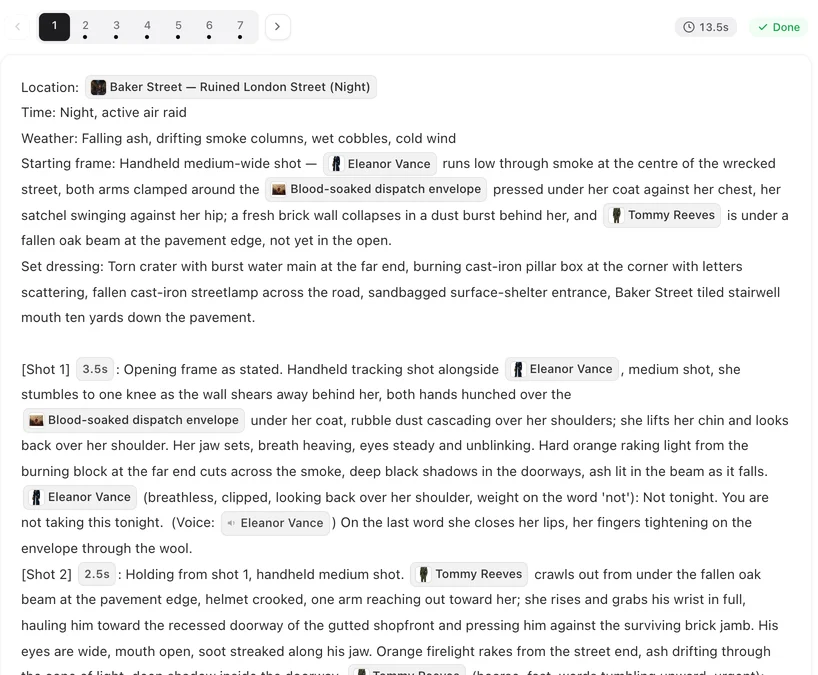
Open a finished episode and play a segment with dialogue, then read its storyboard. Every line you hear is written this way.
The shape of a line
@Mara (low, steady, a beat before ‘no’): Read it before you say no. (voice: 🔊Mara)
Four parts. The speaker’s chip. The delivery note in brackets. The words after the colon. The voice chip. Write the line inside the shot where it is spoken, at the moment it is spoken; what happens after it — she closes her lips and looks away — follows in the same shot.
The delivery note
How it is said, in a few words, physical rather than emotional: low, steady; through her teeth; fast, out of breath; calling from the stairs; stress on ‘never’. One note per line. A note that describes a whole mood — heartbroken — gives less to work with than one that describes the voice.
The voice chip
Every line needs one. Type @ after the words, open the Voice tab and pick the speaker. The chip reads (voice: 🔊Mara) and says the line is spoken in Mara’s voice — the one chosen for her in step 2. A line without a chip may be spoken in some other voice; the editor warns you after saving. How a character gets a voice.
The Cast chip and the Voice chip are different things. The Cast chip puts her in the picture; the Voice chip gives the line her voice. A line usually needs both: her in the shot, and her voice on the words.
Voice-over and off-screen lines
When the speaker is not in the picture — a narrator, a phone call, a shout from another room — start the delivery note with (voice-over) or (off-screen), keep the voice chip, and do not put the speaker’s Cast chip in the picture text. The line is heard over the shot; nobody on screen mouths it. Who is in frame.
The listener
Whoever is in the shot and not speaking gets lips closed, no lip movement. Without it, a listener can end up mouthing the other person’s words.
On-screen captions
Text the viewer should read on the picture — Three years later, a place name, a date — is not dialogue. Write it as a caption in the shot: On-screen caption reads “Three years later”. Give that shot a couple of seconds so the text can be read. Keep captions short.
Length and language
A line takes as long to say as it takes to say: about three words a second in English, so a twelve-word line needs a four-second shot. Shot seconds. Lines are spoken in the project’s dialogue language, chosen when the project was set up; write them in that language. Dialogue language.
| You want | Write |
|---|---|
| A line said on camera | @Mara (low, steady): the words. (voice: 🔊Mara) |
| A line from off camera | @Jules (off-screen, calling): the words. (voice: 🔊Jules) — no Cast chip for him in the picture |
| A narrator | @Narrator (voice-over): the words. (voice: 🔊Narrator) |
| Text on the picture | On-screen caption reads “Three years later”. |
| The other person in the shot | @Jules lips closed, no lip movement |
| Nobody speaks | No dialogue |
FAQ
Is the dialogue really spoken in the video?
Yes. Each line is generated with the picture, in the voice chosen for that character, and the speaker's lips move with the words.
What happens if I forget the voice chip?
The editor warns you after saving that the line's audio may drift. Add the chip from the Voice tab.
How do I write a phone call?
The person on the phone: their line with (off-screen) in the note and their voice chip, no Cast chip in the picture. The person we see: normal line.
Can I put subtitles or a title card on the screen?
Write it as an on-screen caption in the shot. Keep it short and give the shot a couple of seconds.
Can I write the line in my own language?
Write it in the project's dialogue language. That is what the voice will speak.
Write a line and hear it
Open a segment, give a character one line in this shape, save, and regenerate the segment.
Updated September 26, 2026
Pricing·Novel to Video·Guides·Samples·Support·Privacy·Terms·Legal·Contact·© 2026 SceneMixer