How to make AI video look more realistic

Try it: write one character as a man in his fifties, a crooked front tooth, grey stubble, reading glasses pushed up into thinning hair and one shot as late afternoon sun through the blinds, striping his desk, then compare with a generic description.
Start with a live-action look
| Visual Style | What it looks like |
|---|---|
| Digital HD | Crisp and true-to-life, like today's streaming dramas |
| Shot on Film | Film grain, warm colour, soft blacks |
| Soft Glow | Hazy highlights, pale and dreamy |
| Black & White Film | Rich blacks and greys, like a classic film |

Visual Style: Digital HD
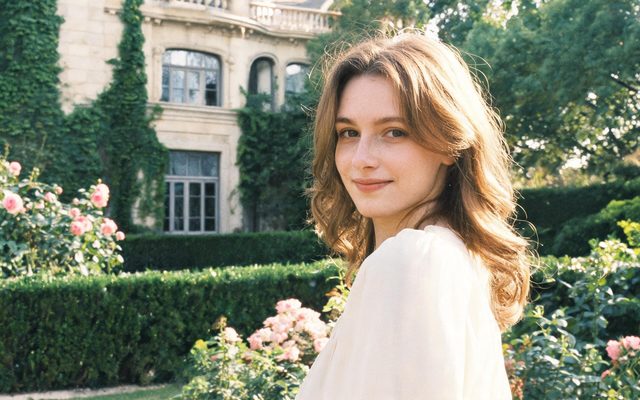
Visual Style: Shot on Film
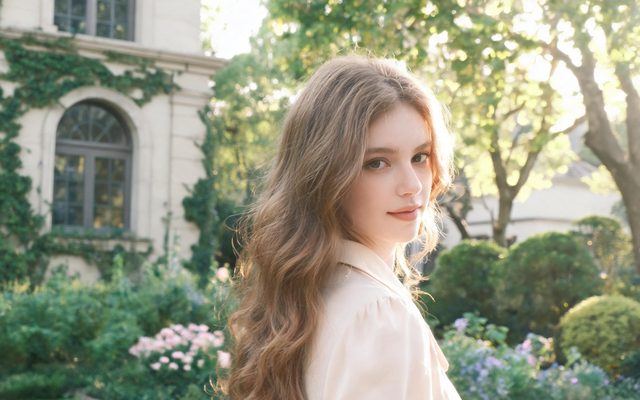
Visual Style: Soft Glow
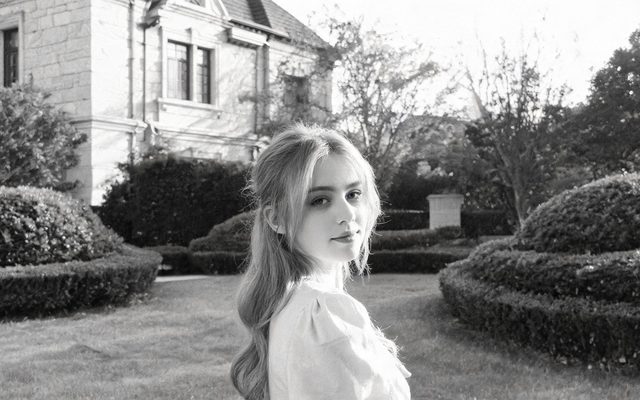
Visual Style: Black & White Film
Realistic 3D and Game Engine Realism are computer graphics, not live action. The look is fixed once you continue past Step 1. Choosing the visual style.
Faces that belong to someone
A generic description gives the generic AI face: smooth skin, symmetrical, too pretty. Real faces have one or two things wrong with them: a crooked tooth, a broken nose, freckles, uneven eyebrows, a scar. Write those, plus age and build, into the character sheet. Do not aim for a famous actor: a face too close to a real person is refused. Describe a face · Real faces.
Light with a source
Unreal light comes from nowhere. In each shot, say where it comes from: a desk lamp, the fridge door open, headlights across the ceiling, overcast noon. Time of day and weather come from the script for the scene. Sheets are evenly lit on purpose, so the mood belongs in the shot. Why sheets are plain.
Write the cause, not the effect
“A dramatic spill” is a picture the model has to invent; the train brakes and her coffee tips into her lap is physics it can follow. Small, physical, ordinary actions read as real. Describe the cause · Say what is there.
Fewer people, one action
Hands, crowds and five people talking at once are where AI video gives itself away. Two or three named people per shot, one action each; the rest of the room goes in the background line. Background people · Group scenes.
Tier and resolution
Higher tiers render finer detail and steadier faces. A cheap way to work: draft every segment at 480P, fix what is wrong, regenerate the keepers at a higher tier, then raise the best clips one step at a time with Enhance, up to 2K. Draft at 480P, finish at 1080P · Enhance a clip · Which model.
Make it in SceneMixer, start to finish
- Script: paste your own on Upload Script, or write the brief above in AI Create and let it draft the episodes.
- Step 1: Type Film; Scene Style Street Life, Nordic Minimal; Costume Style Smart Casual, Soft Everyday; Visual Style Digital HD, Shot on Film; Target Region; dialogue language; 16:9 Landscape. Then read the script.
- Step 2: faces with specific features written into every character; locations described with their layout and light source; the objects that matter as props. The first 15 setup images on an account are free.
- Storyboard: generate episode 1 first (free on your first drama) and read it before you render anything. One place per segment.
- Video: render on the default tier at 10 credits a second, fix single shots instead of whole episodes, then put the episode together and post.
| It looks fake because | Fix |
|---|---|
| Faces are smooth and generic | Write age, build and one or two imperfections |
| The light is flat or everywhere | Name a light source in the shot |
| Movement looks floaty | Write the physical cause of the action |
| Hands and crowds go wrong | Fewer people per shot, one action each |
| Detail is soft | Higher tier for the keepers, then Enhance |
| Text in the frame is garbled | Keep signs and screens out; add text in your editor |
FAQ
How do I make AI video look more realistic?
Choose a live-action look, write specific imperfect faces, give the light a source, write causes, and keep shots to two or three people.
Do words like 8K or hyperrealistic help?
No. They add nothing the model can place in the frame and push the useful words down.
Which visual style is the most realistic?
Digital HD for modern; Shot on Film for a warmer cinema look.
Why do faces look like AI?
Generic descriptions produce average faces; write the details that make someone a person.
Can I make it look like a real actor?
No. Faces close to real people are refused by the face check.
Does a higher tier make it more realistic?
Higher tiers give finer detail; draft cheap, regenerate the keepers higher, then Enhance.
Why does text in the frame look wrong?
Generated video does not spell reliably; add text afterwards.
Updated October 31, 2026