Reusing a Character, Scene or Voice Across Projects

Why the same sheet gives the same face is what makes reuse worth doing.
Where the picker is
Step 2: open a character, scene or item, and the edit dialog offers Upload & Replace and Pick from Asset Library. The editor: Add asset to episode (the plus in the assets panel) also reaches the library, adding the entry to this episode only. Adding to an episode.
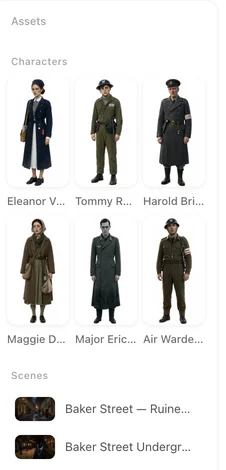
What it lists
Entries of the same type as the card you opened, from every project you own, that have a finished sheet; entries with no image yet do not appear. Each shows its name and project; the search box filters by either. Showing n / total at the bottom loads more.
What gets copied
The sheet, the name and the description. For a character, Also copy voice brings the voice as well, so the lines sound the same in both dramas. The copy is a full entry in this project: rename it, rewrite its description, regenerate its sheet — the original project is not affected, and changes there do not reach here. There is no live link.
Style
A sheet drawn in one visual style stays in that style when copied. Reuse within the same style, or regenerate the copy in this project’s style from its description: the face holds because the description does. Regenerating.
Voices without a character
Pick from library on the voice row is a different list: the preset voice library with previews, not your projects. To reuse a voice you uploaded, copy the character that has it, with Also copy voice. Character voices.
Uploads
Images you uploaded to the library appear in the same picker under their own name. Uploading is a paid-plan perk; picking from the library is not. The asset library.
| You want | Do | Copies |
|---|---|---|
| The same lead in a new drama | Step 2, open the character, Pick from Asset Library, Also copy voice | Sheet, description, voice |
| The same room | Step 2, open the scene, Pick from Asset Library | Sheet, description |
| A prop from another drama | Step 2, open the item, Pick from Asset Library | Sheet, description |
| A guest in one episode only | Editor, Add asset to episode | Into this episode |
FAQ
Can I use a character from another project?
Yes. In step 2, open the card and Pick from Asset Library; every finished character from your projects is listed.
Does the voice come too?
If you tick Also copy voice.
If I edit the copy, does the original change?
No. After the copy they are separate entries.
Why is my character missing from the list?
It has no finished sheet yet, or it is a different type from the card you opened.
Is reuse free?
Picking from the library is free. Regenerating the copied sheet is priced as any sheet.
Updated September 26, 2026
Pricing·Novel to Video·Guides·Samples·Support·Privacy·Terms·Legal·Contact·© 2026 SceneMixer