Using SceneMixer for Previs and Animatics Before a Live-Action Shoot

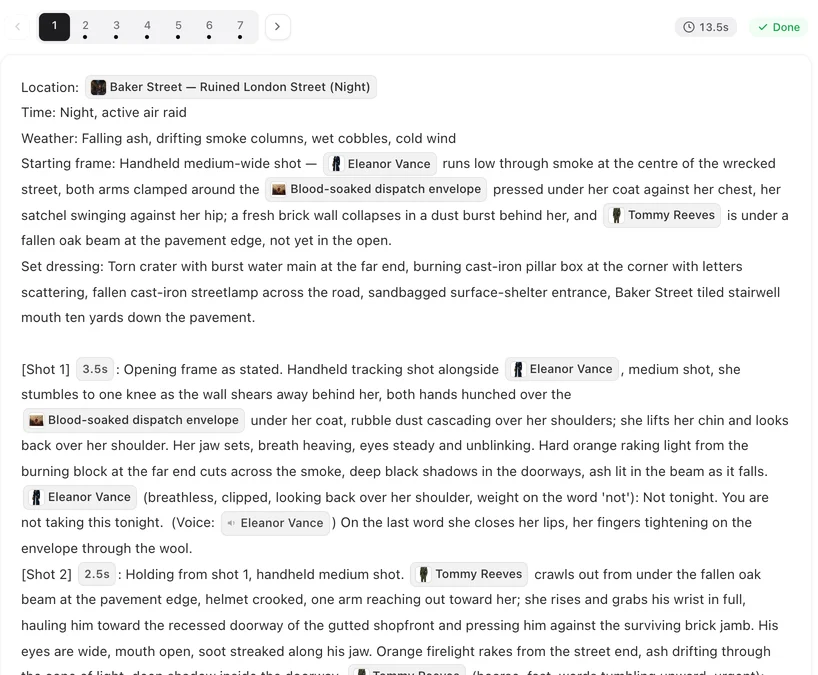
Paste one scene of your shooting script, generate its storyboard, and copy the first segment into your shot-list template.
What you get
- A shot list: each segment’s storyboard numbers its shots and gives framing, action, dialogue and seconds.
- Moving sketches: a clip per segment, with the lines spoken.
- A rough cut: segments joined into one file per episode.
Pacing and timing
The storyboard gives every shot a length in seconds and makes room for each line to be said. Reading the totals tells you early whether a scene runs long. Change the seconds in the text before generating, for free. Shot seconds and timing.
Cheap drafts
For previs, a low tier is usually enough: it is cheaper per second and still shows blocking, framing and rhythm. Pick the aspect ratio of the real shoot in step 1. Draft at a low tier · Aspect ratio.
Sharing with a client or a crew
Share a segment or a joined episode with a link; viewers do not need an account. Copy the storyboard text into your own documents for the shooting script or the call sheet. Share links · Copying storyboard text.
Where it stops
The clips are generated, not photographed: lenses, exact distances and performances are suggestions. Faces come from character sheets, not your cast, unless you upload their photos with their permission. Use the previs to agree on story, rhythm and coverage, then plan the real camera on set.
| Need | In SceneMixer |
|---|---|
| Shot list | The storyboard, copied out |
| Pacing check | Shot seconds and the segment totals |
| Moving rough cut | Segments joined into one episode file |
| Client review | Share links, no account needed |
| Low cost | Draft on a low tier |
FAQ
Can I use photos of my real actors?
Only with their permission, and uploading needs a paid plan.
Will the camera moves match what we shoot?
Not exactly. Treat them as intent; plan the real lenses on set.
Can I export the storyboard?
Copy the text out of the editor; it pastes as plain text into any document.
Is it suitable for a commercial board?
Yes, for pacing and pitching. For product ads made start to finish here, see the ad guides.
Updated October 2, 2026
Pricing·Novel to Video·Guides·Samples·Support·Privacy·Terms·Legal·Contact·© 2026 SceneMixer