Copying and Pasting Storyboard Text Without Losing the Character, Scene and Prop Links

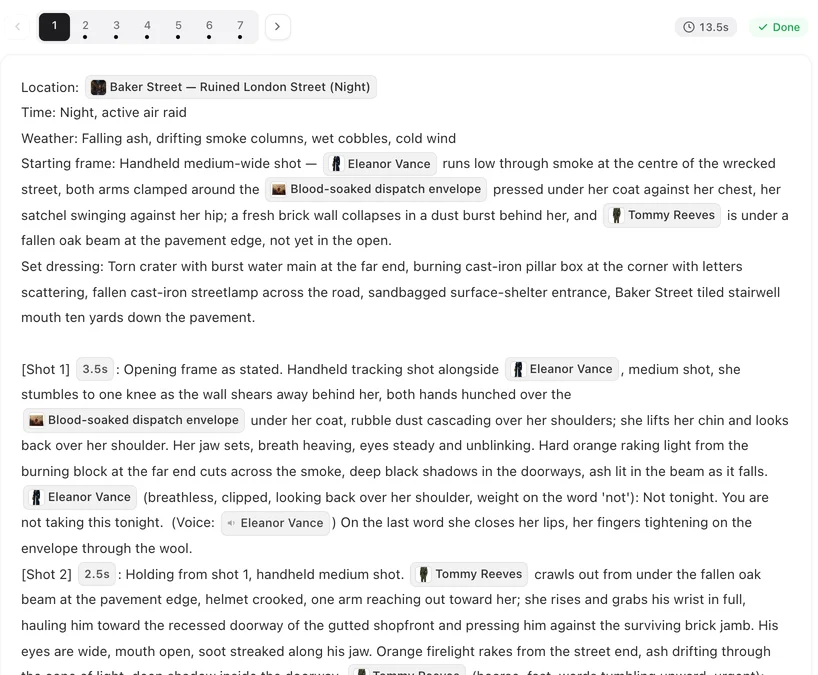
Copy one shot from segment 1, paste it into segment 2 in edit mode, and look: the names arrive as pills.
Inside the editor: pills come back
Select text in a segment’s storyboard or in the edit box and copy it. Paste it into any segment’s edit box in the same project and the character, scene and prop pills come back, along with shot markers and voice tags. This is the safe way to move a shot from one segment to another, or to duplicate a line of dialogue.
Text from outside the editor
Copy the storyboard into a document, rewrite it there, and paste it back: the pills are gone and the names are plain words. Save anyway. If the editor can match names to entries in the project, it links them again and shows the message about linked names. Read the shots after saving: pills mean linked, plain words mean not. Rewritten sentences are the ones most likely to stay plain; link those names with @.
How to check a segment
- Open it with Edit: every character on screen in a shot should be a pill.
- An amber note above the storyboard after saving can list names written without @.
- Before generating, the editor asks if some shots have no linked characters.
The amber notes · Shots with no linked characters.
Linking a name by hand
Delete the plain name, type @ in its place, and pick the entry from the menu. Scenes go on the Location line, props on the Props line and in the shot where they are handled. The @ menu.
Copying out
Text copied out of the editor into a document is readable plain text, which is handy for review or for sharing a storyboard with someone. Keep a copy of a segment before big edits; the editor also keeps a text history you can restore. Text history.
| You paste | Into | Links |
|---|---|---|
| Text copied in the editor | An edit box in the same project | Come back as pills |
| Text from a document, unchanged | An edit box | Usually linked again on save; check the message |
| Text you rewrote outside | An edit box | May stay plain; link with @ |
FAQ
Why did my pasted names turn into plain text?
The text came from outside the editor. Save, then look for the linked-names message; link any plain names with @.
Can I copy shots between projects?
The text pastes, but pills only link to entries that exist in the project you paste into.
Does linking names cost anything?
No. Editing and saving text is free.
I pasted a whole segment and the video had no faces. What happened?
The names were plain text, so no sheets were used. Link them with @ and regenerate the segment.
Copy inside the editor
Move shots with copy and paste in the edit box, and the links come with them.
Updated October 2, 2026
Pricing·Novel to Video·Guides·Samples·Support·Privacy·Terms·Legal·Contact·© 2026 SceneMixer