Alternatives
An Adobe Firefly Alternative for AI Drama Series
Updated November 2, 2026

A workspace inside Adobe, or a series pipeline
Adobe sizes Firefly plans in generative credits a month, with a count of five-second videos on each paid tier and a free tier of daily generations1. SceneMixer starts from the story: the outline decides the episodes, and every segment is rendered against the same character sheets.
At a glance
| Adobe Firefly | SceneMixer | |
|---|---|---|
| Built around | A generative AI workspace for images, video and audio, with partner models beside the Adobe Firefly Video Model12 | One series project: script → cast → episode outline → storyboard per episode → video per segment → one file per episode |
| Video | A text prompt or an image (first frame optional) to a clip; refine, trim, reorder, swap models mid-edit, regenerate or extend any segment in its editor2 | Upload or paste a script or novel (.txt, .docx, .md), or draft one from a single sentence with AI Create |
| Partner models | Google Veo 3.1 (and Veo 3.1 Fast), Luma AI Ray3, Kling 3.0 and Runway listed beside Adobe's own2 | Tiers by resolution and price per second; the model behind each tier is managed for you |
| Plans | Standard 2,000 generative credits a month, Pro 4,000, Pro Plus 10,000, Premium 50,000; shown in local currency (A$16.49, A$32.98, A$79.99 and A$329.99 a month incl. GST when we checked)1 | Credit packs from $1.49; Pro plan $7.99/month with 700 credits. New accounts get 50 free credits and 15 free reference images. |
| Videos per plan | Up to 20, 40 and 100 five-second videos a month on the first three plans; unlimited access to the Firefly Video Model on Premium1 | From about $0.06 per second at 480P, $0.12 at 720P and $0.24 at 1080P (lowest tier at each resolution, at the lowest credit price). |
| Free | Free daily generations across image, video and audio, with models such as Nano Banana and Luma Ray3.14; limits refresh every day1 | 50 free credits and 15 free reference images for new accounts |
| Commercial use | “Videos generated with the Adobe Firefly model are safe for commercial use”, as Adobe's video page puts it2 | You own the results, including commercial use, on free allowances too; uploads and outputs are not used to train models unless you agree. |
Models differ between platforms, so compare a test clip of your own scene, not only the price per second.
What a fixed cast looks like


Stay with Adobe Firefly if…
- You already work in Adobe apps — its plans list Photoshop on web and mobile, Adobe Express Premium and Adobe Fonts1.
- You want Adobe's own video model with its statement on commercial use, next to partner models in one workspace2.
- You want to compare models on one prompt — Adobe says you can swap models inside a workflow or try one prompt across models2.
- You also need audio tools — speech, sound effects, music and audio and video translation are listed on its plans1.
SceneMixer fits if…
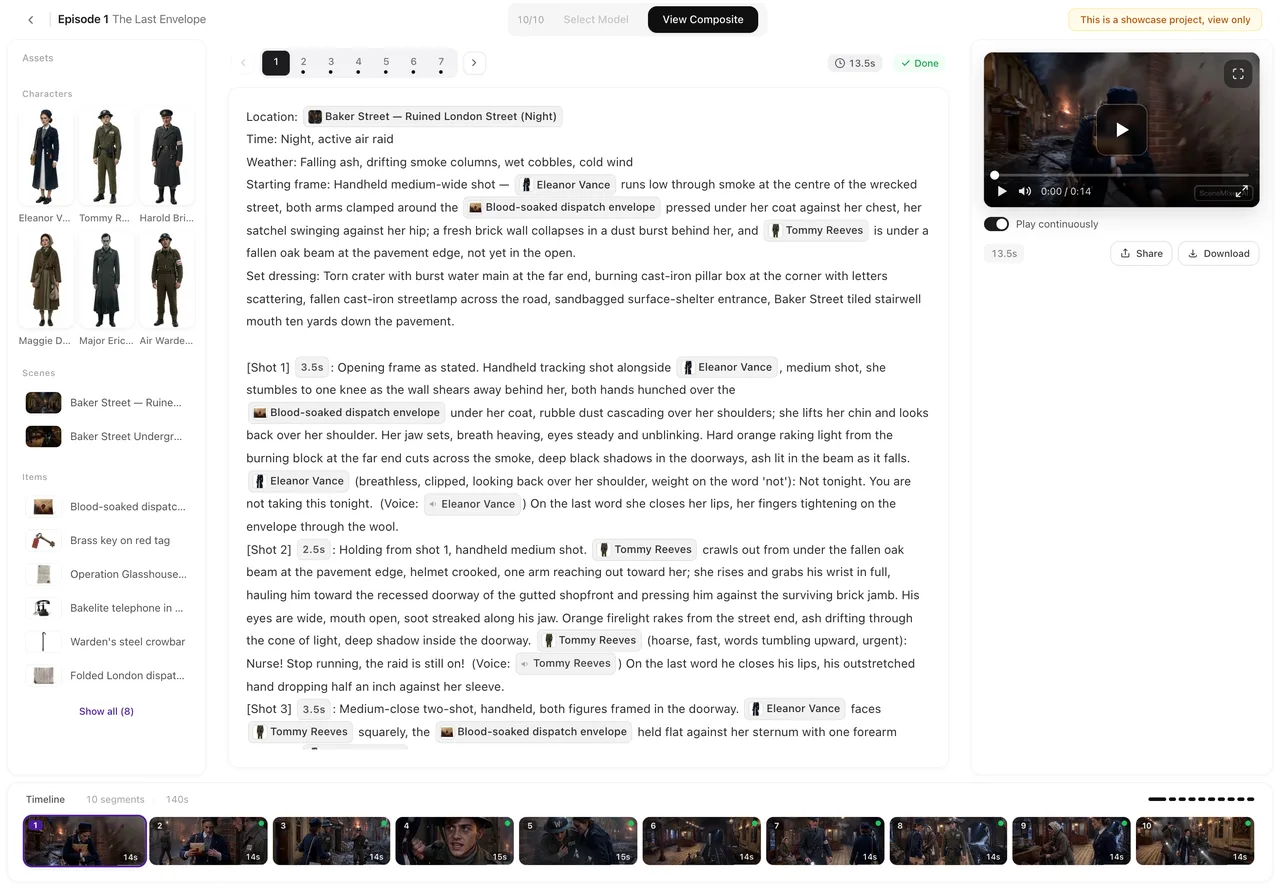
- You are telling a story in episodes. One read of the script returns the cast, locations, props and an episode-by-episode outline with an end-of-episode hook; each episode gets its own storyboard. Upload a script and read it.
- The same faces must hold from shot to shot. Reference sheets ride along with every segment, linked by id rather than by name. How consistency works.
- Your cast should speak a particular language. Pick it in step 1 and the lines are performed in that language as the shot renders — no dubbing pass. Native dialogue vs dubbing.
- You are adapting one story for a market. The target region adapts names, casting and scenery for Western, East Asian, Southeast Asian or Latin American audiences. Relocate a story by region.
- You would rather pay as you go. Packs start at $1.49 and plan credits stay in your balance. Do credits expire?
Where Adobe Firefly lands in SceneMixer
| In Adobe Firefly | Closest step in SceneMixer |
|---|---|
| Generate video from a prompt or image | A storyboard segment, rendered on a video tier. How to write one shot |
| Assembler and the video editor | The episode editor, with one card per segment on the timeline. The episode editor, a tour |
| Generate sound effects and music | A built-in score written per episode. Background music |
| Extend any segment | The next segment opens where the last one ended. Shot-to-shot continuity |
Moving a story over
- Bring the script — paste it or upload .txt, .docx or .md; prompts you wrote for single clips can become shots in the storyboard.
- Set the project in step 1: Type (Short Drama, TV Series or Film), aspect ratio, dialogue language and target region.
- Reuse character art you own. On a paid plan, upload it in place of a generated sheet; otherwise generate sheets — the first 15 on an account are free.
- Draft cheaply, finish the keepers. Generate at the lowest tier, then regenerate only the segments that will be seen most at a higher resolution. Draft at 480P, finish at 1080P.
Frequently asked questions
Is SceneMixer an Adobe Firefly alternative?
For turning a written story into a multi-episode drama with a fixed cast, yes. For images, clips and edits inside Adobe's apps, Firefly is built around that.
How much does Adobe Firefly cost?
On November 2, 2026, its plans page listed Firefly Standard with 2,000 generative credits a month, Pro with 4,000, Pro Plus with 10,000 and Premium with 50,000, priced in local currency (A$16.49, A$32.98, A$79.99 and A$329.99 a month for us). Check adobe.com for your region.
Is Adobe Firefly free?
Its plans page, checked November 2, 2026, said you do not need a plan to get free daily generations across image, video and audio, which refresh every day.
Can SceneMixer characters talk?
Yes. Lines are written into the storyboard and performed in the video in the project's language, one of 15. Native dialogue vs dubbing.
Sources and corrections
- Compare plans that include generative AI – Adobe Firefly (adobe.com/products/firefly/plans.html) — plans, monthly generative credits, videos per plan, free daily generations
- AI Video Generator – Adobe Firefly (adobe.com/products/firefly/features/ai-video-generator.html) — inputs, models, editing, commercial-use statement
Facts about Adobe Firefly come only from the pages listed above, as checked on November 2, 2026. Prices and plans change often, so check Adobe Firefly's site before you buy. Adobe Firefly is a trademark of its owner and is named here only to identify the product; SceneMixer is not affiliated with it. Spotted something out of date? Email support@scenemixer.com and we will correct it.
From a clip to a series
Episodes, one cast and dialogue in your language.
Start a project freeCredit packages from $1.49 · Pro $7.99/mo · No credit card to start