Answers · Action
How Do I Plan a One-Take Action Shot With AI Video?
Published October 14, 2026

What a one-take asks the pipeline to hold
Cuts are places to hide. When a fight, a chase or a walk-through is cut together, every cut resets the geography, forgives a costume that changed, and lets the next angle invent a new room. A one-take forbids all of that: the camera travels through the space without stopping, so positions, direction of travel, props in hand and the light on a face have to agree for the entire run.
That is also why one-takes are the shots viewers remember and the shots makers burn budgets on — with a physical crew it takes rehearsal, and with generated video it takes planning, because the model will happily produce a beautiful continuous shot of a room that rearranges itself mid-move. The corpus's motion questions are large: 520 posts ask about copying motion one-to-one. The answer is not a setting; it is writing the take so the pieces cannot disagree.
Write the path before the shots
Plan the take as a single journey, in one sentence: the camera enters behind the courier, follows her along the alley, ducks with her under the shutter, and ends on the dropped package. That sentence is the shot's spine. Then break the journey into beats — a beat ends where the action meaningfully changes — and write each beat as a shot with its own seconds in the storyboard. The shots are not cuts; they are the timing ruler for one continuous move, and their seconds are editable for free before anything is generated, which is how you tune the take's pace.
Write the space the same way you would describe a real room: where the furniture is, which side the door is on, where the light comes from. Vague rooms are exactly what a continuous camera exposes — there is no cutting away from a wall that moved. Every claim the storyboard makes about position and direction is a claim the take has to keep true for its whole run, so the cheapest planning tool is an unglamorous one: fewer beats, each clearly located.
One segment, or several?
A take that fits the generation cap is the easy case: one segment, one request, up to 15 seconds on Seedance 2.0, with a thirty-second segment length available on the tiers built for it. Inside one segment there are no seams at all, and for a single action beat fifteen seconds is usually more than enough screen time.
Longer runs chain segments, and the chain follows one rule: the next segment opens where the last one ended. What protects the illusion at the seam is direction — keep the camera's heading and the subject's travel continuous across the join, and avoid meeting the seam with a reverse or a hard topic change, which reads as the cut the take promised not to make. The seam is also where a regenerated segment earns its keep: fix the one segment that came back wrong instead of rebuilding the take.
Keep the room fixed
The machine-side answer to drifting geography is a plan in three dimensions. Before a scene's shots are generated, the site lays the scene out as a simple three-dimensional pass — rooms as boxes, the furniture that matters, each person as a plain figure — and works out one placement per shot: where everyone is, and where a camera can stand to see them. The pass fixes four things and nothing else — where the camera is, how wide the frame is, where each person is in the space, and where the shot changes — and that plan is what makes seats, doors, walls and who stands next to whom hold across a whole take. It is why the camera only cuts to angles that exist in the room, and it is built from your storyboard and the scene's image, which is another reason the previous section matters: you are not fighting the plan when you write, you are feeding it.
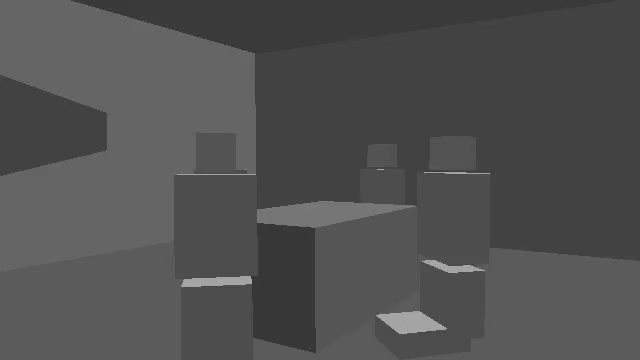
Two habits put the plan to work. Name positions rather than assuming them — who is at the head of the table, who is beside the door — and keep the cast of a take small: every extra face in a continuous frame is another person the camera has to keep track of. A take works best with a subject, a pursuer and a room.
What usually breaks a continuous take
- A change the take cannot make. A costume swap, a fresh injury or a drawn weapon changes what the object is, not where it is — each one needs its own reference image selected for the relevant segments. Mid-take transformations are a state problem, not a camera problem.
- Beats that need their own coverage. If the plan secretly wants a close-up, a reaction and a wide inside one unbroken move, the take will satisfy none of them. Decide what the take is for: the geography, the momentum, or the reveal.
- Crowd and traffic. Background people are a scene-level statement, not a per-beat improvisation; a take with an unmanaged crowd is a take with a different crowd in every second.
- Dialogue drive-by. Lines said mid-move need their seconds in the shot text, exactly as in any other shot; a take does not relax the timing rules, it multiplies them.

How the motion questions split
The two big motion questions split neatly: one asks how to copy movement, one asks how to build a take. Both are volume symptoms of the same missing piece — a plan for where things are:
| Question (near-identical posts) | Posts |
|---|---|
| The motion-copying question | 520 |
| The one-take question | 150 |
And when a plan works, the audience tells you in one line — this comment is the bar every continuous action beat is judged against:
That was great. One of the most coherent action AI sequences I've seen.
Coherent is the operative word: whatever the sequence did, it did not lose the room. The quote comes from a discussion in r/aivideo.
Limitations: what this page does not cover
- A one-take is a choice, not a virtue. Coverage — a wide, a close, a reaction — is how most action is actually built, and a scene of fast, small beats usually reads better cut than held.
- Generated takes still need review: the model decides how the pixels move, so budget for a regenerate of the segment that came back wrong, and re-fix the storyboard text before rerolling.
- A take that must change location halfway is two takes chained across a seam, no matter how the text is written; plan that seam deliberately rather than discovering it.
- The counts here are rule-based approximations from a fixed window, and the quoted praise is one viewer's experience, not a benchmark.
FAQ
How long can a single take be?
One segment runs up to 15 seconds on Seedance 2.0, or thirty on the long-take tiers. Longer continuous action is chained segments, each opening where the last ended — the seam is a join, not a cut, when the heading carries across it.
Do I have to describe every step of the camera move?
Describe the journey, not the choreography: entrance, what the camera follows, where it stops, and the beats in between with their seconds. The shots give the take its timing; the position lines give it a room to move through.
What if the model adds a cut anyway?
Treat it as a shot-text problem first: regenerate the segment after making the continuity explicit — heading, subject, position at the end. If two attempts fail the same way, split the take at the beat where it keeps breaking; a planned seam beats an unplanned cut.
Can the take include a crowd or street traffic?
Yes, if the crowd is declared at the scene level and kept to it — background people as a standing state of the location, not a fresh invention per beat. A crowd that is not declared reads as a different crowd in every second of the take.
Two guides go deeper: how spatial consistency holds and how to rehearse a real shoot with generated clips are the mechanics, and the sibling answer on building past one minute covers the segment arithmetic this page assumed. The method note describes how counts like these are collected.
Plan the take where it can be planned
Upload a script; SceneMixer writes the storyboard, fixes the room in a spatial model, and renders the take segment by segment.
Sign up freePer-second video rates are on the pricing page with the same numbers.
Pricing·Novel to Video·Guides·Samples·Alternatives·Answers·Support·Privacy·Terms·Legal·Contact·Affiliate program·© 2026 SceneMixer