Your Free Character, Scene and Prop Sheets Are Per Account, Not Per Project

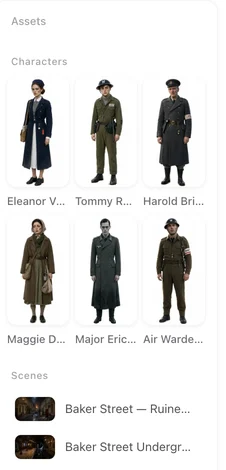
Open Step 2 of any parsed project: the banner above the grid shows how many free sheets are left on the account right now.
How the count works
Every generated sheet is one task; the free pool is charged one per successful or in-progress task, whichever type it is. A sheet that fails, or is cancelled before it starts, is not counted. The pool is account-wide: sheets used in project A are no longer available in project B. There is no per-type quota any more and no per-project reset. What you see in Step 2 and how the grid is organised: Reading Step 2.
Where free sheets can and cannot be spent
Only in projects that paid the parse fee: a script you uploaded or wrote with AI Create and then parsed. Ad projects and remakes generate sheets too, but they never draw from the free pool; they are priced per sheet from the start. Regenerating a sheet draws from the pool while any is left, exactly like a first generation. AI edits, regeneration from a reference image and state images never use it: they are priced on their own.
What does not give the credits back
Deleting a sheet, deleting a character, deleting the whole project, or re-parsing the script: the tasks already ran, so the pool stays where it was. If you want to try a different look for a character, edit the description and regenerate — free while the pool lasts, then a paid sheet at the default tier’s price of 7 credits. Regenerate One Sheet and Write a Description That Works.
What the first project gets on top
Your first project also gets the storyboard for episode 1 generated free the first time; later episodes, regenerations and every later project pay the storyboard fee. New accounts start with 50 credits as well. The complete list of what is free: What SceneMixer Gives You for Free.
Making the free pool go further
Spend it on the sheets that matter for the video: the lead characters and the rooms that appear in most segments. Minor props and one-scene locations can be generated later, only if a shot needs them; the storyboard falls back to text description for anything without a sheet. Order and price of Generate All: Generate All in Step 2.
| Action | Draws from the free pool? | Notes |
|---|---|---|
| Generate a character, scene or prop sheet in a parsed project | Yes, one per sheet | Until the pool is empty; then per-sheet price |
| Sheets in an ad project or a remake | No | Always paid |
| Regenerate a sheet | Yes, while the pool lasts | Same as a first generation |
| AI edit, regenerate from a reference, state image | No | Priced on their own |
| Delete and recreate a sheet or project | No refund to the pool | Tasks already ran |
| First episode's storyboard in the first project | Separate allowance | Once |
FAQ
Do my free sheets expire when I start a second project?
No. The pool is per account and carries over until it is used up.
Is it five per type?
Not any more. It is one pool of 15 for all types together.
Why does my remake show no free sheets?
Free sheets only apply to projects that paid the parse fee; remakes and ads never draw from the pool.
I deleted a project by mistake. Do I get the sheets back?
No; the generations already ran. The pool only counts tasks, not what you keep.
What is the price after the pool is used?
The default image tier's price per sheet, shown on the button before you generate.
Spend the free ones on the faces that carry the story
Leads and main rooms first; props only when a shot needs them.
Updated September 27, 2026
Pricing·Novel to Video·Guides·Samples·Support·Privacy·Terms·Legal·Contact·© 2026 SceneMixer