Generate All: Order, Price and the Free Sheets

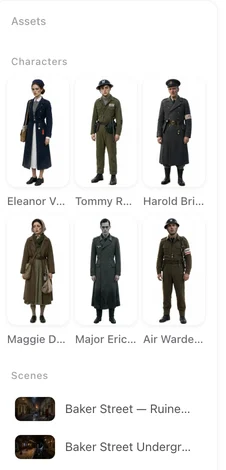
Open a finished episode and look at the left panel: that is a fully generated cast.
The two buttons
Generate All Characters (or Scenes, or Items) sits above the grid and applies to the tab you are on. Its tooltip says what it does: generate reference images for every asset of this type that has none yet, together with their state images, which start automatically once the main image is done.
Generate everything is the one-click version: all characters, scenes and props, plus the storyboard for episode 1. When you press it the page confirms: started — all reference images and the episode-1 storyboard are generating.
What it skips
Entries that already have an image. Entries whose image you uploaded. Characters marked Off-screen (voice only). Entries currently generating. So pressing it twice does not pay twice, and it never overwrites something you chose.
The order and the pace
Several images generate at once; each card shows Generating and the line above the grid counts them: Characters generating — 12/20 done. State images wait for their main image and then start on their own (Queued N state images). A failed card says Failed — click to retry. You can move to step 3 while they finish.
What it costs
Images are priced per image, and the price is on the button. Every account gets 15 free character, scene and prop images, counted together across the three tabs, usable on any project whose script has been read; the line above the grid shows how many are left. After that each image is 7 credits on the default image tier. State images have their own small free allowance on your first project and are priced the same way afterwards. What is free.
After it finishes
Look at the cast. A face that is not who you had in mind is cheaper to fix now than after ten videos: open the card, adjust the description, Regenerate. Regenerating one sheet. A character whose clothes change during the story gets a state. States.
Ads and remakes
An ad made by AI generates its images on its own. A remake’s cast and places come from your video and are generated here the same way, after you have chosen a style in step 1.
| Button | Generates | Skips |
|---|---|---|
| Generate All (tab) | Every entry of this tab without an image, plus their states | Existing, uploaded, off-screen, generating |
| Generate everything | All three tabs, plus the episode-1 storyboard | The same |
| Generate (one card) | That entry only | — |
FAQ
Does Generate All regenerate images I already have?
No. It only fills in entries that have no image. Use Regenerate on a card to redo one.
How many images are free?
The first 15 character, scene and prop images on your account, counted across the three tabs. The line above the grid shows what is left.
What does Generate everything add?
All three tabs at once, and it starts the storyboard for episode 1.
Do I have to wait for it to finish?
No. Move on; the images land in the background. Give the cast images before generating video, though.
Why was an entry skipped?
It already has an image, was uploaded, is voice-only, or is generating.
Press it once and read on
Generate everything starts the cast and the first storyboard together.
Updated September 26, 2026
Pricing·Novel to Video·Guides·Samples·Support·Privacy·Terms·Legal·Contact·© 2026 SceneMixer