Alternatives
A CapCut AI Video Alternative for Drama Series
Updated November 2, 2026

An editor with AI, or a series pipeline
CapCut's pricing page lists a free plan with free templates and basic editing, Pro with 850 monthly AI credits and 1 TB of storage, and Ultra with a larger credit pool1. Its AI video page describes a guided workflow: start from a topic or script, adjust the settings, preview the AI output, then refine the video before export2. SceneMixer's workflow is fixed around the story: script, cast, storyboard, video, composite.
At a glance
| CapCut | SceneMixer | |
|---|---|---|
| Built around | A video editor (desktop, online, mobile) with an AI video maker, templates, captions and effects12 | One series project: script → cast → episode outline → storyboard per episode → video per segment → one file per episode |
| AI video inputs | A script or reference image; styles such as realistic film, cartoon 3D or cinematic movie; aspect ratio, voiceover and duration settings2 | Upload or paste a script or novel (.txt, .docx, .md), or draft one from a single sentence with AI Create |
| Characters across scenes | Digital avatars with voiceover choices; how a character is kept the same across scenes is not stated on the page2 | The cast is generated once as reference sheets and attached to every segment a character appears in; paid plans can upload their own image instead |
| Plans | Free; Pro 850 monthly AI credits and 1 TB of storage; Ultra 12,179 monthly AI credits; Teams per seat. Shown in local currency (AUD 37.99 and 111.99 a month for Pro and Ultra when we checked)1 | Credit packs from $1.49; Pro plan $7.99/month with 700 credits. New accounts get 50 free credits and 15 free reference images. |
| Seconds of AI video | Pro: up to 100 seconds a month of its Seedance 2.5 video at 720p; Ultra: up to 235 seconds; first-month prices from $0.12 and $0.18 a second12 | From about $0.06 per second at 480P, $0.12 at 720P and $0.24 at 1080P (lowest tier at each resolution, at the lowest credit price). |
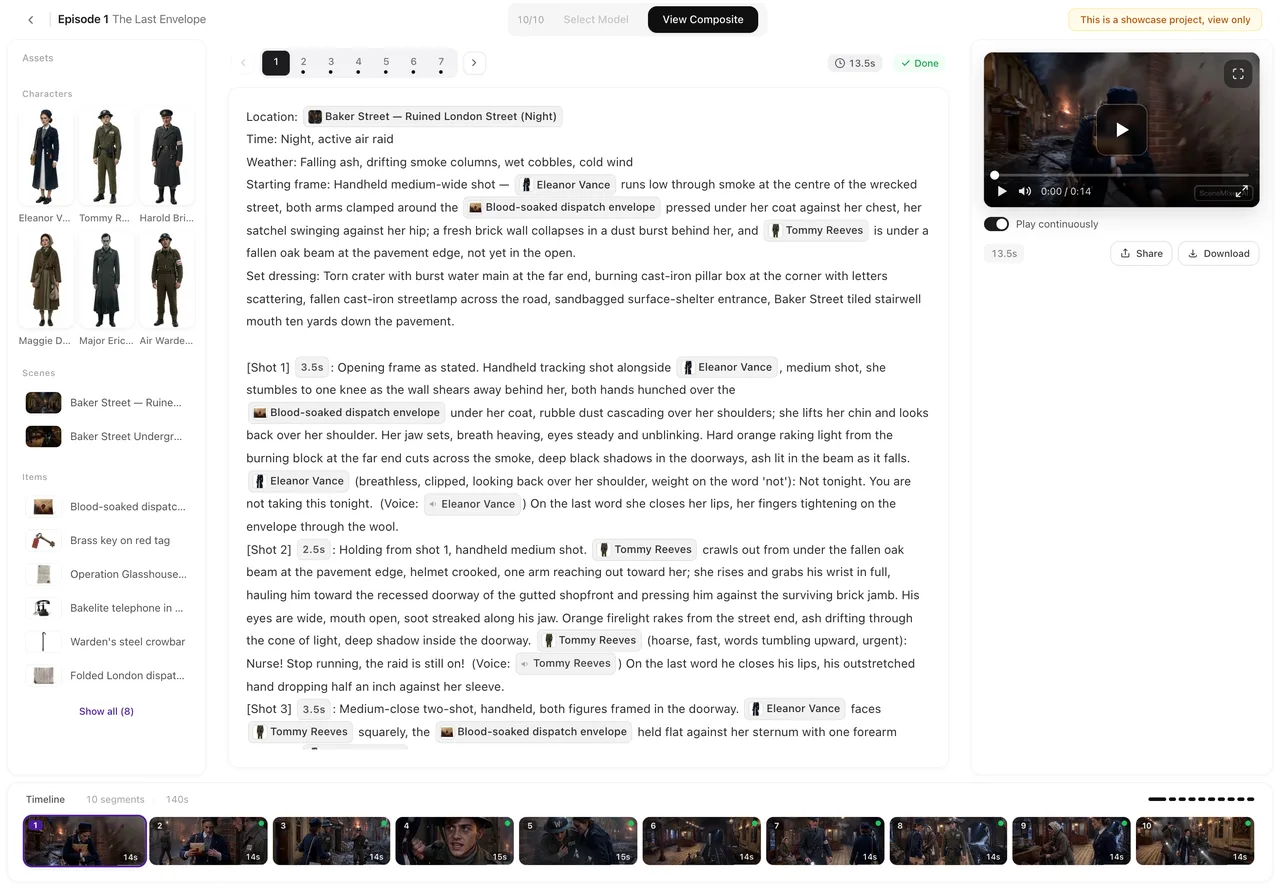
| After generating | Adjust visuals, pacing, background music, subtitles and effects before export2 | The episode editor: one card per segment; trim, re-dub, AI-edit or enhance a clip; subtitles and a built-in score per episode |
Models differ between platforms, so compare a test clip of your own scene, not only the price per second.
What a fixed cast looks like


Stay with CapCut if…
- You edit video — trimming, captions, templates and effects across desktop, web and mobile1.
- You make short social or marketing videos from a topic with a guided workflow and your own footage beside the AI clips2.
- You want to start free — the free plan lists free templates and basic editing tools1.
- You prefer one app for editing and generation with a plan that bundles storage and AI credits1.
SceneMixer fits if…
- You are telling a story in episodes. One read of the script returns the cast, locations, props and an episode-by-episode outline with an end-of-episode hook; each episode gets its own storyboard. Upload a script and read it.
- The same faces must hold from shot to shot. Reference sheets ride along with every segment, linked by id rather than by name. How consistency works.
- Your cast should speak a particular language. Pick it in step 1 and the lines are performed in that language as the shot renders — no dubbing pass. Native dialogue vs dubbing.
- You would rather pay as you go. Packs start at $1.49 and plan credits stay in your balance. Do credits expire?
- You want commercial rights from the first credit. Our terms give you ownership of the results, including commercial use, on free allowances too.
Where CapCut lands in SceneMixer
| In CapCut | Closest step in SceneMixer |
|---|---|
| Instant AI video (script to video) | The script read into cast, locations and an episode outline, then a storyboard per episode. Upload a script and read it |
| Digital avatar and voiceover | Character sheets drawn once and a voice per character, performed in the shot. Pick character voices |
| Captions and music | Subtitles and a score per episode. Add subtitles · Background music |
| Timeline editing | The episode editor, with one card per segment on the timeline. The episode editor, a tour |
Moving a story over
- Bring the script you would have pasted into the AI video maker — the read returns the cast, locations and an episode outline.
- Set the project in step 1: Type (Short Drama, TV Series or Film), aspect ratio, dialogue language and target region.
- Reuse character art you own. On a paid plan, upload it in place of a generated sheet; otherwise generate sheets — the first 15 on an account are free.
- Draft cheaply, finish the keepers. Generate at the lowest tier, then regenerate only the segments that will be seen most at a higher resolution. Draft at 480P, finish at 1080P.
Frequently asked questions
Is SceneMixer a CapCut alternative?
For turning a written story into a multi-episode drama with a fixed cast, yes. For editing footage you shot, templates and effects, CapCut is built around that.
How much does CapCut cost?
On November 2, 2026, its pricing page listed a free plan, Pro with 850 monthly AI credits and Ultra with 12,179, with prices shown in local currency (AUD 37.99 and 111.99 a month for us). Check capcut.com/pricing for your region.
Is SceneMixer a video editor like CapCut?
No. It generates the episode and lets you trim, re-dub, AI-edit and enhance each clip, but it is not a multi-track editor. The episode editor, a tour.
Can I take a SceneMixer episode into CapCut?
The finished episode can be downloaded at full quality, and you own the results. Composite and share an episode.
Sources and corrections
- CapCut pricing (capcut.com/pricing) — plans, monthly AI credits, per-second video prices
- AI Video Generator – CapCut (capcut.com/tools/ai-video-generator) — what the AI video maker takes, steps, seconds per plan
Facts about CapCut come only from the pages listed above, as checked on November 2, 2026. Prices and plans change often, so check CapCut's site before you buy. CapCut is a trademark of its owner and is named here only to identify the product; SceneMixer is not affiliated with it. Spotted something out of date? Email support@scenemixer.com and we will correct it.
Make the series, then edit it anywhere
One script in, episodes out, the same cast throughout.
Start a project freeCredit packages from $1.49 · Pro $7.99/mo · No credit card to start