Answers · Storyboards
How Do I Make a Storyboard With AI?
Published November 6, 2026

What a storyboard is for
A filmmaker made the case for storyboarding small films in one of the most-upvoted threads on the subject, and the line that stuck was this:
storyboarding is like editing the film before it’s even shot.
That was a thread in r/Filmmakers, and the same post gave the reason in four words: "Confusion costs more than planning." With AI video that is more literally true than on a set. Every shot is a purchase, and a shot that was never planned is a shot that gets bought twice. Shot lists for specific kinds of scene are their own question in the community, asked in some form in 86 posts.
A storyboard as text, not a grid of pictures
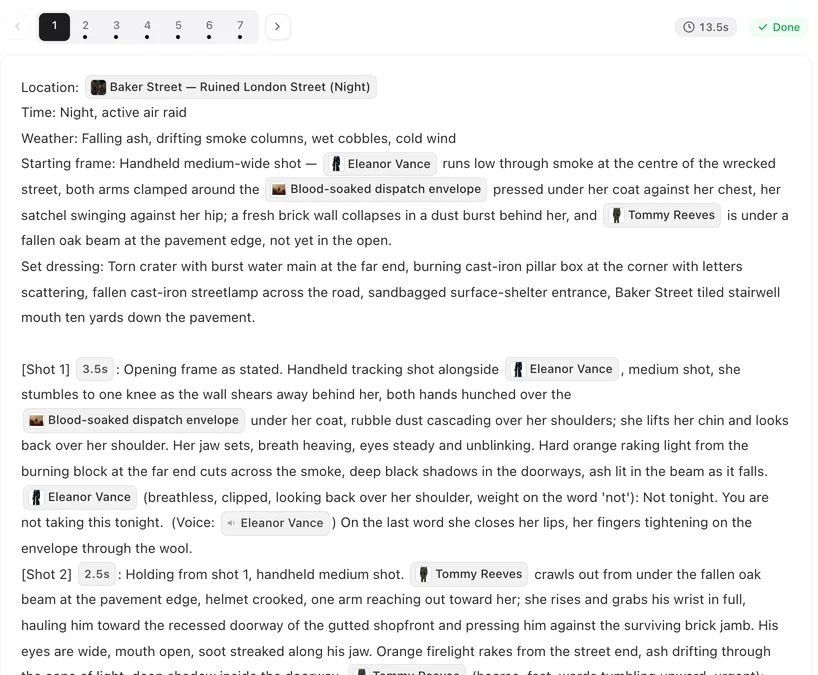
On SceneMixer the storyboard is text with numbered shots, and then real video for each segment. There is no intermediate frame-by-frame image grid to approve: the reference art for characters, locations and props is what you approve visually, and the storyboard is what you approve as writing. That split is deliberate. A drawn frame tells you roughly where people stand; a written shot tells the video model exactly what to do, and it is free to change.
Each segment carries a header — location, time, weather, and a starting frame that says where everyone and everything is at frame one — then numbered shots, each with its own duration in seconds, framing change and action text. The on-screen cast is marked per shot, and a character who is only being looked at or spoken to is deliberately not named, because naming an absent person is the most reliable way to make a video model paste their face into the frame.
Timing is derived, not guessed
The most common way a generated storyboard fails is a shot that gives an actor a second and a half to say a nine-word line. SceneMixer derives shot length from the dialogue, writes the same rule into the generation prompt and re-checks it after the model answers, so a shot that comes back too short for its own line is corrected before you see it. A segment's length is the sum of its shots; segments are typically four to fifteen seconds, with long takes of up to thirty on tiers that support them.
Generate, read, fix, then render
Each episode has a card with a Parse Storyboard button; the first episode of your first drama is free, and after that a storyboard is 1 credit per 333 characters of that episode's share of the script. It takes a few minutes — the median on the site over the 30 days to November 6, 2026 was 3 — and a failed storyboard is not charged.
Then read it before you shoot, the way a first assistant director reads a call sheet: line by line, asking whether each shot can actually be made as written. Rewriting shot text, dialogue or durations costs nothing; only model calls consume credits. A wrong name or a missing seconds value is a free edit now and a paid regeneration later. When you render, changing one segment re-renders that segment only, and every render is kept as a version you can switch back to. Use Re-parse only when the whole breakdown is wrong: it rewrites the episode from its outline and discards that episode's segments and videos.
The storyboard generator page lists every field, and generating the storyboard for an episode covers the buttons and states. For the camera language inside each shot, see how to write camera movement prompts.
Limitations of a text storyboard
- There is no drawn storyboard grid; if you need pictures for a pitch deck, use the reference art and stills from rendered segments.
- A segment has to fit inside the chosen video tier's maximum length; lengthening a shot lengthens its segment.
- Re-parse is destructive for that episode: its segments and their videos are discarded, so use it only when the whole breakdown is wrong.
- You can write a storyboard by hand, but it needs the same structure — numbered shots with durations and tagged dialogue — because the renderer reads those fields.
- The site figure is one month of SceneMixer tasks, refreshed monthly; the community count is a keyword approximation.
FAQ
Is an AI storyboard images or text?
On SceneMixer it is text with numbered shots, then real video for each segment. You approve the characters and places as images and the storyboard as writing.
Does editing the storyboard cost credits?
No. Editing text is free; only rendering is charged, per second of the segments you actually render.
Can I write my own storyboard?
Yes. You can rewrite any generated storyboard, including replacing a segment's text wholesale, as long as it keeps numbered shots with durations and tagged dialogue.
How long does one take to generate?
A few minutes; over the last month the median on the site was about three minutes per episode.
Related: making an AI movie from a script puts the storyboard in the whole pipeline, what you can change in a storyboard lists the editable fields, and the community counts follow the collection method.
Generate your first storyboard free
The first episode of your first drama is storyboarded at no cost. Read it before you render anything.
Sign up freePer-second video rates are on the pricing page with the same numbers.