Answers · Workflow
How Do I Make an AI Movie From a Script?
Published November 6, 2026

Why a script is the strongest starting point
Of all the ways into a project, a finished script loses the least. A one-line idea has to be expanded by the AI, and a novel has to be adapted; a script already says who is in the scene, where it is, and what they say. What usually goes wrong is the next step. A writer who wanted to turn a manuscript into a film described trying tool after tool to break it into scenes and then into video, and where the money went:
I blew through 12,000 tokens trying to create consistent characters from scene to scene
That was a post in r/aivideos, and it is the common shape of the problem: the script is fine, but every scene is generated from scratch, so the cast drifts and the attempts pile up. Continuity between scenes carries a label on about 1,500 posts in the community corpus. On SceneMixer the script is read once into a cast and places that every scene then uses — and the words themselves survive. If the words exist, upload them, because the read keeps your dialogue.
Step one: upload, and read what the read found
Paste the screenplay or upload it as a TXT, DOCX or Markdown file on the Upload Script tab. The read extracts the characters, the locations and the props, and breaks the script into episodes with an outline for each. A DOCX is unpacked to plain text in your browser before anything is sent, so formatting and comments in the document are dropped rather than uploaded. A script you drafted with an AI assistant goes in the same way as one you typed yourself.
Then read the cast list against your script. The read occasionally merges two minor characters or misses a place mentioned once. Adding or correcting them here is free text work, and it is far cheaper than discovering the gap in a rendered scene.
Step two: approve the faces and places
Each character gets a full-body reference sheet and each location an image. These are your casting session and your location scout in one, and they decide whether the same person appears in every shot. Approve them carefully; redo the ones that are wrong. A new account has 15 free reference images, and one image takes about 17 seconds.
Step three: check the storyboard as text
Each episode becomes a storyboard: segments of a few to fifteen seconds, each with a header for the place, the time and the weather, and numbered shots with durations, action and the lines. This is the screenplay turned into shooting instructions, and it is where to spend your editing time. Editing the storyboard costs nothing and calls no model, so a wrong camera angle or a missing beat is free to fix here.
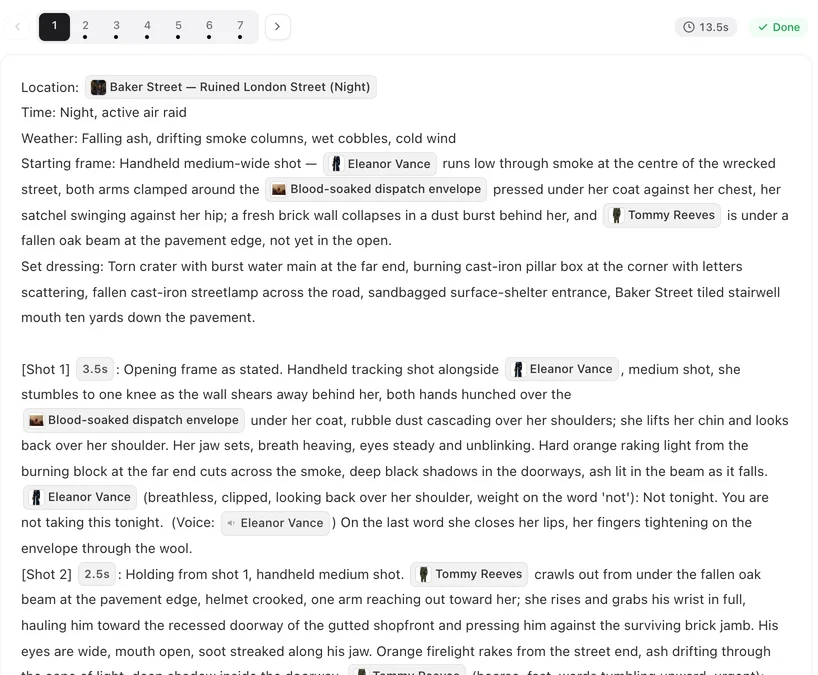
Read it the way a director reads a shooting script. Does each shot have one clear action? Do the shot durations add up to enough time for the line to be spoken? Is the right person in the frame when they speak? The guide on how to write one shot has the rules that matter most.
Step four: render, check, composite
Render one segment first and watch it. If it is right, render the rest; segments run in parallel, and the median episode on the site last month was composited 24 minutes after its first segment started. If a shot is wrong, fix that shot's text and regenerate that segment alone — every version is kept, and you can switch back. Then composite the episode into one file at 1 credit per second of runtime.
For a script longer than one episode, the same cast and places carry into every episode, so the second episode starts at step three. The answer on keeping the same characters in every episode explains how.
Limitations of working from a script
- A very long script is split into episodes by the read; if you need a particular split, adjust the episode outlines before you storyboard.
- Screen directions for on-screen text — title cards, signs, captions — are not drawn reliably by video models; add them in an editor afterwards.
- Scenes built around real public figures or a reference that looks like a real person are refused.
- Very complex shots — three or more people doing different things, a camera moving through several rooms — need more attempts; splitting them into simpler shots is usually cheaper.
- The site figures are one month of SceneMixer tasks, refreshed monthly.
FAQ
Does the AI rewrite my dialogue?
No. A script upload keeps your lines; the read turns your scenes into storyboard segments and shots, and you can edit any of it as text before rendering.
What file formats work?
Paste the text or upload TXT, DOCX or Markdown. A DOCX is converted to plain text in your browser, so its formatting and comments are not uploaded.
How do I fix one bad shot?
Edit that shot's text, which is free, and regenerate that segment alone. Every version is kept, so you can switch back if the new take is worse. In SceneMixer, a bad shot is fixed by editing its text and regenerating that one segment.
Can a script become several episodes?
Yes. The read breaks a long script into episodes, and the same cast and places are used in all of them.
Related: what you need to make an AI movie is the checklist before you start, script to video covers screenplay formats, and the community counts follow the collection method.
Upload your script
See your cast, your places and your first episode's storyboard before anything is charged.
Sign up freePer-second video rates are on the pricing page with the same numbers.