Answers · Look
How Do I Make AI Video That Looks Like Gameplay?
Published October 31, 2026

Gameplay is a camera, not a graphics setting
The clips that get mistaken for real game footage are rarely the most detailed ones. They are the ones where the camera behaves like a player is holding it. One creator described the goal of a cooking-gameplay clip in exactly those terms:
The idea was to make it feel less like a cinematic AI video and more like actual leaked next-gen gameplay footage.
And the way they got there:
Instead of a fixed camera, I used a third-person over-the-shoulder camera with small controller-style movements
Cinematic video is composed: the camera knows where the story is and frames it. Gameplay is reactive: the camera trails the character, swings a beat late on a turn, nudges back when the player corrects. Viewers have spent thousands of hours behind that camera and spot its absence instantly. Under a gameplay-style clip in r/aivideo, the praise went to motion, not resolution:
The details are stunning, even down to the way the character moves/pivots as if he’s being controlled by a joystick.
The look: game-engine materials, no film grain
The second ingredient is the surface of things. Game engines render clean: sharp materials, glossy highlights, no grain, a slightly too-perfect skin. Film looks are the opposite — grain, soft blacks, a grade. In SceneMixer this is the visual style chosen in Step 1, and one of the seventeen animated looks is built for it: Game Engine Realism, next-generation game graphics with sharp materials and no grain. For a stylised game, Cel-shaded 3D gives anime characters built in 3D with flat colour bands.
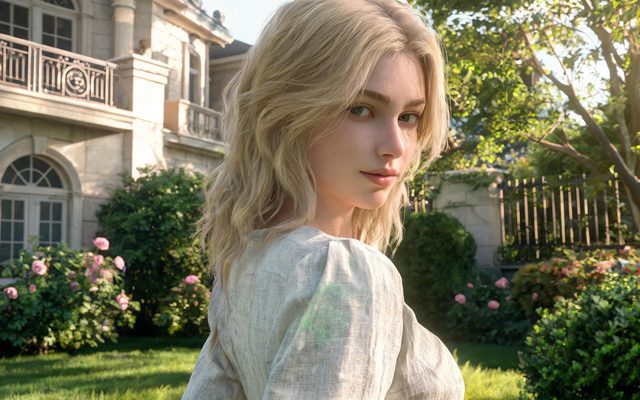
The look is chosen once and fixed for the project; every character sheet, location and segment is made in it. That is what stops shot five from slipping into a film look while shot four looked like a console. Every visual style, one by one.
Writing the player's camera
Describe the camera in plain words at the start of each shot. These are starting points, not presets — the model follows the words.
| Game camera | Write it as | Reads as |
|---|---|---|
| Third-person follow | camera behind and slightly above her, following as she walks, drifting a little on turns | Open-world exploration |
| Over the shoulder, aiming | close behind his right shoulder, looking past him down the corridor | Action and shooter games |
| Fixed side view | wide side view, camera tracking alongside him as he runs left to right | Platformers, side-scrollers |
| Top-down | high overhead view looking straight down on the square | Strategy, city builders |
| Cutscene | medium close-up, still camera, the two of them facing each other | The story moments between play |
Mixing cutscenes with play is what makes a gameplay video feel like a game rather than a demo reel. The camera moves guide and the answer on writing camera movement prompts cover the vocabulary; camera questions are the biggest single theme in the community, with 22,000 posts carrying that label.
Loops of action, one per shot
Games are made of loops: walk to the counter, pick up the knife, chop, carry to the stove, stir. The cooking clip above packed a whole loop into one fifteen-second instruction. It works sometimes; more often the middle steps blur together. Splitting the loop into shots — one action each, a few seconds each — gives every interaction its moment, which is also how a player experiences it. The next segment opens where the last one ended, so the loop continues across segments instead of restarting.
Menus, minimaps and button prompts
The interface is the giveaway viewers look for, and the one layer a video model handles worst. Under the cooking clip, a reply joked about how many maps were floating on screen:
How about a third minimap?
Text and small icons inside a generated picture come out garbled or duplicated, because no current model spells reliably. Render the play clean, then add the health bar, the minimap, the quest text and the button prompts as overlays in an editor, where they stay sharp and stay put. A clean render is also easier to reuse: the same shot can become a trailer, an ad or a cutscene.
Your own game, not someone else's
The most-shared examples of this trend borrow a famous franchise: its city, its hero, its logo. Those are refused here — unauthorised film, anime and game IP is on the list of things that cannot be made, as are characters that look like real actors. The upside of inventing your own is that nothing has to match an original. Pick a scene style for the world — the neon towers of Cyber Metropolis, a Wasteland, a fantasy kingdom — give your hero a sheet, and you have a game that exists only in your video. Content rules.
One reaction to a gameplay-style compilation saw where this goes commercially:
Omg. Mobile game ads are about to become even crazier
If you are making an ad for your own game, SceneMixer's ad mode starts from a product image and writes the spot around it: an ad from one photo.
Limitations of fake gameplay
- It is video, not a game: nothing is playable, and the "controls" are only what the camera and the character are written to do.
- Interface elements generated inside the picture are unreliable; plan to add them in an editor.
- Real games, their characters and their logos are refused by name and by likeness; build your own world.
- A look made for games is wrong for a story meant to pass as filmed — for that, a live-action look such as Digital HD fits better.
- The post counts are matched by rules over a fixed set of public threads; they show how often the question comes up, not who asked.
FAQ
How do I make AI video look like real gameplay?
Use a game-engine look, write a third-person camera that follows the character with small corrections, keep one action per shot, and add the interface in an editor.
Which style looks most like a video game?
Game Engine Realism for realistic next-generation graphics; Cel-shaded 3D for a stylised, anime-like game. The style is fixed after Step 1.
Can I recreate a scene from a famous game?
No. Unauthorised game IP, its characters and its logos are refused. Invent the world and the hero; scene styles cover cities, wastelands and fantasy kingdoms.
Can the AI draw the HUD and minimap?
Not reliably: text and small icons come out garbled. Render clean play and add the interface as overlays afterwards.
For the camera vocabulary see cinematic camera moves; for the opposite brief — a picture that should look filmed — read the answer on making a realistic AI vlog. Which threads were counted, and how, is set out in the method note.
Build a game that only exists on video
Pick Game Engine Realism, give your hero a sheet, and write the camera like a player holds it.
Sign up freePer-second video rates are on the pricing page with the same numbers.