How to make an AI pirate or Viking adventure
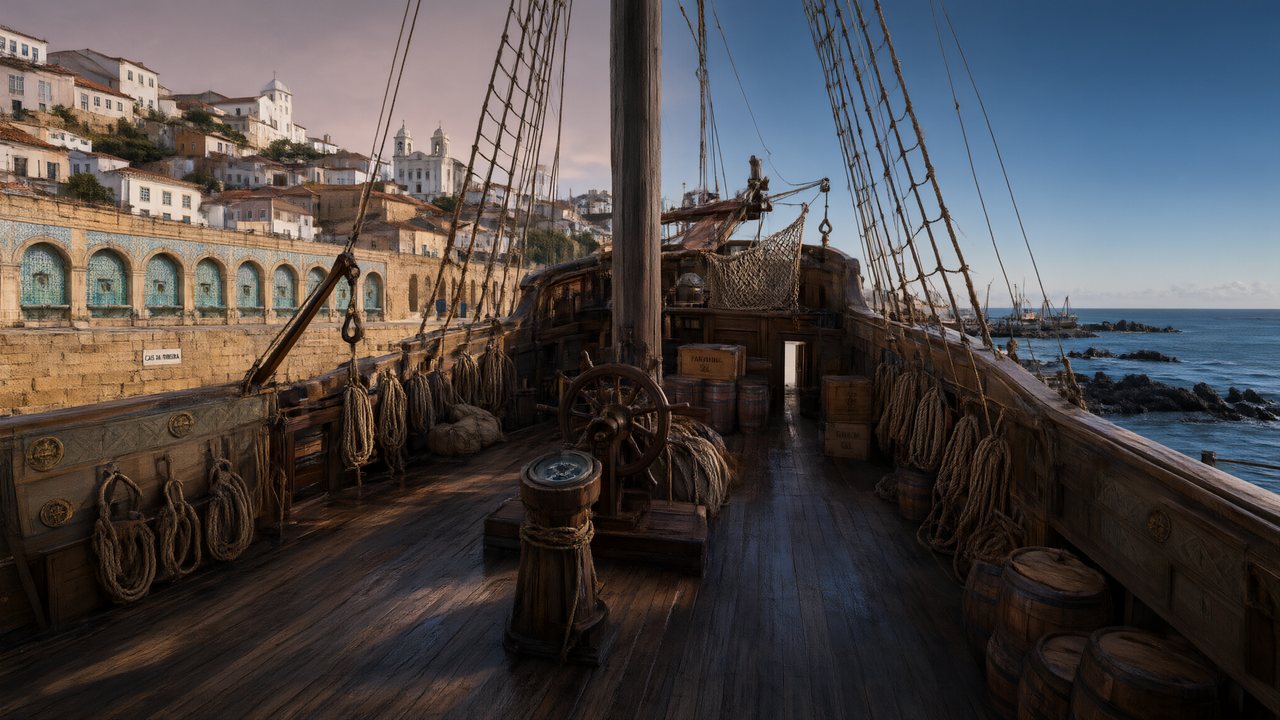
Brief for AI Create: A pirate adventure: a ship’s cook who can read finds the captain’s map is a forgery, and has to decide, in a harbour full of people who want it, whether to say so; 8 short episodes, English dialogue, every episode ends on a ship leaving a harbour.
Pick your world
| Step 1 setting | Pirates | Vikings |
|---|---|---|
| Scene Style | Age of Sail Harbor | Viking Fjord |
| Costume Style | Pirate | Nordic Viking |
| Costume extras | Fantasy Adventurer for a fantasy crew | Celtic Tribal for a rival people |
| Visual Style | Digital HD, Shot on Film; Family 3D Animation for a family pirate tale | Shot on Film, Game Engine Realism, Digital HD |
| Target Region | Follow script keeps your names; Western moves the cast to Western names | |
| Dialogue language | English, or any other supported language | |
What the two scene styles give you: Age of Sail Harbor is a 17th–18th-century Caribbean colonial harbour with wooden decks and rigging, colourful stucco houses and a turquoise sea. Viking Fjord is a Viking-age fjord settlement with steep cliffs around deep blue water, timber longhouses with carved dragon ridges and wooden docks. Every scene and costume style.
All of this is written into the descriptions when the script is read, so choose it first. Why they are fixed afterwards.
Keep the ocean out of the shot list
An open sea with a fleet is the hardest picture to ask for. Build the adventure on places a camera can stand:
- The deck. Wood underfoot, rigging overhead, a rail, a wheel. Most of a ship story is people on a deck talking.
- The harbour. Where the ship arrives, the deal is made and the rumour starts.
- The hall or the tavern. Oaths, bargains and betrayals indoors, with a fire.
- The shore. A boat pulled up, a figure walking away along a beach or a jetty.
- The ship itself as a wide shot only: leaving, arriving, a silhouette on a horizon.
Each place needs its own scene card in Step 2, and each segment stays in one place and one stretch of time. A segment stays in one place and one timeline.
Storms, fog and night
Weather is a setting, not a sentence. In the storyboard, each segment header has a Time and a Weather row: Time runs from Dawn to Late night, and Weather offers Clear, Cloudy, Overcast, Rain, Storm, Snow, Fog, Windy and Sandstorm. Change on the header applies your choice to the run of segments in that scene, it is free, and it takes effect the next time those segments are generated.
Wet clothes follow the story: if a character is soaked in one segment, the next segment starts with them wet until the text dries them off. What the system keeps track of between segments · The segment header, field by field.
Fights without the gore
Swords, axes and cannon are fine to have; wounds and blood on screen are what the video checks stop. Tell the fight by its beats:
- The draw: a blade leaving its scabbard, two stances, a held breath.
- The clash: sparks, a block, a boot sliding on a wet deck.
- The result: a figure falling out of frame, a sail coming down, a shield split on the ground.
- The raid: torchlight on a hall, then the morning after.
Invent your crew and your clan. Characters from known films and series can trigger the IP check. If a clip is blocked.
A deck scene, shot by shot
| Beat | Shot to adapt |
|---|---|
| The deck | [Shot 1] 4s: Wide shot, fixed camera. The deck of a three-masted wooden ship at dawn, rigging overhead, a colourful colonial harbour behind. @Tamsin, the cook, stands at the rail holding a rolled map. |
| The map | [Shot 2] 3s: Close-up on @Tamsin’s thumb running along the edge of the paper. The ink is the wrong colour. |
| The captain | [Shot 3] 3s: Medium shot. @Rooke, the captain, comes up the stairs from below, tying his sash. |
| The line | [Shot 4] 4s: Close-up on @Tamsin, steadying her voice. @Tamsin (low): Captain, the map is a copy. (voice: Tamsin) |
| The silence | [Shot 5] 3s: Close-up on @Rooke. He smiles slowly, and looks past her at the harbour. |
How to write one shot · Hooks and cliffhangers.
Story shapes that work
- The forged map: a prize that is not what it seems, and one person who knows.
- The mutiny: a crew that votes with its feet before it votes with its hands.
- The exile and the oath: a clan, a broken promise, a ship that will not wait.
- The rival crew: two ships in one harbour, one dock between them.
- The saga: three generations, one hall, a feud no one remembers starting.
Make it in SceneMixer, start to finish
- Script: paste your own on Upload Script, or write the brief in AI Create.
- Step 1: Type Short Drama, TV Series or Film; the scene and costume styles above; a visual style; Target Region; dialogue language; 9:16 Portrait for feeds or 16:9 Landscape for YouTube and film. Read the script.
- Step 2: a specific face and a mark per character (an eyepatch, a scar, a braid); the map or the sword as a prop. The first 15 setup images on an account are free.
- Storyboard: episode 1 first (free on your first project). Set Weather and Time on the headers of the storm and night scenes.
- Video: generate on the default tier at 10 credits a second; put the episodes together and post.
| Episode | The scene | The ending beat |
|---|---|---|
| 1 | A ship’s deck at dawn. | The cook notices the map is a copy. |
| 2 | A tavern in the harbour. | Someone else is asking after the same map. |
| 3 | The storm. | The captain is not on the deck. |
| 4 | The rival crew’s ship alongside. | The cook’s name is on their list. |
| 5 | A beach at night. | A boat pulled up with no one in it. |
FAQ
How do I make a pirate story with AI?
In Step 1 choose the scene style Age of Sail Harbor and the costume style Pirate, then write or generate the script. Stage it on decks, in harbours and in taverns rather than on open sea.
How do I make a Viking story with AI?
Choose the scene style Viking Fjord and the costume style Nordic Viking. Longhouses, docks and the shore carry most of a saga.
Can I film a storm at sea?
Set Weather to Storm on the segment header of the scene. It applies to the run of segments in that scene and takes effect the next time they are generated.
Can I show sword fights?
Show the draw, the clash and the result. Graphic wounds and blood are stopped by the video checks.
Do the characters stay wet from one segment to the next?
In newer storyboards, yes: a soaked character starts the next segment wet until the text dries them off.
Which Target Region should I pick?
Follow script keeps the names you wrote. Western moves the cast to Western names.
Can I use a famous pirate or a Viking king from a known series?
Use invented characters. Characters from known films and series can trigger the IP check.
Can I make it for kids?
Yes. Pick a family-friendly visual style such as Family 3D Animation and keep the fights comic.
Leave harbour on the first shot.
Start a pirate or Viking adventure from one sentence.
Updated October 26, 2026