The Segment Header, Field by Field

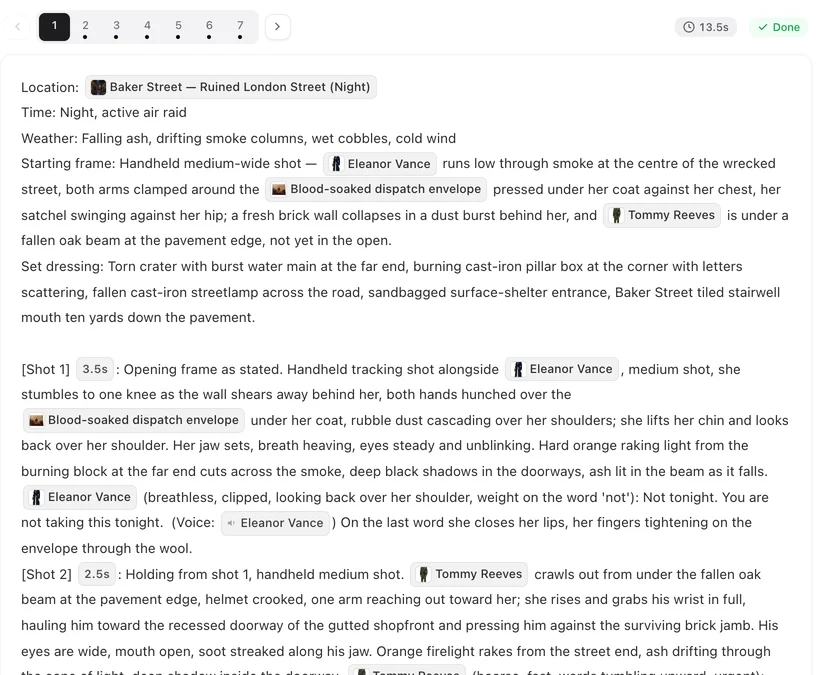
Open a finished episode and read the header of any segment. It is the same six fields every time.
Location
A scene chip from the project’s Scenes. It is the one place the whole segment happens in. To change it, put the cursor in the field, type @ and pick another scene. Two places means two segments. Props and locations.
Time
Time of day, and the moment if it matters: Night, active air raid; Late afternoon, just after the bell. It sets the light for every shot in the segment. If the next segment is later, change its Time and the light follows; if you leave it, nothing has moved.
Weather
Plain words: Clear, Falling ash and smoke, Rain on the glass. Like Time, it applies to the whole segment and sits on top of the room, which does not change.
Opening frame
What the very first frame shows: the framing, who is in the picture and how they are standing or sitting, where they are in the room, what is in their hands. It is written from the end of the previous segment, so the join is continuous; when a segment was split in two, the second piece’s opening says it continues from the first. Edit it to change how a segment starts. Continuity between segments.
Only people who are actually visible in that first frame belong here. Someone in the room but out of the picture does not.
Set dressing
The room in words: the furniture that matters, the light source, the mess, the parked cars outside. No chips needed. At the end of the same line, background people are declared if the segment has any: Background people: diners at the other tables, quiet. Delete that clause and the room is empty of extras for every shot in the segment. Who is in frame.
Props
The objects the segment uses, as prop chips. List a prop here and name it again in the shots that handle it; a prop listed here but never used in a shot is dropped when you save. Why props stay the same.
Editing the header
It is text like the rest of the storyboard: click Edit Script, change it, Save. Free. Keep it consistent with the shots — a header that says night and a shot that describes sunlight will fight each other. What you can change.
| Field | Applies to | Write |
|---|---|---|
| Location | The whole segment | One scene chip |
| Time | Every shot | Time of day, plus the moment if it matters |
| Weather | Every shot | Plain words |
| Opening frame | The first frame, and the join to the previous segment | Framing, who, posture, position, what is in hand |
| Set dressing | Every shot | The room in words; Background people: at the end if any |
| Props | The segment | Prop chips, also named in the shots that use them |
FAQ
Which header fields affect every shot?
Time, Weather and Set dressing. The Opening frame describes only the first frame; Location is the one place the segment happens.
How do I make a segment happen at night?
Set Time to night. The room stays the same; the light changes.
Can I change the Opening frame?
Yes. It is text. Describe the frame you want the segment to start on; keep it consistent with how the previous segment ended.
Where do extras and crowds go?
At the end of Set dressing, as Background people: … They are not cast and need no chips.
A prop I listed vanished from the header.
It was not used in any shot. Name it in a shot and it stays.
Read one header, then write one
Open a segment, change its Time to night, save, and regenerate to see the light move.
Updated September 26, 2026
Pricing·Novel to Video·Guides·Samples·Support·Privacy·Terms·Legal·Contact·© 2026 SceneMixer