How to Make an AI Book Trailer for Your Novel

Story trailer, first line of your trailer script: NARRATOR (voice-over): In the town of Halloway, nobody has opened the lighthouse door in forty years. Tonight, someone knocked from inside.
Which kind of trailer
| Story trailer | Cover trailer | |
|---|---|---|
| Starts from | A short trailer script you write | One to four photos: the cover first |
| Where | Upload Script (or AI Create) | The Ad Video tab |
| Shows | Your characters and settings, in scenes | Your book as the hero object, in styled scenes |
| Title and author | Spoken by the narrator; add text later in your editor | Printed on the end card |
| Length | Whatever your script runs to | 15, 30 or 60 seconds |
| Best for | Fiction with a strong premise and a face on it | A release announcement, a pre-order push, non-fiction |
The story trailer, step by step
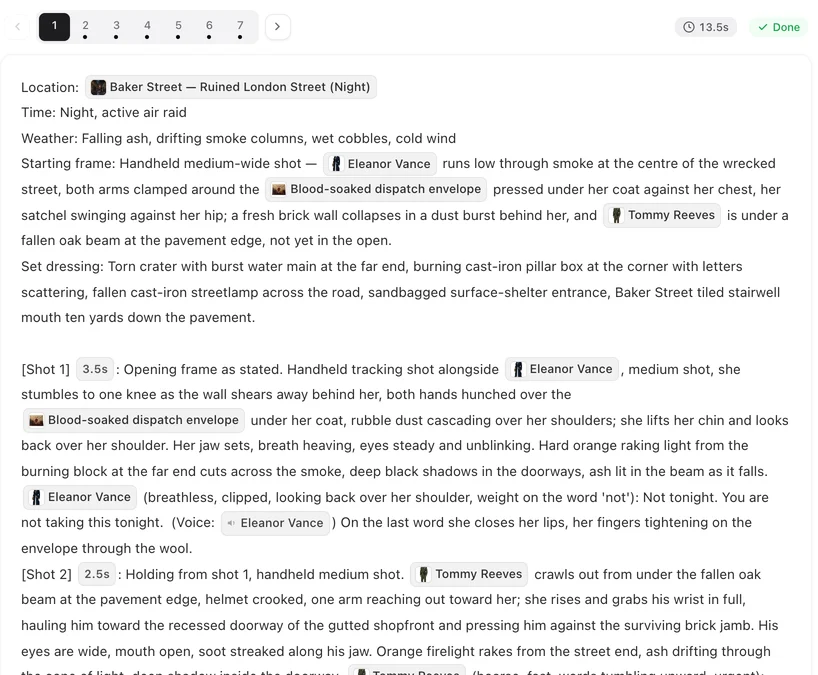
- Write the trailer script, not the book. Pasting a whole novel gives you the whole novel, episode by episode. A trailer is its own short script: a narrator, three or four moments that raise questions, and a last line. One page is plenty. Use a screenplay layout.
- In step 1, choose Film for a cinematic pace and 16:9 Landscape for YouTube and your website, or 9:16 Portrait for book communities on TikTok and Instagram. Pick the visual style that matches your cover: Filmic Live-Action for a thriller, Soft-Mist Live Action for a romance, Hand-painted Anime Film or Watercolor Storybook for fantasy or a children’s book.
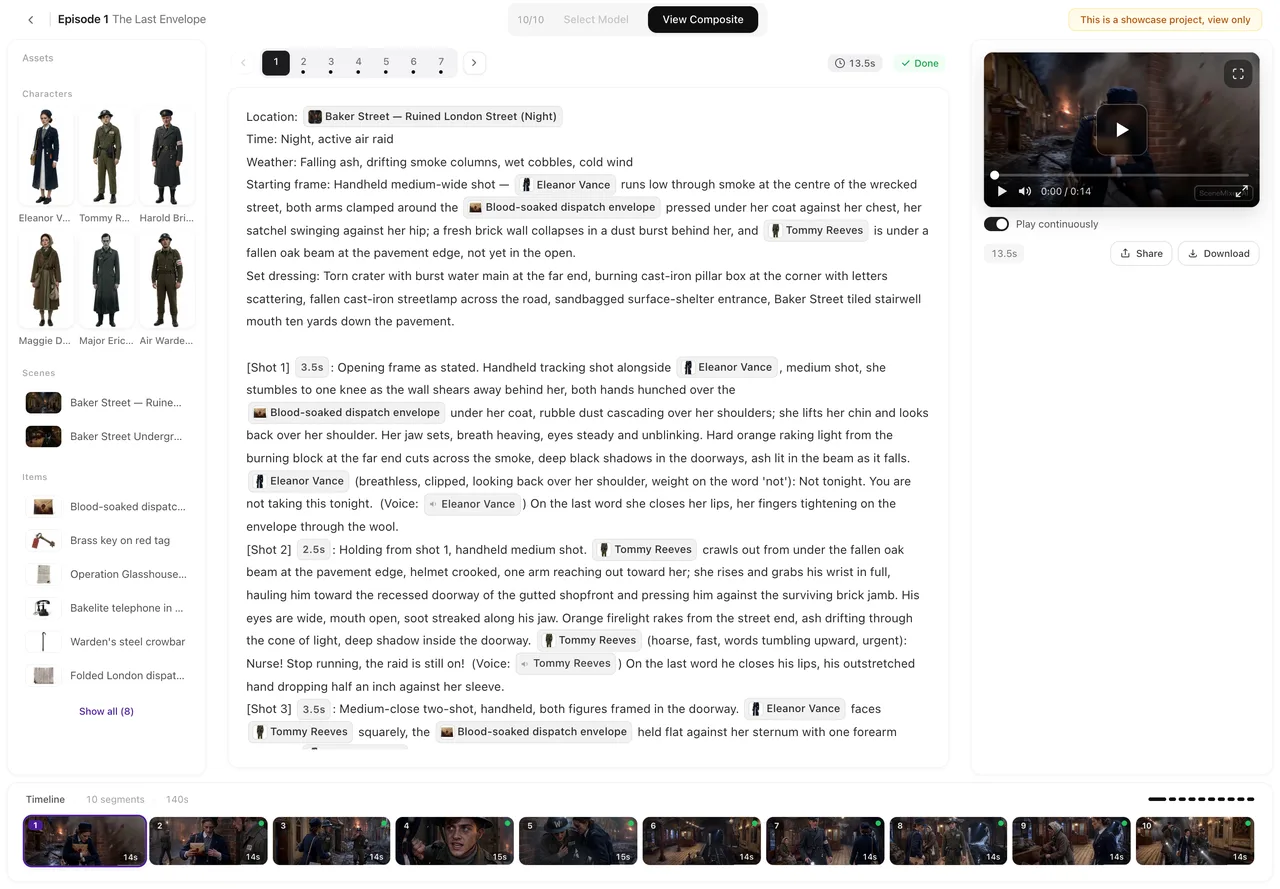
- Cast your characters as you see them. In step 2, rewrite each character’s description to match the book — the scar, the coat, the colour of the eyes — and regenerate. You know them better than any reader. Describe a face so it is not generic.
- Make the narrator voice-only. A narrator who is heard and never seen is set to Voice only (off-screen); describe the voice you hear when you read the book aloud.
- Generate, fix, composite. Regenerate the shots that miss, then composite the trailer into one file and download the original.
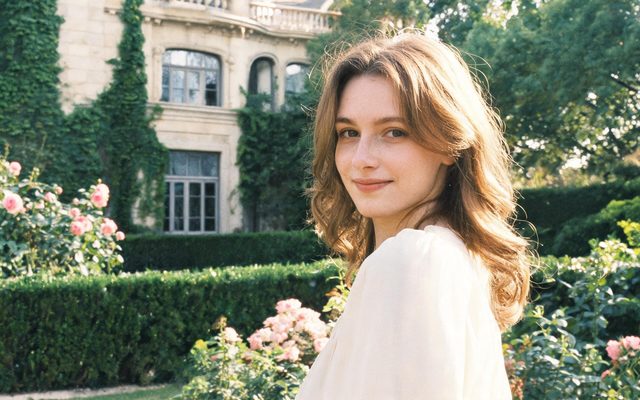
Visual Style: Filmic Live-Action
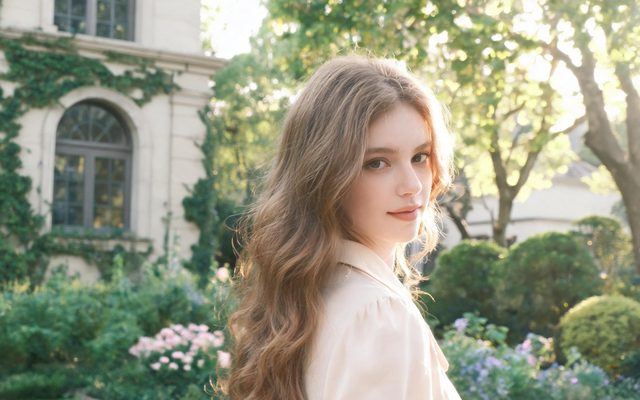
Visual Style: Soft-Mist Live Action

Visual Style: Hand-painted Anime Film

Visual Style: Watercolor Storybook
A trailer script you can adapt
| Beat | What to write |
|---|---|
| The world | A wide shot of the one place the book is about, at the time of day it feels like. Narrator: one sentence of premise. |
| The lead | A close-up of the main character doing something that shows who they are. No dialogue, or one line. |
| The disturbance | The moment the story starts: a letter, a knock, a stranger. Narrator: the question. |
| The stakes | Two or three quick shots of what could be lost. Sound carries them. |
| The last line | A close-up and one line of dialogue that the reader will meet again in the book. |
Keep spoken lines short: about three words a second in English. A sixty-second trailer holds far fewer words than you think. How to write one shot · Lines and voice-over.
The cover trailer, step by step
- Open the Ad Video tab and add your cover first. Up to four images; the first one is the hero. A photo of the printed book — on a table, in someone’s hands — often works better than the flat cover file. Which photos work.
- Say what it is in the one-line box: a hardback psychological thriller, launching in March. Where the sentence and the photo disagree, the sentence wins.
- Pick length, tone, shape and resolution. Tone sets the treatment — Twist or Epic for a thriller, Warm for a romance, Minimal for literary fiction. Ad options.
- Hand it to the AI, or take the wheel. One click runs the whole chain at one quoted price; expert mode stops after the script so you can rewrite lines first. One-click or expert mode.
- Set the end card. Brand = your author name, Product name = the title, a tagline, and a call to action such as Pre-order now. You can edit the card and rebuild the cut without reshooting. The end card.
Text, rights and covers with faces
- No readable text in the shots. Generated video does not write legible words, so a title painted across a scene will come out garbled. Let the narrator say the title, use the end card in a cover trailer, or add the title and release date in your own video editor after downloading.
- Only your own book. Make trailers for work you hold the rights to. Someone else’s novel, a famous series or its characters are not yours to adapt, and well-known franchises trigger the IP check.
- Covers with a real person’s photo. Real people are not put into generated video: in an ad, people in a photo are removed before anything is made, and a reference that is a real photograph of a face is rejected by the face check. A cover built around a photograph of a person may lose the person or not be usable at all. Illustrated covers and object covers work best. Which photos work for an ad.
- The AI label. Retailers and festivals may have their own rules for disclosing AI-made trailers; check them before you publish. The AI badge switch.
What it costs
A story trailer is priced like any short project: the script read, the setup images (the first 15 on an account are free), the storyboard, and video by the second — 10 credits a second on the default tier, so a sixty-second trailer is sixty seconds of video. A cover trailer shows one all-in price on each length and resolution option before you start, and that price is a cap. The ad price is a cap.
| Genre | Trailer kind | Visual style or tone |
|---|---|---|
| Thriller, crime | Story trailer | Filmic Live-Action |
| Romance | Story trailer | Soft-Mist Live Action |
| Fantasy, YA | Story trailer | Hand-painted Anime Film or Painterly Anime |
| Children’s picture book | Story trailer | Watercolor Storybook |
| Non-fiction, business | Cover trailer | Minimal or Show how it works |
| Pre-order or launch push | Cover trailer | Epic or Twist |
FAQ
Can AI make a trailer for my book?
Yes. Write a short trailer script and make it as a short film project, or upload your cover on the Ad Video tab and make a product-style trailer that ends on an end card with your title.
Can I paste my whole novel?
You can, but that makes the novel into a series, not a trailer. For a trailer, write a one-page trailer script with a narrator and three or four key moments.
Can the trailer show the book title on screen?
Not inside the generated shots; video models do not write legible text. The narrator can say it, a cover trailer prints it on the end card, or you can add it in your own editor afterwards.
How long should a book trailer be?
Thirty to ninety seconds. Cover trailers come in 15, 30 or 60 seconds; a story trailer runs as long as its script.
Will my characters look like I imagined them?
Rewrite their descriptions in step 2 to match the book and regenerate their images until they do. The same faces are then kept in every shot.
Can I make a trailer for someone else's book?
Only with the rights. Trailers for books you do not own, or for famous series and their characters, are not allowed.
Vertical or horizontal?
Horizontal (16:9) for YouTube, your website and retailer pages; vertical (9:16) for TikTok and Instagram book communities.
Can I use music from my favourite film?
No, only music you have the rights to. Projects can carry their own generated score, and an ad gets music written for it.
Updated October 13, 2026
Pricing·Novel to Video·Guides·Samples·Support·Privacy·Terms·Legal·Contact·Affiliate program·© 2026 SceneMixer