“Some Shots Have No Linked Characters”: What the Question Means and How to Fix It

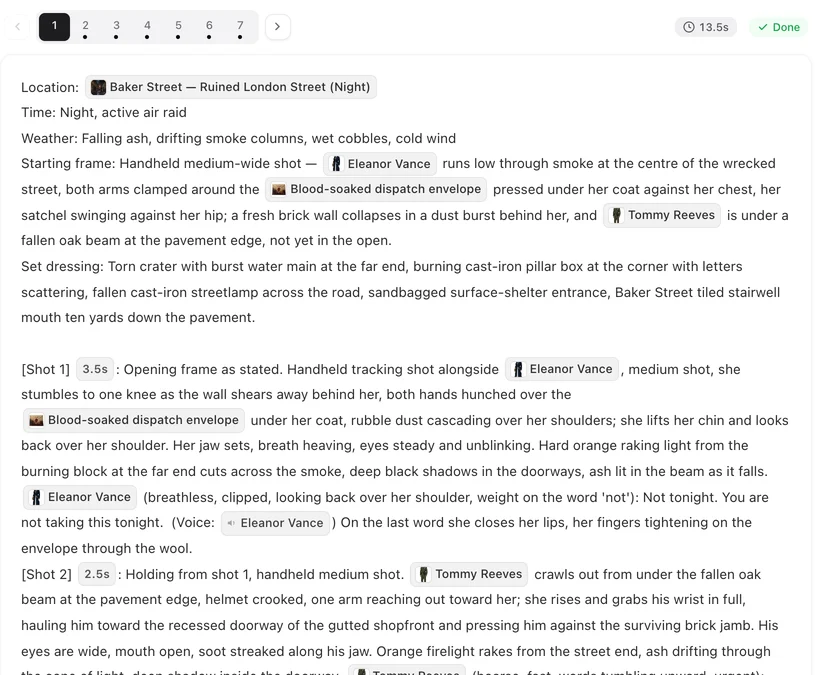
Open a segment you edited, press Edit, and look at the names in each shot: pills are linked, plain words are not.
When the question appears
Only on segments you wrote or changed yourself: one you inserted, edited, or pasted text into. Segments exactly as the storyboard produced them are not checked. It appears on the website, on a computer or a phone browser; the apps do not ask. Nothing is charged until you confirm.
What a linked name is
A name inserted with the @ menu becomes a coloured pill. A pill tells the shot which character you mean, and that character’s sheet goes into the generation. A name you typed is ordinary text: the video model reads the word, but it has no picture to go with it, so it draws someone who fits the words. The question appears when a shot has no linked character at all, yet its text names one. The @ menu · Who is in frame.
How to fix it
- Press Cancel.
- Open the segment with Edit and find the shots the question named.
- Delete the typed name, type @ in its place and pick the character. A pill appears.
- Save, then generate.
If the character is not in the @ menu, it is not in this episode yet: add it with Add assets in the editor’s left panel. Add a character to this episode.
When to generate anyway
When the named person is not in the picture in that shot: someone talked about, heard on the phone, or a shot of a letter or a doorway. Linking a person who is not on screen invites their face into the frame, so leaving the name as text is right there. Directions instead of naming who is off screen.
Generate all and the same question
Generate all asks the same question for each segment that has such shots. Confirm and that segment is submitted; cancel and only that one is skipped, with Segment N was skipped: some shots have no linked characters. The others carry on. Generate all segments at once.
Earlier warnings, and pasted text
You may see it coming: after a save, an amber note above the storyboard can say a name was written without @. When you paste text and save, a message saying Names in the text were linked to their characters, scenes and items means the pills are back; if it does not appear, or the question still comes up, link the names with @ yourself. The amber notes after you save · Copying and pasting storyboard text.
| Shot text | Linked? | In the video |
|---|---|---|
| @Mara pill turns to the window | Yes | Mara's sheet is used; her face holds |
| Mara turns to the window (typed) | No | A woman who fits the words; may not look like Mara |
| She reads Mara's letter (Mara not on screen) | No, and that is right | Generate anyway |
FAQ
I already generated, and the person looks wrong. What now?
Link the name with @, save, and regenerate that segment. The earlier clip was delivered, so it was charged; if you think something went wrong on our side, send feedback with the segment number.
Why was a segment I never touched not checked?
Segments as the storyboard produced them already have their characters linked. The check is for text you wrote or changed.
How do I use @ on a phone?
Open the segment's editor on the phone and type @ in the text; the same menu opens.
Does the question cost anything?
No. Nothing is charged until you confirm a generation.
Turn typed names into pills
One @ per character in the shots where they are on screen.
Updated October 2, 2026
Pricing·Novel to Video·Guides·Samples·Support·Privacy·Terms·Legal·Contact·© 2026 SceneMixer