Who Is in Frame

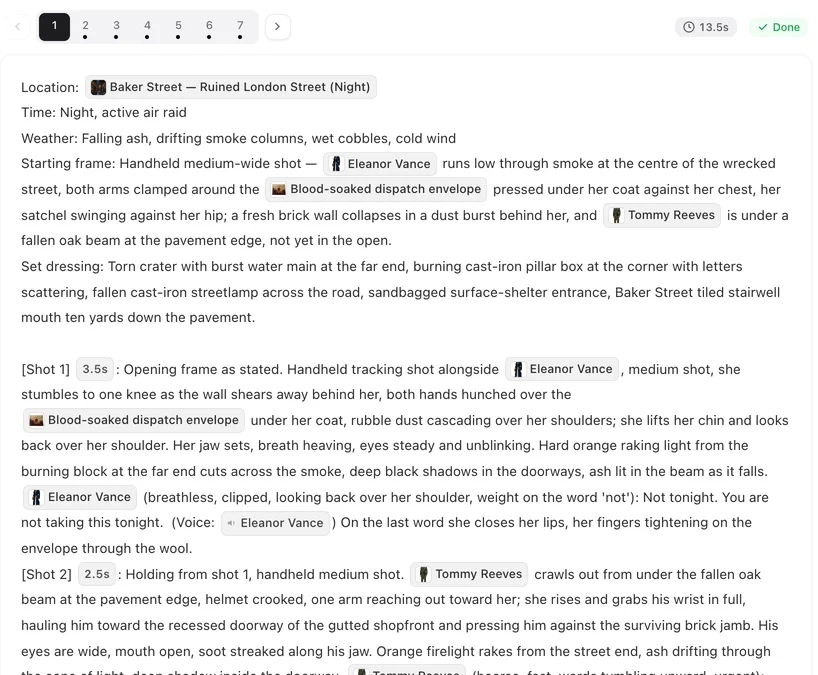
Open a finished episode and read a two-person scene. Notice which shots name both people and which name only one.
The rule
Whoever is visible gets a chip. Whoever is not, does not. That is the whole rule, and it does more for face consistency than anything else you can write. Why a named character keeps her face.
A name typed by hand, without the chip, is not the same: the editor warns you after saving that it is not a character in this project, and no image is used for it. Type @ and pick the character.
One person in the shot
Write the chip in the action and add the line In frame only: @Mara. That tells the shot the frame holds one person, even if someone else is speaking or is nearby. It is the single most useful line for close-ups and reaction shots.
If she is reacting to someone we cannot see, say where she looks — she looks to frame left — rather than naming him. Naming him puts him in the picture.
Two people, and who faces whom
Name both. Say the arrangement once: @Mara across the table from @Jules, or an over-the-shoulder shot from behind @Jules on @Mara. The scene’s automatic AI 3D staging keeps them on the same sides for every later shot, so you do not need to repeat it. How positions hold across cuts.
The one who is not speaking gets lips closed, no lip movement. It stops a listener mouthing the other person’s line.
A voice from off screen
Someone speaks but is not in the picture: the narrator, a phone call, a shout from the corridor. Write the line normally, put (voice-over) or (off-screen) at the start of its delivery note, and tag it with the speaker’s voice chip. Do not put the speaker’s Cast chip in the picture text. The line is heard; the face is not drawn. Writing dialogue lines.
Background people
A crowd, guests, passers-by are not cast. They are declared once in the segment header, at the end of Set dressing: Background people: wedding guests seated in the pews, murmuring. Every shot in that segment then has them where they belong. Without that line, a shot that mentions “the congregation” has nowhere to put it. The segment header.
A quick check before you generate
Read each shot and ask: who can I actually see? Those names have chips. Anyone else mentioned is a direction (she looks toward the door), a sound, or a voice-over. Then save and generate.
| Situation | Write |
|---|---|
| Only Mara is visible | In frame only: @Mara |
| Mara and Jules are both visible | Chips for both; say once who is where |
| Jules speaks from another room | His line with (off-screen) and his voice chip; no Cast chip for him |
| Mara reacts to someone we cannot see | she looks to frame left — no name |
| A crowd fills the room | Background people: in the Set dressing line of the header |
FAQ
What happens if I name a character who is not in the shot?
The shot tends to put a face where there should be none, or to swap faces. Name only the visible.
How do I write someone speaking from off screen?
Write the line with (voice-over) or (off-screen) in its delivery note and the speaker's voice chip. Leave the speaker out of the picture text.
Do background people need chips?
No. Declare them once in the Set dressing line as Background people.
What does 'In frame only' do?
It tells the shot that one named person fills the frame. Use it on close-ups and reaction shots.
Does the listener need anything?
Add lips closed, no lip movement to the person who is not speaking, so they do not mouth the line.
Fix one shot's names
Open a segment, check who is visible, add the chips, save and regenerate that segment.
Updated September 26, 2026
Pricing·Novel to Video·Guides·Samples·Support·Privacy·Terms·Legal·Contact·© 2026 SceneMixer