Your Scene Image Becomes the Set

Open step 2 of a project and look at the Scenes tab: each scene image there is the starting point for that location’s set. Then, in the editor, select a segment set there that has not been generated, and drag around the preview.
From one picture to a whole set
- The scene image. The picture of the location you already have in step 2.
- Opened up to 360°. The image shows one direction; the set needs all of them. The rest of the room is filled in to match the picture, once, and then kept.
- Measured. Walls, ceiling, door and window openings, and where each piece of furniture stands.
- Used for the scene. Characters get places in it, and every shot’s camera is placed inside it.
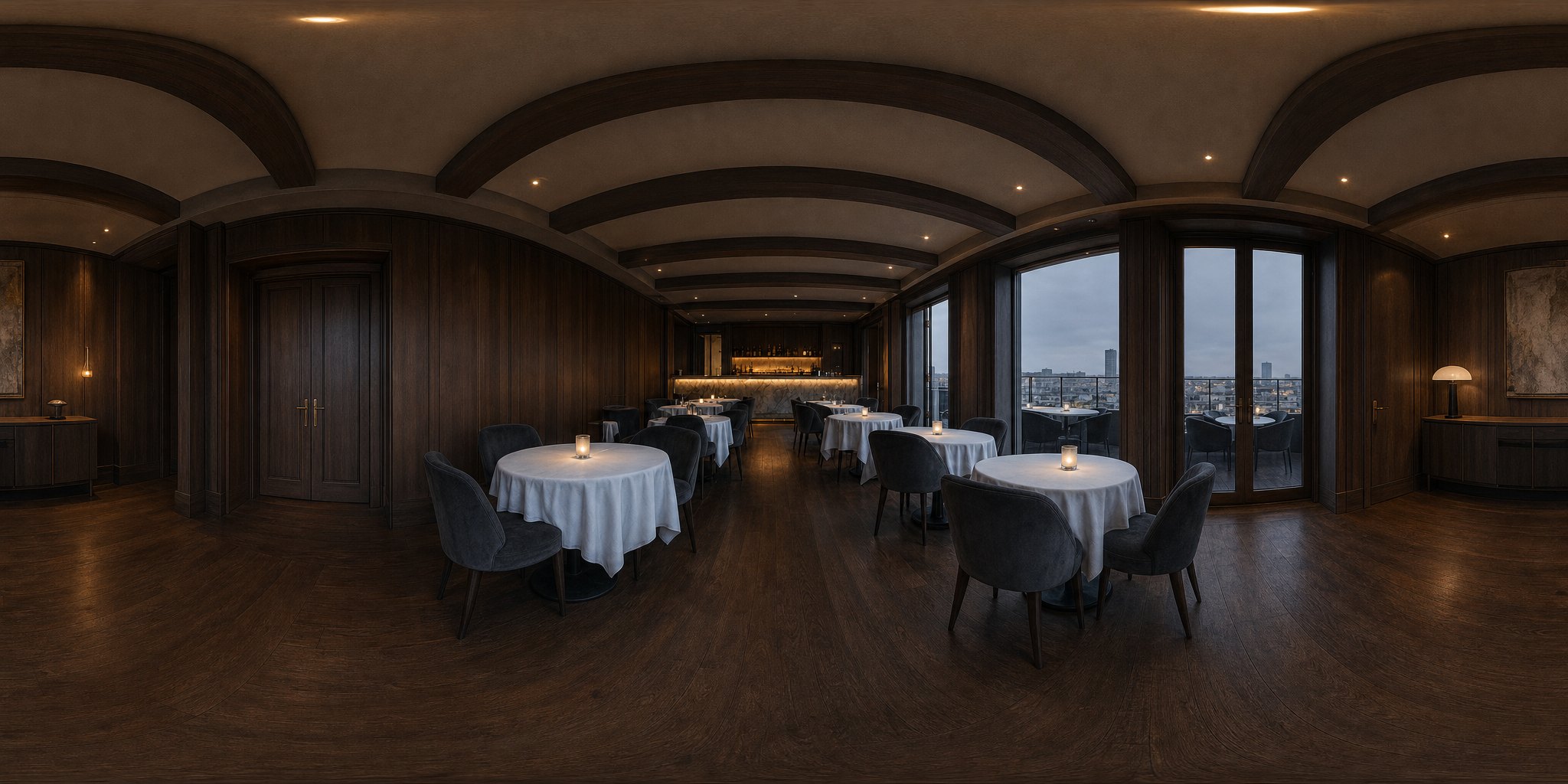
What the measurements are for
- Placing people. “Sits at the round table” needs to know where the table is. “Stands in the doorway” needs the door.
- Placing cameras. A camera stands inside the room, at a real distance, and does not look through a wall.
- Keeping the background. A reverse shot shows the part of the room that is really behind the person, so the window and the door stay put.
How positions are written so they can use the room: Write positions the world can read.
Indoors and outdoors
Rooms get the full treatment: walls, ceiling, openings and furniture. Outdoor scenes get a lighter set: the ground people stand on, the objects close by, and the distant view in four directions. There is less to measure outdoors, so anchor people to things that are really there, such as a bench, a car or a doorway.
Vehicles are their own case: Scenes inside a car, bus, train or plane.
Measured once, used everywhere
A room is measured once and reused for every shot in every segment set there, across episodes. The office in episode 1 is the same measured office in episode 6. That is a large part of why a location looks like the same place each time it comes back; Props and locations in a shot covers the rest.
If you change the scene image
- A new scene image means a new room. The set is opened up and measured again from the new picture, and segments generated from then on use it.
- Finished segments keep their look. Clips already made were filmed in the old room. Regenerate them if they need to match; each regeneration is charged as usual.
- Fix the description first. If the image is wrong because the description is, change the description, then make the image. Scene image does not match the description.
What makes a good scene image for a set
- Show the space. A view of the room with floor and walls visible gives the set more to measure than a close-up of one object.
- Include what the scene uses. If they sit at a table and leave through a door, the table and the door should be in the picture.
- Keep people out of it. Characters come from their own images. Anyone painted into the scene image becomes part of the set.
- Match the story’s place. An office for the office scenes, a kitchen for the kitchen; one image per location, not one for everything.
- Make it in the project’s style. The set takes its look from this picture, so a scene image in the wrong style carries that into every shot.
Which projects build sets
New projects on paid plans build a set for each scene automatically, with no extra credits. Scene images themselves are priced as before. What a paid plan changes. Projects created before the world model launched, and projects on the free plan, still use the scene image as the location’s reference with the earlier automatic staging. More on the idea: What is a world model in AI video?
| The scene image shows | What the set gets from it |
|---|---|
| The whole room, floor and walls visible | Walls, ceiling, openings and furniture to measure |
| The table, bed or door the scene uses | Real places to put people and send them to |
| One corner or one object, close up | Little room to measure; most of the set is filled in |
| People in the picture | Those people become part of the set |
| An outdoor place | The ground, nearby objects and the distance in four directions |
FAQ
Do I have to make anything extra for the set?
No. The set is built from the scene image you already have. There is no extra step and no switch.
Does building the set cost credits?
No. It runs on new projects on paid plans with no extra credits. The scene image itself is priced as before.
Why does the set show parts of the room my image did not?
An image shows one direction and the set needs all of them, so the rest of the room is filled in to match the picture. It is filled in once and then kept, so it stays the same in every shot.
I made a new scene image. What happens?
The room is measured again from the new picture, and segments generated from then on use it. Finished segments keep the old room until you regenerate them.
Can I edit the set directly?
No. Change the scene image, or its description and then the image. The preview of the set is read-only.
Does it work outdoors?
Yes, with a lighter set: the ground, nearby objects and the distant view in four directions. Anchor people to things that are really there.
Is the same set used in later episodes?
Yes. A room is measured once and reused across shots and episodes, as long as the scene image stays the same.
My older project has no 360° set. Why?
Projects created before the world model launched keep the earlier automatic staging. Start a new project on a paid plan to get sets.
One picture, one set, every shot
Start a project, make your scene images, and every location becomes a set you can look around.
Updated October 15, 2026
Pricing·Novel to Video·Guides·Samples·Alternatives·Answers·Support·Privacy·Terms·Legal·Contact·Affiliate program·© 2026 SceneMixer