Props and Locations in a Shot

Open a finished episode and read a segment header: Location first, Props further down, and the same prop names again inside the shots.
The location
The first line of a segment header is Location, and its value is a scene chip from the project’s Scenes. That is the room, street or car the whole segment happens in, and the shots are generated in it — from any angle, but always that place. Why it is the same room every time.
To change where a segment happens, put the cursor in the Location field, type @ and pick another scene. To move the story to a second place mid-segment, do not: split it. Insert a segment after this one and give the new segment the new location. One segment, one place.
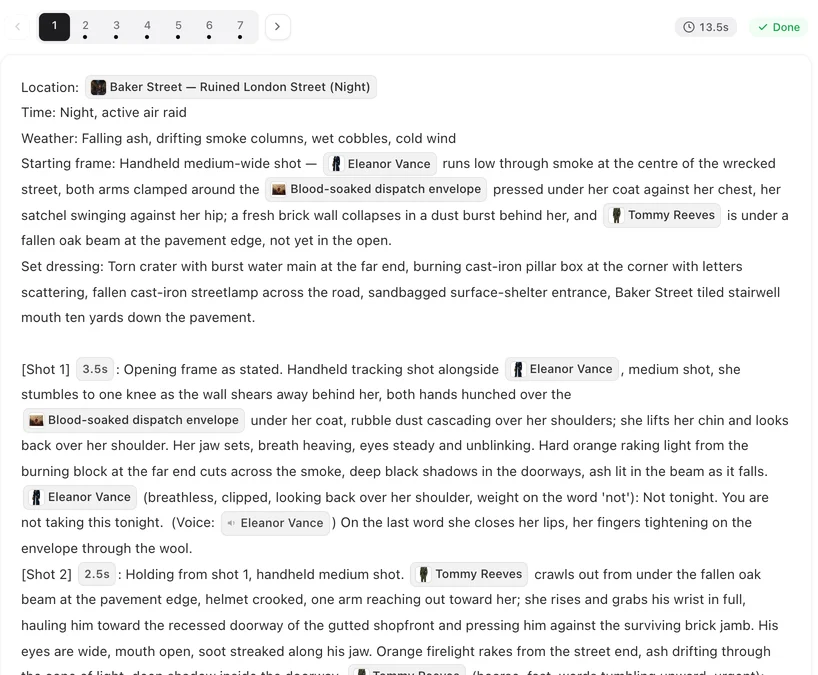
Props: the objects that must be the same one
A prop is an entry in the project’s Items with its own image: the letter, the sword, the phone. A shot that names it with a chip — @Sealed letter is slid across the table — gets that object. Why a named prop stays the same.
Name it twice: once in the header’s Props line, so the segment knows what it needs, and again in each shot where the object is handled or clearly visible. A prop listed in the header but never mentioned in a shot is dropped from the header when you save.
Set dressing: everything else
The table, the lamp, the rain on the window, the cars parked outside: these are the room, not props. Describe them in plain words in the Set dressing line. They do not need chips and do not need to be the same object twice. The same line is where background people are declared. The header, field by field.
If an ordinary object suddenly matters — the cup that will be poisoned in episode 4 — promote it: add it as a prop in step 2, generate its image, and name it from then on.
Where the object is
Say it. @Sealed letter in @Mara’s left hand; the @Sealed letter on the table between them; @Jules picks up the @Sealed letter. A shot with the object in a hand and a shot with it on the table are two shots; write which one you mean.
When it comes out wrong
Wrong object. Was it named with a chip in that shot? If it was typed by hand, the shot does not know which one you mean. Right object, wrong state — sheathed when it should be drawn, whole when it should be broken: that is a state of the prop, assigned to this segment. States. Too many objects. A shot asking for five named props usually loses one; split the action across two shots. Then regenerate the segment — every version is kept.
| Thing | Where it lives | How you write it |
|---|---|---|
| The place the segment happens | Header, Location field | One scene chip |
| An object that must be the same every time | Header Props line + the shots that use it | Prop chips |
| Furniture, weather on the glass, clutter | Header, Set dressing | Plain words |
| A crowd or passers-by | Header, Set dressing | Background people: … |
| A second place in the same scene | A new segment | Insert segment after, set its Location |
FAQ
Can one segment have two locations?
No. A segment happens in one place. Split it into two segments and give each its own Location.
Do I have to name a prop in every shot?
Name it in the shots where it is handled or clearly visible. Where it is out of the picture, leave it out.
What is the difference between a prop and set dressing?
A prop must be the same object every time and has its own image. Set dressing is the rest of the room, described in words.
The prop was listed in the header but disappeared after saving.
It was not mentioned in any shot, so the header dropped it. Name it in a shot and it stays.
How do I add a prop the script did not have?
Add it under Items in step 2 (or with Add assets in the editor), generate its image, then name it with @.
Put the right object in the right hand
Open a segment, name the prop in the shot that handles it, and regenerate that segment.
Updated September 26, 2026
Pricing·Novel to Video·Guides·Samples·Support·Privacy·Terms·Legal·Contact·© 2026 SceneMixer