Kling 3.0 Multi-Shot and Native Audio: What the Model Does

What Kling 3.0 announced
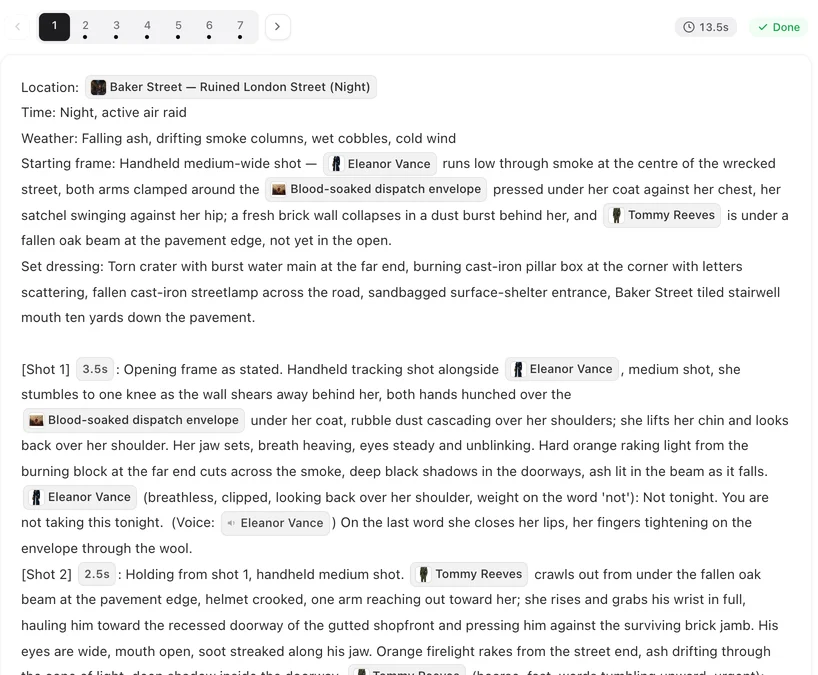
The still above is from Crimson Vow, produced on this site; the storyboard screenshot further down is the page that decided its shots.
Kling 3.0 and 3.0 Omni were announced in February 2026 (a press release dated February 6, 2026, and material on Kling's own blog). The headline capability is multi-shot generation: one generation produces several shots with cuts between them, rather than one unbroken camera move.
Per the announcement: a take runs 3–15 seconds; a generation can contain up to 6 shot changes; and each shot can carry its own duration, framing, angle, content and camera movement. Kling's blog describes an AI Director that handles shot-reverse-shot dialogue and cross-cutting inside the take. Third-party write-ups of the same release market the feature as Smart Storyboard and Custom Storyboard.
Access is tiered on Kling's side: the official page states that unlocking 3.0 requires a Pro, Premier or Ultra membership.
Native audio: the second half of the announcement
Kling 3.0 generates video and audio in one pass rather than dubbing afterwards. The announced language list is English, Chinese, Japanese, Korean and Spanish, with accents (American, British and Indian English among them, plus several Chinese dialects). In scenes with several speakers, the announced behaviour is that lines are assigned to the right speaker.
The practical consequence is timing. When the line is part of the render, the mouth movement, the pause and the shot length are decided together; when a line is added later, someone has to bend one to fit the other. The reasoning behind generating dialogue natively is covered in more depth in Native dialogue vs dubbing.
Reference modes and Character Identity 3.0
The announced modes are text-to-video, image-to-video, first-and-last-frame, multi-image reference, element reference (a subject — a person, an object, a place), and video element reference.
Character Identity 3.0 is the consistency layer: a character can be defined from a reference video or several images. Kling's guidance says the strongest consistency comes from a character video of about 3–8 seconds. An Element can also be bound to a voice (Element Voice Control), so the same subject arrives with the same sound.
On-screen text is the last announced capability worth naming: signage, subtitles and logos are described as staying legible during motion, which matters for any shot where a sign carries story information.
Six shots in one take: what changes in the writing
A generation that can cut internally changes what a take is for. Instead of one camera movement, you are writing a short sequence: an establishing shot, the reaction, the two-shot, the insert — with the cuts already inside the clip.
Two consequences follow, and both are about editing discipline rather than models:
- The cut between shots inside the take is decided at generation time. You write it, you do not find it later in an edit. That is closer to a storyboard than to a prompt.
- Each shot inside the take still needs its own information — who is in frame, how long it lasts, what is said. A six-shot take is six small scenes with one shared take number.
The storyboard idea, one level up
Everything Kling 3.0 asks the writer for — shot boundaries, per-shot duration, framing, who is in frame, what is said — is what a storyboard already is. The model made the paper step part of the input.
That is the same structure this site uses for a series. A script is read into episodes; each episode gets a storyboard made of segments; each segment holds numbered shots, and each shot carries its seconds, the people in frame and the lines to be spoken. Segments then render one at a time and composite into one file per episode. How to make an AI short drama walks the pipeline end to end.
So if you are coming to this from Kling 3.0, the useful translation is: what the model calls a multi-shot generation is what a storyboard page calls a segment; what it calls a shot with duration and framing is what the storyboard calls a numbered shot with its seconds. The vocabulary is different; the discipline is the same, and it is the part that transfers.
What a storyboard looks like here
A segment in this editor is short and specific. It opens with where and when (location, time of day, weather), then lists numbered shots. Each shot line carries its duration in seconds, the characters who are actually in frame, and any spoken line, with the sound noted separately. Editing any of that text is free; regenerating the segment is what costs.
Two habits make six-shot writing work on either side of the fence:
- One beat per shot. If a shot has two things happening, it is two shots. A cut inside a take is still a cut.
- Write the in-frame list honestly. Naming someone who is not visible in the shot is one of the most common causes of a frame that drifts from the plan. How to write one shot covers what belongs on the line and what does not.
Where the two approaches differ
Multi-shot generation decides the cut at generation time, inside one take. This site cuts between segments: each segment renders as its own take and the episode composite joins them. The trade is straightforward — internal cuts buy continuity inside a scene and cost you the ability to re-cut after the fact; separate segments make every join reviewable and re-renderable on its own.
For series work the practical pattern is the same either way: fix the story in the script, fix the shot list in the storyboard, and only then spend render time. Editing one shot without redoing the episode is the version of that discipline here.
Things to keep in mind about the announcement
- 3.0's numbers are its own. 3–15 seconds and 6 shots describe 3.0; the later 4.0 announcement moved the numbers again. Compare like with like.
- Membership-gated. The official page ties 3.0 access to paid Kling membership tiers; the free tier does not reach it.
- Third-party names are marketing. “Smart Storyboard” and “Custom Storyboard” come from coverage of the release; Kling's own blog describes the same capability as multi-shot generation with an AI Director.
- Character video range. The 3–8 second guidance for the strongest character identity is Kling's own recommendation, not a limit on the formats you can try.
Sources
- Kling: Video 3.0 Omni multi-shot and native-audio guide (kling.ai blog, June 2026) — shot counts, durations, audio languages, reference modes and Character Identity 3.0.
- Bernama: Kling 3.0 press release (February 6, 2026) — the launch and the model list (Video 3.0, Video 3.0 Omni, Image 3.0, Image 3.0 Omni).
Kling is a trademark of its owner and is named here only to identify the product; SceneMixer is not affiliated with it. Specifications are quoted as announced and may change.
| Kling 3.0, as announced | Figure |
|---|---|
| Take length | 3–15 seconds |
| Shots per generation | Up to 6 shot changes |
| Per-shot settings | Duration, framing, angle, content, camera movement |
| Native audio languages | English, Chinese, Japanese, Korean, Spanish |
| Character reference | Character Identity 3.0; 3–8 second character video for strongest consistency |
FAQ
What is multi-shot generation?
One generation that contains several shots with cuts between them, instead of a single unbroken camera move. Kling 3.0 announced up to 6 shot changes per generation, each with its own duration, framing, angle, content and camera movement.
How long is a Kling 3.0 take?
3 to 15 seconds, per the announcement. A later announcement (Kling 4.0) raised the ceiling to 30 seconds, so check which version a page is describing.
Does Kling 3.0 generate sound?
Yes - audio and video come out of the same pass, with dialogue announced in English, Chinese, Japanese, Korean and Spanish, accents and Chinese dialects, and lines assigned to the right speaker in multi-person scenes.
What is Character Identity 3.0?
Kling's character-consistency feature: define a character from a reference video or several images and reuse that identity. Kling's guidance says a 3-8 second character video gives the strongest consistency.
Can a character keep its voice?
The announcement includes Element Voice Control, binding a voice to a referenced subject so the same character arrives with the same sound.
Do I need a paid membership to use Kling 3.0?
Kling's official page states that unlocking 3.0 requires a Pro, Premier or Ultra membership.
How does this relate to a storyboard?
A multi-shot generation is written shot by shot: duration, framing, who is in frame, what is said. That is what a storyboard page holds, and it is how this site writes every episode - segments of numbered shots with seconds, the cast in frame and the lines.
Do creative tools on this site render with Kling 3.0?
No. This page describes what Kling announced. The video tiers available here, with their prices and limits, are listed on the pricing page, and Kling is not among them.
Where can I read the original material?
Kling's own blog post on Video 3.0 Omni multi-shot and native audio, and the February 2026 press release. Both are linked in the Sources section at the end of this page.
Write the shots, then render them
A storyboard of numbered shots with seconds, cast and lines - the part that outlives any model version.
Updated October 15, 2026
Pricing·Novel to Video·Guides·Samples·Alternatives·Answers·Support·Privacy·Terms·Legal·Contact·Affiliate program·© 2026 SceneMixer