What Comes Out

Every number below is visible on the sample projects.
Aspect ratio
A project is either landscape or portrait, and you choose once, in the first step. A new project starts as 16:9 landscape. Portrait 9:16 is one click away and is what you want for a vertical short-drama feed.
The aspect governs video, and only video. Setup images do not follow it: character sheets are always 9:16 because a full-length standing figure needs the height, and location and prop plates are always 16:9 whatever the project is. A plate is a reference the video model reads, not a frame it has to fill — the shot gets composed at generation time.
Once you continue past the first step, the aspect ratio is fixed for the project. To make the same story in the other shape, start a new project with the same script; the cast can come across from the asset library.
How long one segment can be
A segment is one generation. You choose the ceiling when you generate an episode's storyboard — Standard 15s or Long take 30s, per episode — and the storyboard is written within it. It is a ceiling, not a target: a segment with two short shots may run only a few seconds. The tier then has to be able to deliver it: the default and the recommended tiers both go to thirty seconds, while the older model families stop at fifteen and the picker greys them out for a segment that is too long.
Within a segment, the storyboard divides the time into numbered shots with their own durations, and those durations add up to the segment length. That is the arithmetic the editor is checking when it complains about a segment being over. When the shots add up to more than the episode's limit, the silent ones are tightened first, and if that is not enough the segment is split at a shot boundary. Nothing gets cut off the end.
To lengthen one segment, raise the seconds of its shots in the editor, up to the ceiling; changing segment duration has the details. Which is worth knowing when you plan: writing towards the ceiling gives the model a whole continuous take to work with, and continuity inside one generation is free in a way that continuity across two generations never is.
Resolution
Resolution is a property of the tier, not a separate setting. Lower tiers are lower resolution and cheaper per second; higher ones are more pixels and cost proportionally more. The picker lists each tier's resolution next to its per-second price, and the pricing page has the full table.
The default is deliberately a low tier. It is the cheapest way to find out whether a shot reads before you spend a higher one on it.
Two files, not one
Each finished segment exists as more than one file: the player in the app streams a lighter copy, and the download button gives you the full-quality one. So if a clip looks softer in the browser than you expected, download it before drawing conclusions.
When every segment in an episode came out of the same tier, compositing copies the streams rather than re-encoding them — the composite is the same picture as your segments, joined. Mix resolutions inside one episode and the join has to re-encode onto a single canvas, which does cost a generation of quality. If you iterate cheap and re-shoot the keepers expensive, re-shoot all of them. Compositing and sharing covers that step in full.
The label
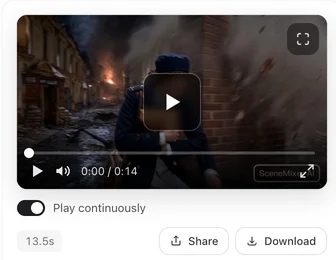
We add two marks to delivered video: a small badge burned into the corner of the picture and a line of AI-generated-content metadata, both written in the same pass. Without a paid plan you always get them; on a paid plan we add neither by default and you can switch them on. Because the badge is part of the picture rather than an overlay, when it is there it survives download, re-upload and re-encoding. We do not add a badge to generated images. Anything the model services mark at generation time is a separate layer; section 05 of the terms governs all of it.
What is permitted is governed by the terms, and what you get to keep goes through it in detail.
| Property | Value | Set by |
|---|---|---|
| Project aspect | 16:9 or 9:16 — new projects are 16:9 | You, in step one |
| Character sheet aspect | Always 9:16 | Fixed |
| Location and prop image aspect | Always 16:9 | Fixed |
| Segment length | Up to 15s or 30s | You, per episode — if the tier can take it |
| Resolution | Listed per tier in the picker | The tier |
| Streamed file | Lighter re-encode for playback | Automatic |
| Downloaded file | Full quality | Automatic |
| Composited episode | Copied when all segments match; re-encoded if they do not | Automatic |
FAQ
Is the default vertical or horizontal?
Horizontal. A new project starts as 16:9, and 9:16 is one click away in the first step.
Can a segment be longer than fifteen seconds?
Yes — pick Long take 30s when you generate that episode's storyboard. The tier has to be able to take it; the default and recommended tiers both go to thirty. If the shots still add up to more than the limit, the silent ones are tightened and the segment is split, never truncated.
Why does the video look softer in the browser than after downloading?
The player streams a lighter copy for smooth playback. The download is the full-quality file.
Does compositing re-encode my segments?
Only if you mixed tiers within the episode. When every segment matches, the streams are copied and nothing is re-compressed.
Can I change the aspect ratio after generating?
No. It is fixed once you continue past the first step. For the other shape, start a new project with the same script.
I chose Long take 30s, so why is a segment only a few seconds?
Thirty seconds is the most a segment can hold, not a length every segment is filled to. Raise the shot seconds in the editor to lengthen one.
Do generated images carry the AI badge too?
We apply our badge to video, not to images. Labelling rules are in section 05 of the terms.
Pick the shape first
Aspect ratio cannot change once you continue past the first step, so decide it before the script is read.
Updated October 2, 2026
Pricing·Novel to Video·Guides·Samples·Support·Privacy·Terms·Legal·Contact·© 2026 SceneMixer