The Same Face in Every Shot

Open a finished episode and click through the segments. Watch the lead across a close-up, a two-shot and a wide shot.
Where the face comes from
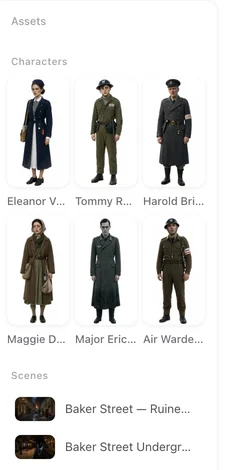
When your script is read, SceneMixer writes a description for every character: face shape, hair, build, age, what they wear. In step 2 each description becomes a character image. That image is the character. You look at it once, and if it is not who you had in mind you change the description and generate again, or upload your own photo instead.
Leads and supporting cast work the same way. So does a character who only appears in episode 6.
What “consistent” covers
Face, hair, skin, build, age. The clothes in the entry. Glasses, a scar, a necklace, if the description has them. And the voice: each character has one voice, chosen once, used for every line she speaks. How voices are chosen.
It holds at every distance and every angle. A close-up, an over-the-shoulder shot, a full shot from the other side of the room — the same person.
Across shots, segments and episodes
This is not one clip that happens to hold together. A segment is several shots; an episode is several segments; a series is many episodes. The same entry feeds all of them. Generate episode 3 today and episode 4 next month, and the lead is unchanged.
Because the source is the entry and not the previous clip, a bad shot does not poison the next one. Regenerate it, or leave it and move on; the shot after it is made from the entry either way.
Changing a character on purpose
A different look for the whole series: open the character in step 2, edit the description, generate a new image. Every shot from then on uses it. Shots you already generated keep the old look until you regenerate them.
Your own face or artwork: upload an image on the character. It replaces the generated one.
A costume change, an injury, a transformation: add a state to the character and assign it to the segments where it applies. States, step by step.
One episode only: in the editor, Edit (this episode) on a character swaps her image for that episode and leaves the rest of the series alone.
When one shot drifts
It still happens: a shot comes back with someone who is not quite her. Almost always the storyboard for that shot did not say who was in it. A line that reads “a woman turns to the window” gives the shot nothing to hold on to; a line that reads @Mara turns to the window does. Open the shot, make sure the character is named with the @ chip, and regenerate that one segment. Every version is kept, so you lose nothing by trying. Naming who is in frame.
| What you see | Usual cause | Fix |
|---|---|---|
| A stranger’s face in one shot | The shot text does not name the character | Add the @ chip for her, regenerate that segment |
| Right face, wrong outfit | The story changed her clothes but the entry did not | Add a state for the new outfit and assign it to those segments |
| Hair or age changed after you edited the description | Old shots were generated before the edit | Regenerate the shots you want updated |
| Same face on two characters | Two entries with near-identical descriptions | Give each a distinct anchor in the description and regenerate their images |
FAQ
Do I need to upload a photo to keep a character consistent?
No. The generated character image is enough. Uploading is an option when you want a specific face or artwork.
Will the character look the same in a later episode?
Yes. Every episode is generated from the same entry. Nothing you do in episode 3 changes the entry unless you edit it.
What if I change the description after some shots are already made?
New shots follow the new description. Old shots keep what they had until you regenerate them.
Can two characters share a face by accident?
If their descriptions are nearly the same, their images can end up similar. Give each a clear distinguishing feature in the description and regenerate.
Does consistency cost extra?
No. It is how the project works. You pay for generating shots, not for keeping them consistent.
See your own cast hold together
Upload a script, approve the characters once, and generate a scene.
Updated September 26, 2026
Pricing·Novel to Video·Guides·Samples·Support·Privacy·Terms·Legal·Contact·© 2026 SceneMixer