Why a Whole Series Stays Consistent on SceneMixer

Watch it rather than read about it: open a finished episode and step through the segments on the bottom timeline. Same faces, same room, same props, shot after shot.
One project, one cast
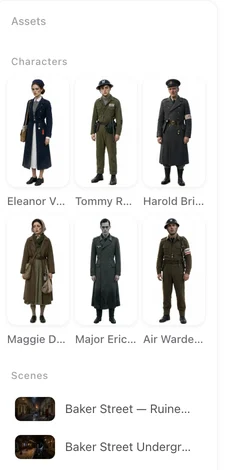
When you upload a script, SceneMixer reads it and produces three lists: the characters, the locations and the props. Those lists are the project. Each entry gets its own image in step 2, and that is the image the rest of the series is built from.
Episode 7 does not invent a new lead. It draws on the same entry you approved in step 2 of episode 1. Rename a character, change her description or replace her image, and every shot you generate from then on follows the new entry.
Four things that stay put
Faces. The lead has one face. It is the same face in a close-up, in a wide shot, in episode 12. More on character consistency.
Clothes. A character wears what her entry says she wears. When the story needs a change of outfit, you make a state for it and choose which segments use it — the change is deliberate, not drift. How states work.
Props. A sword, a letter, a red flip phone: each is an entry with an image, and a shot that mentions it gets that object, not a look-alike. More on props.
Rooms. A location is generated once and used for every scene set there. The kitchen in episode 3 is the kitchen from episode 1. More on locations.
The one people do not expect: where everyone is standing
Consistency is not only faces. In a scene with four people at a table, who sits where has to hold from one cut to the next, and the camera has to cut to angles that exist in that room.
SceneMixer builds an automatic AI 3D model of every scene: the room, the furniture, and where each person is placed. Every shot in that scene is generated against the same model. The person at the head of the table is still at the head of the table after the cut; the window stays behind the same chair; a reverse shot shows what is actually on the other side. Nothing to set up — it happens when you generate. More on spatial consistency.
What it looks like when you watch
Ten shots in a row without a re-introduction. A cutaway to the second person and back, and the first person is in the same seat holding the same cup. The pen that was put down in shot 4 is on the table in shot 5. The next segment opens where the last one ended. More on continuity between shots.
That is what lets an episode be a hundred seconds long and still read as one scene rather than a montage.
What you can change on purpose
Consistency is a default, not a cage. Edit a character’s description and regenerate her image. Make a state for a costume change or a damaged location. Use Edit (this episode) in the editor to swap a character’s image for one episode only. Regenerate one shot without touching the rest.
Each of those is a decision you make once, in one place. The series follows it from there.
| What stays the same | Where it is set | How you change it on purpose |
|---|---|---|
| A character’s face and build | Step 2, the character’s entry | Edit the description and regenerate, or upload your own image |
| What a character wears | The character’s entry | Add a state for the other outfit and pick which segments use it |
| A prop’s look | Step 2, the prop’s entry | Edit and regenerate the prop image |
| A location | Step 2, the location’s entry | Regenerate it, or add a state for a changed version |
| Who sits where, which wall is behind whom | Automatic, per scene | Change the storyboard text; the layout follows |
FAQ
Do I have to do anything to keep characters consistent?
No. Approve the cast once in step 2. Every shot in every episode is generated from those same entries.
What if I want a character to look different in one episode?
Use Edit (this episode) in the editor to give that episode its own image, or add a state and assign it to the segments that need it. The rest of the series is unaffected.
Does the layout of a room really stay the same across shots?
Yes. Each scene gets an automatic AI 3D model, and every shot in the scene is generated against it. Seats, doors and who stands where hold across cuts.
Will a prop look the same in every shot?
A prop is an entry with its own image. Shots that mention it get that object. Mention it with @ in the storyboard so the shot knows which one you mean.
Can consistency break?
A shot can still come out wrong, the same way any generated shot can. When it does, regenerate that one shot; the rest of the series does not move.
Start with one script
Upload it, approve the cast, and watch the same people walk through every episode.
Updated September 26, 2026
Pricing·Novel to Video·Guides·Samples·Support·Privacy·Terms·Legal·Contact·© 2026 SceneMixer