How to Make One Scene Use a Character’s State (Costume, Damage, Drawn Blade)

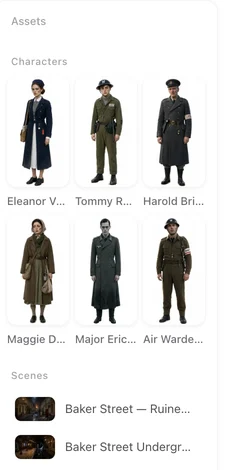
In the editor, open the asset panel on the left, click a character, and pick a state for this segment; the chip on the timeline card updates.
The four levels, in order of priority
1. Segment pick. In the editor, select the segment, open the character (or scene, prop) in the left panel and choose a state. This wins over everything else, for that segment only. 2. Episode cover image. A custom image set on the episode’s asset entry replaces the sheet for the whole episode; it cannot be combined with an episode state pick. 3. Episode pick. The same panel, applied to every segment of the episode that has no segment pick. 4. Base sheet. What every shot uses when nothing else is set. How states are created and edited: Costume Changes and Scene States.
What the site picks for you
When an episode’s storyboard is generated, the site reads which segments call for which state — the flashback outfit only in the flashback, the drawn blade only in the fight — and writes a pick on those segments. Your own segment picks replace these. Regenerating the storyboard rebuilds the segments and redoes the automatic picks, so hand picks made before are gone; episode picks survive.
A state that has no image yet
Only a state with a generated image is ever used. If the state you picked has no image, or its image is out of date because the base sheet was regenerated, the shot uses the base sheet and the state is described in text instead (“wedding dress” goes into the character line). Generate the state’s image from its card in Step 2 — Generate All queues state images along with the sheets and prices them together.
Who can do what
Using the states the site created, and choosing which segment or episode uses them, is free of any plan. Creating a state by hand, renaming it, editing its description or deleting it is a member feature. Generating a state’s image is priced like a sheet, with its own small free allowance in the first project. What a Paid Plan Changes.
Checking before you generate
The timeline card shows chips for the references a segment will use; a state chip carries the state’s name. Hover or tap to confirm, then generate. If the video shows the wrong outfit, check the segment pick first, then whether the state image exists. Timeline Cards: Every Icon.
| Level | Where to set it | Applies to |
|---|---|---|
| Segment pick | Editor → left panel → the character/scene/prop → state | That segment |
| Episode cover image | Episode asset panel → custom image | Every segment of the episode |
| Episode pick | Episode asset panel → state | Segments without a segment pick |
| Base sheet | Nothing to set | Everything else |
FAQ
I created states but the video ignores them.
Check that the state has a generated image, then that the segment's pick points to it. A state without an image falls back to text.
Can I set a state for the whole project?
No; picks are per episode or per segment. Set the episode pick in each episode that needs it.
Why did my picks disappear?
You regenerated the storyboard. Segment picks are rebuilt automatically; set them again if the automatic ones are wrong.
Do states cost credits?
Generating a state's image does, like a sheet. Choosing which segment uses it does not.
Can a scene have a state too?
Yes: the burnt kitchen, the flooded street. Same picks, same priority.
Updated September 27, 2026
Pricing·Novel to Video·Guides·Samples·Support·Privacy·Terms·Legal·Contact·© 2026 SceneMixer