The Video Says a Line You Never Wrote, or Someone Talks in a Silent Shot

Open the segment, press Edit, and read every shot marked No dialogue: if one of them says someone talks, explains, asks or tells, that is where the invented line comes from.
What it looks like
- A sentence nobody wrote, often at the very start of a segment, sometimes in words that do not quite make sense.
- A shot marked No dialogue in which a character speaks, or a narrator talks over it.
- One more sentence after the written line has finished.
- A thought from the description spoken aloud: “She is going to bluff her way out of this.”
- A written line said twice.
A wrong word inside a written line, or the right line in the wrong voice, is a different problem: Text in the picture and wrong dialogue.
Why it happens
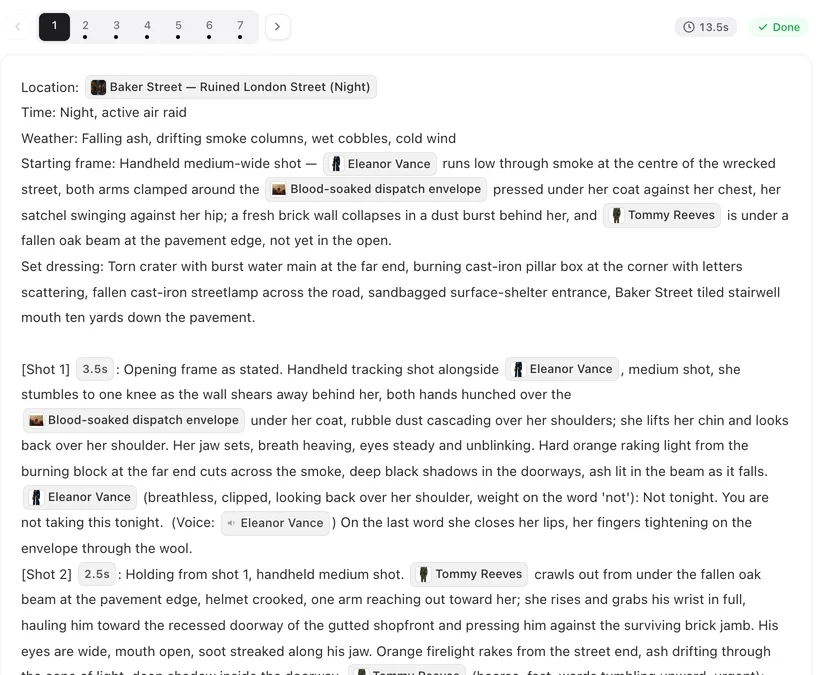
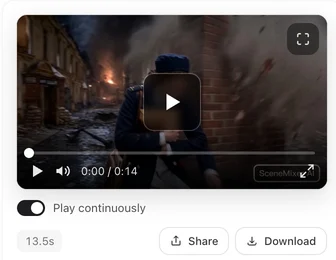
Dialogue on SceneMixer is generated with the picture: the model produces the image and the sound together from the segment’s text. That is what makes lips move with the words, and it is also why the model can produce words of its own when the text invites them. Three invitations account for most of it:
- A silent shot that describes talking. “He addresses the crowd”, “they argue in low voices”, “she explains the plan” — with no line attached. The model sees a person who should be speaking and supplies the words.
- A thought written as a sentence in a dialogue shot. In a shot where someone speaks, a full sentence of what they think or intend (“She is weighing whether to tell him the truth.”) can be blended into the spoken line.
- A long silence before the first line. When a segment opens with several silent seconds and the dialogue comes later, the model sometimes fills the gap with improvised speech.
Storyboards written by the site avoid the first two, so they show up mostly in text you edit or paste yourself. And a small share of clips adds a word or two even from clean text — a regeneration usually clears that.
Write silent shots so nobody speaks
In a shot with no line, describe what people do, never that they talk. If someone in the shot is a listener, say their lips are closed.
| Invites a made-up line | Write instead |
|---|---|
| [Shot 2] 4s: Medium shot. @Aldric speaks to the nobles gathered around him. No dialogue. | [Shot 2] 4s: Medium shot. @Aldric raises a hand and the nobles around him fall silent; he looks from face to face, lips closed, no lip movement. No dialogue. Ambient: a murmur dying away. |
| [Shot 5] 3s: Close-up. In frame only: @Mara. She tells him she is leaving. No dialogue. | [Shot 5] 3s: Close-up. In frame only: @Mara. She sets the key on the table and pushes it toward him, lips closed, no lip movement. No dialogue. |
| The two of them argue in the hallway. | Give them the lines, or write the argument as action: he blocks the door, she steps around him. |
If you want speech there, write the line. Every spoken word belongs in a line with a speaker and a voice chip. How to write one shot.
Keep thoughts out of dialogue shots
In a shot where someone speaks, everything before the line should be what the camera sees. A sentence that states a thought, a plan or a judgement can come out of a mouth. Show it instead:
| Can be read aloud | Write instead |
|---|---|
| [Shot 3] 5s: Medium shot. @Mara faces the guard. She is going to bluff her way through this. @Mara (bright, too casual): I’m on the list. (voice: 🔊Mara) | [Shot 3] 5s: Medium shot. @Mara faces the guard, chin up, a smile that does not reach her eyes. @Mara (bright, too casual): I’m on the list. (voice: 🔊Mara) |
| @Jules looks at the letter. He realises she lied to him about everything. | @Jules looks at the letter; his jaw tightens and he folds it once, slowly. |
Delivery notes in brackets say how a line is said — (low, steady), (barely a whisper) — not what the character means by it. Describe the cause, not the result.
Watch the start of a segment
Most invented speech lands in the first seconds. When a segment begins with a long silent shot and the first line comes several seconds later, either give the opening shot a clear action that fills its time (a door opening, a car pulling up), keep it short, or let the first line come earlier. Shot seconds and timing.
A narrator you did not ask for
If no character is meant to narrate, check that no shot says “a voice explains” or “we hear her thoughts”, and that every shot without a line is marked No dialogue. If you do want narration, make it a character: a narrator set to Voice only (off-screen), with lines written as @Narrator (voice-over): … (voice: 🔊Narrator). Then it is a voice you chose, not one the model made up. Lines, voice-over and captions.
Fixing a clip that already has it
| Where the extra speech is | Fix | Cost |
|---|---|---|
| At the very start or end | Edit this clip → Trim: cut it off | 5 credits per trim |
| In the middle, in a pause between lines | Trim with Remove selected: cut that moment out | The same |
| Mixed into a line you want to keep | Fix the shot text, then regenerate the segment | The segment’s video price |
| Everywhere, or at random | Regenerate; one clip in a few can add a word even from clean text | The segment’s video price |
Editing the storyboard text is free; only the regeneration is charged, and the earlier take stays in Version History. If you ask AI edit to remove the extra words, it may answer The storyboard doesn’t say that. It appeared while the video was being generated, and regenerating this segment usually clears it. — which is the point: the words were never in the text. Trim a clip · Remove a moment from the middle.
A quick check before you generate
- Every shot without a line ends with No dialogue.
- No silent shot says anyone talks, explains, asks, tells, argues or calls out.
- Listeners in dialogue shots are written with closed lips.
- No sentence before a line states what someone thinks or plans.
- The first line does not come after a long silent opening.
- Any narration is a voice-only character with real lines.
Checklist before you generate videos.
| Symptom | Most likely cause | Change |
|---|---|---|
| Extra sentence at the start | Long silence before the first line | Shorter or busier opening shot, earlier first line |
| Someone speaks in a No dialogue shot | The shot says they talk | Rewrite as closed-mouth action |
| A thought is spoken | A thought written as a sentence in a dialogue shot | Show it as a look or a gesture |
| Narrator out of nowhere | A shot says a voice explains | Remove it, or make a real voice-only narrator |
| One stray word now and then | Occasional glitch | Trim, or regenerate |
FAQ
Why does the video say a line I never wrote?
Picture and sound are generated together, so the model can add speech when the text invites it: a silent shot that says someone talks, a thought written as a sentence in a dialogue shot, or a long silence before the first line. Fix the text and regenerate.
The shot says No dialogue, but someone still talks. Why?
Usually the same shot also describes them speaking, explaining or arguing. Rewrite that part as action with closed lips, keep No dialogue, and regenerate.
Can I remove the extra words without regenerating?
If they sit at the start, the end or in a pause, yes: use Trim under Edit this clip to cut them off or cut that moment out. If they are mixed into a line you want to keep, regenerate.
Can AI edit remove it?
AI edit changes the storyboard text, and the extra words are not in the text, so it will tell you to regenerate. Fix the shot that invited them, then regenerate.
Does it cost anything to fix?
Editing the storyboard is free. Regenerating the segment is charged at its video price, and a trim has its own small price on the button.
Will a higher video tier stop it?
Not reliably. The cause is in the text; fix the text first. A regeneration on any tier can clear an occasional stray word.
How do I add a narrator on purpose?
Create a narrator character set to Voice only (off-screen) and write the narration as lines with a voice-over note and the narrator's voice chip.
Is this a bug that will be fixed?
It is a known behaviour of generating speech and picture together. The site already cleans the most common causes out of its own storyboards; text you write or paste yourself is worth checking with the list on this page.
Say what they do, not that they talk
Read your silent shots for words like speaks, explains and argues, rewrite them as action, and regenerate the segment.
Updated October 13, 2026
Pricing·Novel to Video·Guides·Samples·Support·Privacy·Terms·Legal·Contact·Affiliate program·© 2026 SceneMixer