Keeping Characters Consistent When You Finish on a Kling Tier

Consistency is three layers, and a tier is none of them
The still above is from The Veil at Dawn, produced on this site; its cast kept the same faces because the sheets below were attached to every segment.
A face drifts for three reasons, and each has its own layer: a written description gets diluted sentence by sentence, a reference image carries the light it was shot in, and two shots with nothing in common between them have no anchor. The fix is not a better tier or a longer prompt — it is the layer that holds the information:
- The character sheet — what the face and build are. Drawn once, reused everywhere.
- The scene plate — where the scene is and how it is lit, so the sheet is not fighting the background.
- The storyboard — who is in each shot, where they stand, and what carries over from the shot before.
That model is worked through in detail in AI short drama character consistency: 3 layers. What follows is how it plays out when you finish the episode on a Kling tier.
One sheet per character, drawn once
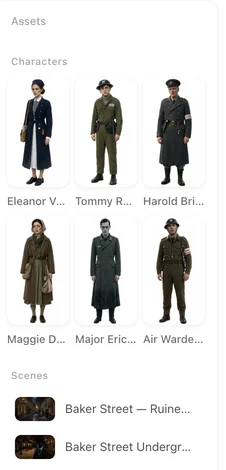
In step 2, each character gets a reference image of their own, generated from the script's description of them: face and build first, with one instantly recognisable anchor (a scar, a mole, a piece of jewellery, a haircut), against a plain background under directional light. That sheet is the cast's identity; every segment a character appears in is rendered against it, whatever tier produces the take.
Three things worth knowing about the sheets:
- They are per character, not per shot. Regenerating a sheet changes the character everywhere; you are not fixing faces segment by segment.
- You can replace or regenerate one without touching the rest of the cast. Regenerate or replace one sheet.
- Scenes and props get the same treatment — a location image and a prop image each, so a room or an object does not change between episodes either.
Your first 15 reference images on the account are free (characters, scenes and props share that pool); after that each one is charged at the image tier's rate.
What gets attached to each segment
When a segment renders, the site looks at the storyboard and attaches the references that segment needs: the sheet of every character listed in frame, the location image, the prop images, and any state image for a costume change or a changed scene. You do not choose references by hand for every shot — that assembly is what the pipeline does.
Two consequences to keep in mind:
- The in-frame list is the switch. A character who is not named in a shot is not in it; a character who is named gets their sheet attached. Naming someone who is not visible is one of the most common ways a shot drifts from the plan.
- State images are part of consistency too. If a character changes clothes or a room burns down, that is a new reference, not a sentence. Costume changes and scene states.
Writing shots so the face holds
The storyboard is where continuity is decided, one shot at a time:
- One beat per shot, with the seconds to carry it.
- Who is in frame, honestly. Carried-over positions and actions, not a fresh description that contradicts the shot before.
- The same character keeps the same voice from episode to episode: voices are set per character in step 2, either described in words or matched to a preset from the library that you can listen to. How character voices work.
How to write one shot is the long version of this list, and spatial consistency covers where people stand between shots.
What the Kling tiers change, and what they do not
The tier decides the picture, not the identity. Choose it per segment in the model picker:
| Tier | Resolution | Segment cap | Price |
|---|---|---|---|
| Kling 4.0 | 1080P | up to 30 seconds | 38 credits per second |
| Kling 4.0 Flash | 720P | up to 20 seconds | 29 credits per second |
A higher-resolution tier gives a sharper picture — useful when a face is seen in close-up or a clip will be watched on a large screen. It does not make a face more stable: the same sheet rides along on both tiers. The cheap way to use that: draft the episode on the default tier while the story is still moving, then re-render the keepers — especially the close-ups — on Kling 4.0. Making a short drama with the Kling tiers walks the whole flow.
One cap to plan around: Kling 4.0 Flash renders segments up to 20 seconds. A long dialogue scene split into shorter segments renders on either tier; a single unbroken take past 20 seconds needs Kling 4.0, which takes up to 30.
Kling's own identity features, as officially announced
The model itself ships with identity tools, and it is worth knowing what they are — with the label that matters attached: these are the officially announced capabilities of Kling's own model, not a description of what a tier here exposes.
- Element reference: as officially announced by Kling, a subject — a person, an object, a place — can be defined once and referenced in later generations.
- Character Identity 3.0: officially announced with Kling 3.0, a character can be defined from a reference video or several images, and Kling's own guidance says a character video of about 3–8 seconds gives the strongest consistency.
- Element Voice Control: the officially announced feature that binds a voice to a referenced subject, so the character arrives with the same sound.
- Omni Reference: officially announced with Kling 4.0 — up to 15 references per task, ten images, five videos, up to seven subjects, plus a voice.
Where you are working through this site, the equivalent job is done by the sheets, the scene plate and the storyboard, and the take renders on whichever tier you picked. The two are not in competition: they are the same idea — keep the identity in a reference and reuse it — expressed in two places. The announcement is at Kling's 4.0 model release page.
A checklist before you call a series consistent
- Five shots, one character, side by side. Put five shots of the same character next to each other, including a close-up and a full-body, and look at them at the same size. If the face changes between them, the sheet is the place to fix it.
- One anchor feature visible in every shot where the face is readable.
- Wardrobe and props match the state the story is in at that episode.
- Every shot lists who is actually in frame, and nobody else.
- Voices are set per character, not per line, so episode 10 sounds like episode 1.
- Only the keepers are re-rendered on the higher tier; the rest stays where it was.
FAQ
Do Kling tiers keep a face consistent on their own?
Consistency comes from the reference layer, not the tier. Here the character sheet is attached to every segment the character appears in, on any tier; the tier decides resolution, segment length and price.
Where do I draw the character sheets?
In step 2, after the script is read: one reference image per character, plus scene and prop images. The first 15 reference images on the account are free.
Can I fix one character without redoing the others?
Yes. Regenerate or replace that one sheet; every segment featuring the character picks up the new sheet. The rest of the cast is untouched.
Does a higher-resolution tier make faces more stable?
No. It makes the picture sharper, which helps in close-ups and on large screens; the identity still comes from the sheet, and the same sheet rides along on both tiers.
What does Kling officially announce for character identity?
Element references for subjects, Character Identity 3.0 (define a character from a reference video or several images; a 3-8 second character video is Kling's own recommendation for the strongest consistency) and Element Voice Control. Kling 4.0 was officially announced with Omni Reference at up to 15 references per task.
Is any of that a promise about what happens here?
No. Those are the officially announced capabilities of Kling's model. What a tier on this site exposes is what the model picker and the pricing page show, and the identity layer here is the sheet plus the storyboard.
What about voices across episodes?
A character's voice is set per character in step 2 - described in words, or matched to a preset from the library - so the same character sounds the same in every episode.
What is the single most common cause of a face drifting mid-episode?
A shot that describes the character again in new words, or names someone who is not actually in frame, instead of carrying over the previous shot's positions. Write one beat per shot and keep the in-frame list honest.
Do the Kling tiers cost extra for references?
No. The reference images are generated in step 2 and charged there once (the first 15 on the account are free); attaching them to a segment is part of rendering, which is billed per second.
Draw the cast once. Keep it for the whole series.
One sheet per character, attached to every segment - on whatever tier you finish each shot.
Updated October 15, 2026
Pricing·Novel to Video·Guides·Samples·Alternatives·Answers·Support·Privacy·Terms·Legal·Contact·Affiliate program·© 2026 SceneMixer