MiniMax H3 prompting guide: shots, cuts and references
What is different about writing for this family
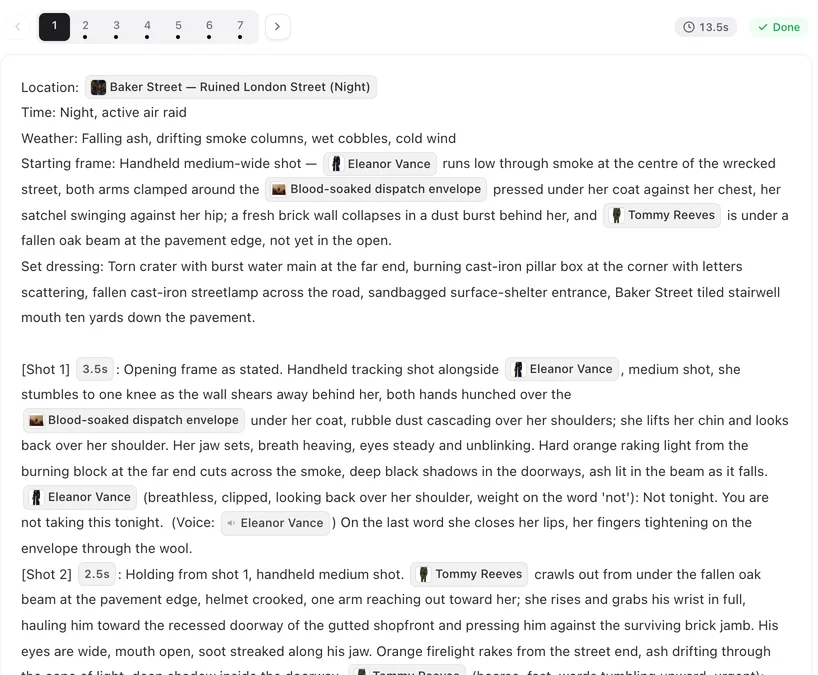
You do not write a prompt for the video model in a separate box. You write the shots of a segment in the storyboard, in the shape every tier shares — marker and seconds, framing and camera, who is in the picture, what happens, the line, what we hear — and the site turns that segment into one request. What MiniMax H3 changes is the size of that request. A segment tops out at 15 seconds, it always renders with sound, and a handful of cuts can live inside it, so a small exchange and its reaction come back as one piece instead of being stitched from separate renders.
That makes the family a good home for short, dense beats: a confrontation that turns, a reveal with its reaction, an exchange of two lines. It is less comfortable for a scene that wants one long, unbroken take or a large cast, and the sections below say what to do about each.
Write the shot, then the seconds

The still above is from Rocket Pup, an episode this site took from script to composite on Wan 3.0 · 720P; the shot grammar it was written in is the same one a MiniMax H3 segment uses, and only the size of a take differs.
Each shot opens with its marker and its seconds. The seconds are not decoration: a segment is one generation and its length is the sum of its shots, so the arithmetic has to close before you render. A shot with a line needs room to say it — about three English words to the second — and a shot with nothing but a look can be short. Here is a four-shot segment with room to spare, written the way a segment is written here:
[Shot 1] 4s: Medium shot, fixed camera. @Mara at the head of the table, @Jules on her right. She slides the @Sealed letter across. @Mara (low, steady): Read it before you say no. (voice: 🔊Mara) Rain on the window.
[Shot 2] 3s: Cut to close-up. In frame only: @Jules. He looks down at the letter, jaw tightening. No dialogue.
[Shot 3] 5s: Cut to medium shot, handheld. @Jules pushes back his chair and stands. @Jules (through his teeth): You had no right. (voice: 🔊Jules)
[Shot 4] 3s: Cut to close-up. In frame only: @Mara. She does not look away. No dialogue. Ambient: the clock in the hall.
Notice what each shot does not do: none of them changes framing halfway, none holds two actions, and the shots with no speech say so, so nobody is made to talk. Those habits matter more here than on a take that is never cut, because the cuts are the structure of the render.
Write the cuts into the shot list
Because the shots of a segment are rendered together, the cut between two of them is made inside the render and not by you in an editor. Treat each new shot as a cut to a new framing and say so — Cut to close-up:, Cut to wide shot: — and when the same people sit in two shots in a row, change the framing or the angle between them. Without that the join reads as a skip.
The inverse also holds. If you want the camera to stay with one thing, write it as one long shot and give it the seconds it needs; do not chop it into shots just because the family can cut. A single held shot is also how you keep an action unbroken, which is the reason to move a scene to a family with a longer ceiling when the whole beat will not fit in 15 seconds.
Keep lines short and one speaker per shot
Dialogue and ambient sound are part of every generation on this family; there is no silent mode, so a shot with no speech should say No dialogue rather than leave the model to guess. Give each line its own shot when two people are talking and let the reaction be the next shot, instead of packing an exchange into one long line of text. Short sentences also leave less room for a slip.
Plan the references before you write
This is where H3 segments most often disappoint, and it is arithmetic rather than prompting. A segment takes up to nine images and three voice clips, with about fourteen seconds of voice in total, and a voice clip only works when an image is attached with it. When a segment asks for more, the site leaves out the least important references first, so the usual symptom is not an error but a voice that changes or a prop that loses its sheet.
So write the segment around the budget. Name only the people who are in the picture. A scene with four speakers has one voice too many — split it into two segments or accept that the extra speaker is voiced from the written description in the delivery note. A crowd does not need a sheet for every face; describe the crowd in words and spend the images on the people the camera will find. The family's reference table lives on its tier page, and MiniMax H3 and its own rules lists it in full.
When to write this scene for a different family
If one action has to run unbroken for longer than 15 seconds, or the cast is large enough that every face needs its own sheet, the same shots belong on a family with a longer ceiling and a wider reference budget: the Wan steps and the Seedance 2.5 tiers take up to 30 seconds a generation with up to ten images and five voice clips. The side-by-side is in when to pick MiniMax H3 over Wan; the tier sits next to it as Seedance 2.5 against MiniMax H3.
FAQ
How do I write a prompt for MiniMax H3 on this site?
You write shots in the storyboard rather than a freeform prompt: marker and seconds, framing and camera, who is in the picture, what happens, the line and the ambience. The seconds of the shots add up to one generation, which can run up to 15 seconds on MiniMax H3 and MiniMax H3 Fast.
Can one MiniMax H3 segment hold several shots?
Yes. The shots of a segment are cut together inside a single generation, so an exchange and its reaction can come back as one render. Write each shot as a cut to a new framing and make the seconds add up.
Why does my voice change between segments on this family?
Usually the reference budget: a segment takes up to nine images and three voice clips, and when it asks for more the least important references are left out first. Name fewer people in the segment, or split it.
Does MiniMax H3 Fast take the same shots as MiniMax H3?
Yes. MiniMax H3 Fast is the lower-resolution, lower-price sibling with the same segment ceiling, sound and reference limits, at 16 credits a second against 25 on MiniMax H3, so a shot list drafted on one renders unchanged on the other.
When should I write for a longer take instead?
When one unbroken action needs more than 15 seconds, or when the cast needs more than nine images. Both are reasons to move that scene to a family with a longer ceiling.
Write the first segment and see the seconds add up
Paste a script, open a segment in the storyboard, and render it on the draft tier before you commit to the finish.
Updated October 14, 2026
Pricing·Novel to Video·Guides·Samples·Alternatives·Answers·Support·Privacy·Terms·Legal·Contact·Affiliate program·© 2026 SceneMixer