What Is Inside a Project

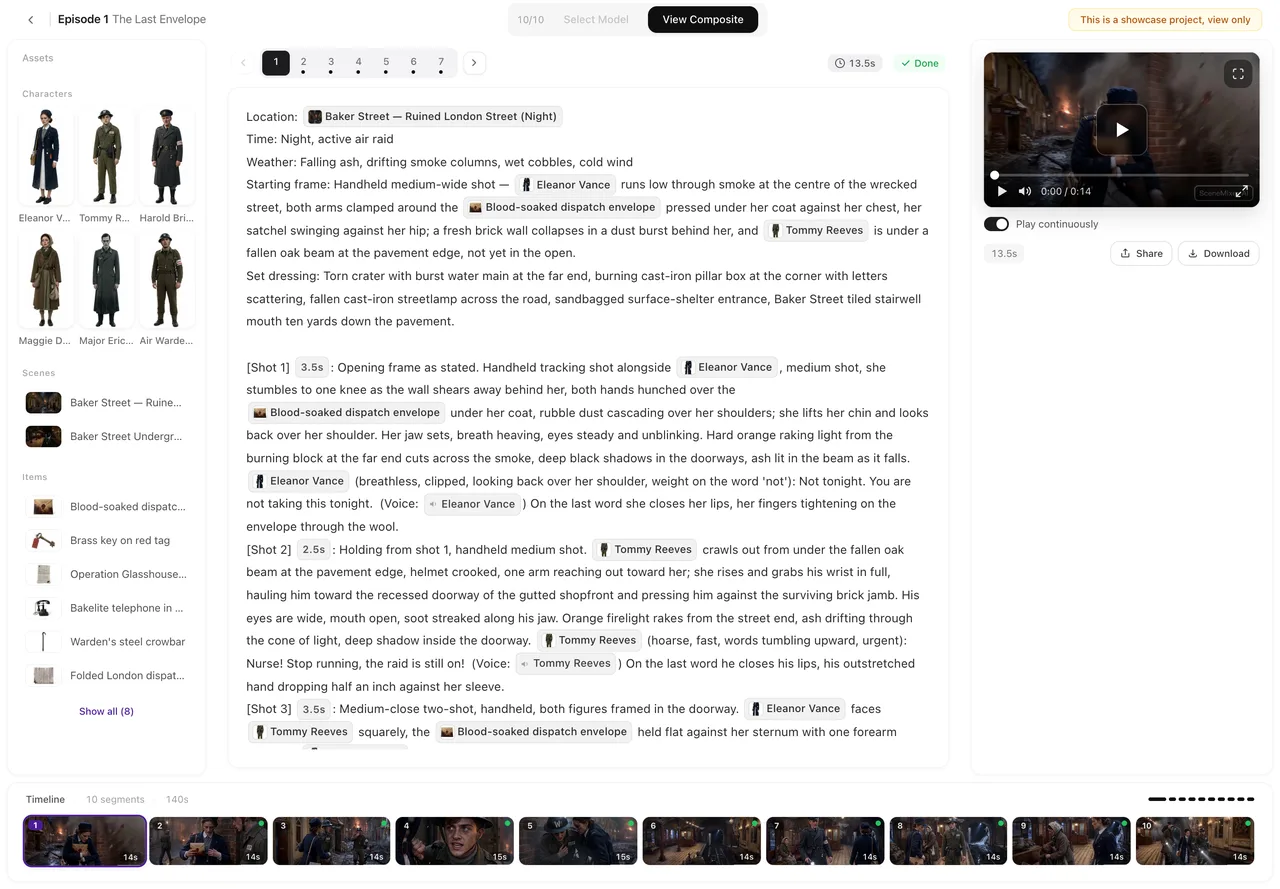
Open a finished sample episode and the four levels are all on one screen.
The five levels
Project. The settings, the cast, and the episodes. Everything below inherits from it.
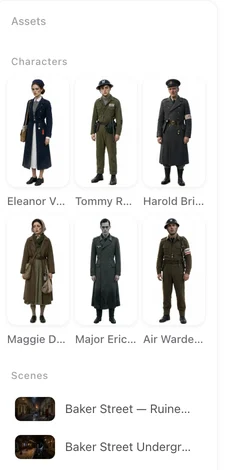
Cast. Characters, locations and props, each with a description and a generated image. A character may also have state images — the same person after a change that a sentence cannot fix, such as a full change of costume or visible injury. Locations and props can have them too: a hall before and after it burns, a blade sheathed and drawn.
Episode. A numbered part of the story with its own storyboard.
Segment. One generation. Fifteen seconds or so of finished video, with the shot text that produced it.
Take. Every time you generate a segment, the result is kept. One of them is the current one; switching between them is free and instant.
Which level an edit lands on
This is the thing worth internalising, because the same-looking edit behaves differently depending on where you make it.
Editing a character in the project's cast changes them everywhere, in every episode that has not been generated yet. Editing the same character from inside an episode's asset panel changes them in that episode only — useful when one episode needs a different look and the rest should not follow.
And picking a state image for one segment changes that segment only. Three scopes, three different blast radii.
Renaming is handled for you. When you rename someone, every reference to them in every storyboard is rewritten in the same transaction, so the text does not quietly stop matching. No two assets in a project can share a name — not two characters, and not a character and a prop — which is what makes that rewrite unambiguous. Projects created before September 2026 may still contain duplicates; in those, a rename updates the cast entry and leaves the storyboard text alone, because there is no safe way to tell which one a reference meant.
Which image a segment actually uses
Up to five things can claim the right to supply the picture for a given character in a given segment. They resolve in a fixed order, most specific first:
A state you picked for this segment wins. Failing that, an image you overrode for this episode. Failing that, a state the system assigned to this segment on its own when it read the storyboard — the editor marks those “auto”, and it is the one people hunt for, because nobody chose it. Failing that, a state set for the episode as a whole. Failing all four, the base image from the cast.
Only states that have actually been generated count. If a state exists as a description but its image was never made, it is skipped and the next rule down applies — the system falls back to something real rather than sending nothing. If a segment is using a face you did not expect, walking down that list will find where it came from.
What a rebuild throws away
Rebuilding an episode's storyboard deletes that episode's segments and writes new ones. Anything attached to a segment goes with it: the finished video, its take history, and any per-segment state choices you made by hand.
The episode level survives a rebuild. Your cast survives, your per-episode overrides survive, and the other episodes are untouched. But the per-segment choices are re-derived from scratch, which for most projects looks like nothing happened — and for a project where you hand-picked states shot by shot, looks like the work vanished.
Re-reading the whole script is the level above that: it replaces the episodes that have no storyboard yet. Episodes you have already worked on are left alone.
Deleting
Deleting anything removes it from the project immediately. Deleting a project, an episode or a cast member also queues its files for erasure. There is no restore, in the app or anywhere else you can reach.
Deletion follows the structure: removing an episode removes its segments and their takes; removing a character removes its state images. Before a file is actually erased we check whether anything else still points at it — a character copied into a second project shares the same image — and if something does, the file stays.
| Level | Contains | An edit here affects |
|---|---|---|
| Project | Settings, cast, episodes | Everything not yet generated |
| Cast member | Description, image, state images | Every episode |
| Episode | Storyboard, segments, per-episode asset choices | That episode |
| Segment | Shot text, takes, per-segment state choices | That segment |
| Take | One generated video | Nothing else — switching is free |
FAQ
I changed a character and only one episode updated. Why?
You edited them from inside that episode's asset panel, which is scoped to that episode. Editing the same character in the project's cast changes them everywhere that has not been generated yet.
A segment is using the wrong picture of someone.
Five things can supply it, resolving most specific first: a state picked for that segment, an image overridden for that episode, a state the system assigned automatically, a state set for the whole episode, then the base image. Walking down that list finds the source — the automatic one is the usual answer.
Does regenerating an episode's storyboard affect other episodes?
No. It rebuilds that episode's segments only. Your cast and the other episodes are untouched — but everything attached to the discarded segments goes with them, including finished videos.
Can I reorder segments?
Segments are numbered within their episode and the numbering is maintained for you when you insert or delete one. They are not free-floating cards you can shuffle.
If I rename a character, do the storyboards break?
No. Every reference is rewritten in the same operation, and no two assets in a project can share a name, which is what keeps it unambiguous. The exception is a project made before September 2026 that still has duplicate names — there the cast entry is renamed and the storyboard text is left as it was.
Are all my takes kept forever?
Every take of a segment is kept and you can switch between them for free, for as long as the segment exists. Deleting the segment, the episode or the project removes them.
Know which level you are on
Most surprises in the editor are an edit landing one level up or one level down from where you meant it.
Updated September 21, 2026
Pricing·Novel to Video·Guides·Samples·Support·Privacy·Terms·Legal·Contact·© 2026 SceneMixer